Why Global Smart Search Matters in Cetec ERP
In any ERP system, one of the most common daily tasks is simply finding the right record. Your team moves between quotes, sales orders, invoices, and customer records all day. If they have to hunt through menus or remember exact numbers, work slows down and customer responses take longer.
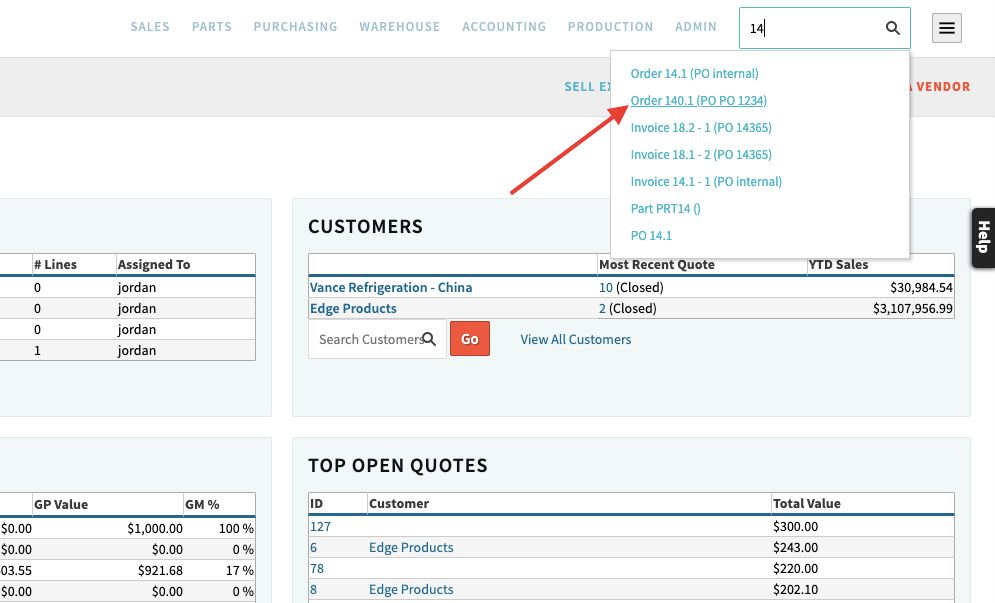
In Cetec ERP, the Global Smart Search bar is the feature users touch most often. It sits at the top right of every screen and lets you type whatever piece of data you have, then searches across the ERP database for likely matches. Instead of drilling through separate modules, you can jump straight to the record you need.
How Global Smart Search Works
Global Smart Search is sometimes called quick search or smart search. Functionally, it is a single search bar connected to your live Cetec ERP data. You click into the bar, start typing any known value, and Cetec ERP returns a list of matching records in a drop-down. From there, you choose the record and go directly to that screen.
Because the search runs across key objects in the system, you do not have to remember where a record lives. Whether the information you have is a quote number, order number, customer name, or a barcoded traveler, the same search bar is your entry point.
Finding a Quote You Were Just Working On
When you need to get back to a quote, you do not have to remember the full number or step through a quote listing. Select the Global Search bar and type the first few characters of the quote number. Cetec ERP shows matching quotes in a drop-down list so you can choose the one you want and reopen it immediately.

Moving From Quote to Order When You Win the Job
Once a quote is committed in Cetec ERP, it becomes a sales order that uses the same numerical sequence. That means the same value you used to find the quote can be used to find the resulting order. Type the order number into the Global Smart Search bar and select the matching order from the drop-down to check status, shipments, or invoices tied to that work.

Everyday Ways to Use Global Smart Search
Global Smart Search is useful beyond quotes and orders. Here are common ways manufacturing teams rely on it during the day.
- Type the first few characters of a customer name to bring up a list of matching customers, then click through to the customer record.
- From the customer record, review sales history or related orders without having to run separate searches in multiple screens.
- Scan a barcoded work order traveler into the Global Smart Search bar to see the live work status for that specific job.
- Scan a bin location barcode and view all part numbers currently stored in that bin.
- Enter a customer PO number when you do not have the invoice number and find the matching invoice record or open sales order tied to that PO.
Using one search bar for all of these tasks reduces clicks and helps both front-office staff and shop floor supervisors get to the same information quickly without separate lookups.
Key Takeaways
- Global Smart Search is a single search bar available on every Cetec ERP screen that searches across core records.
- Users can quickly return to quotes and the sales orders that follow them by typing partial values instead of full numbers.
- Barcoded travelers and bin labels can be scanned directly into the search bar to show work status and bin contents in real time.
- Customer PO numbers can be used as a starting point to locate related invoices and open orders when exact invoice numbers are not available.
- Relying on Global Smart Search reduces navigation time and helps your team stay focused on resolving customer and production tasks.
Conclusion
Global Smart Search is a simple tool that carries a lot of weight in daily use of Cetec ERP. By training your team to start with the search bar whenever they need to find a quote, order, customer, or barcoded record, you shorten lookup time and make it easier for people to stay on top of work in progress and customer needs.