Here’s another newsletter for you, this time for version 4.23. As usual, we’ll highlight the cool important stuff at the top, and include a lengthier technical “release notes” section at the bottom. Version 4.23 is currently available in beta environments with a rollout to live environments in April 2026.
Melting Snow
The Cetec ERP application continues to blossom with new functionality, faster load-times, re-designed reports, integrated AI offerings, and more! We’re excited to spring forward into version 4.23.

Top Navigation Menu Re-design (!)
First, we have to spring something on you.
With the new release of Cetec ERP comes a brand new top-navigation menu design.

PLEASE notify your employees of the upcoming change. Have them login to your “beta” environment (__your_company__.cetecerpBETA.com) and play around.
Cetec ERP Is Now AI-Enabled (!!)
You can now integrate your AI account (e.g. ChatGPT, Google Gemini, Grok, Claude) directly to your ERP database using Model Context Protocol (MCP).
MCP lets AI assistants connect to your ERP data so that you can ask questions and return reports and information like "What are my top 10 open orders this month?" or "Show me inventory levels for part XYZ". Get live answers directly from your ERP data and summarized by your AI tool!
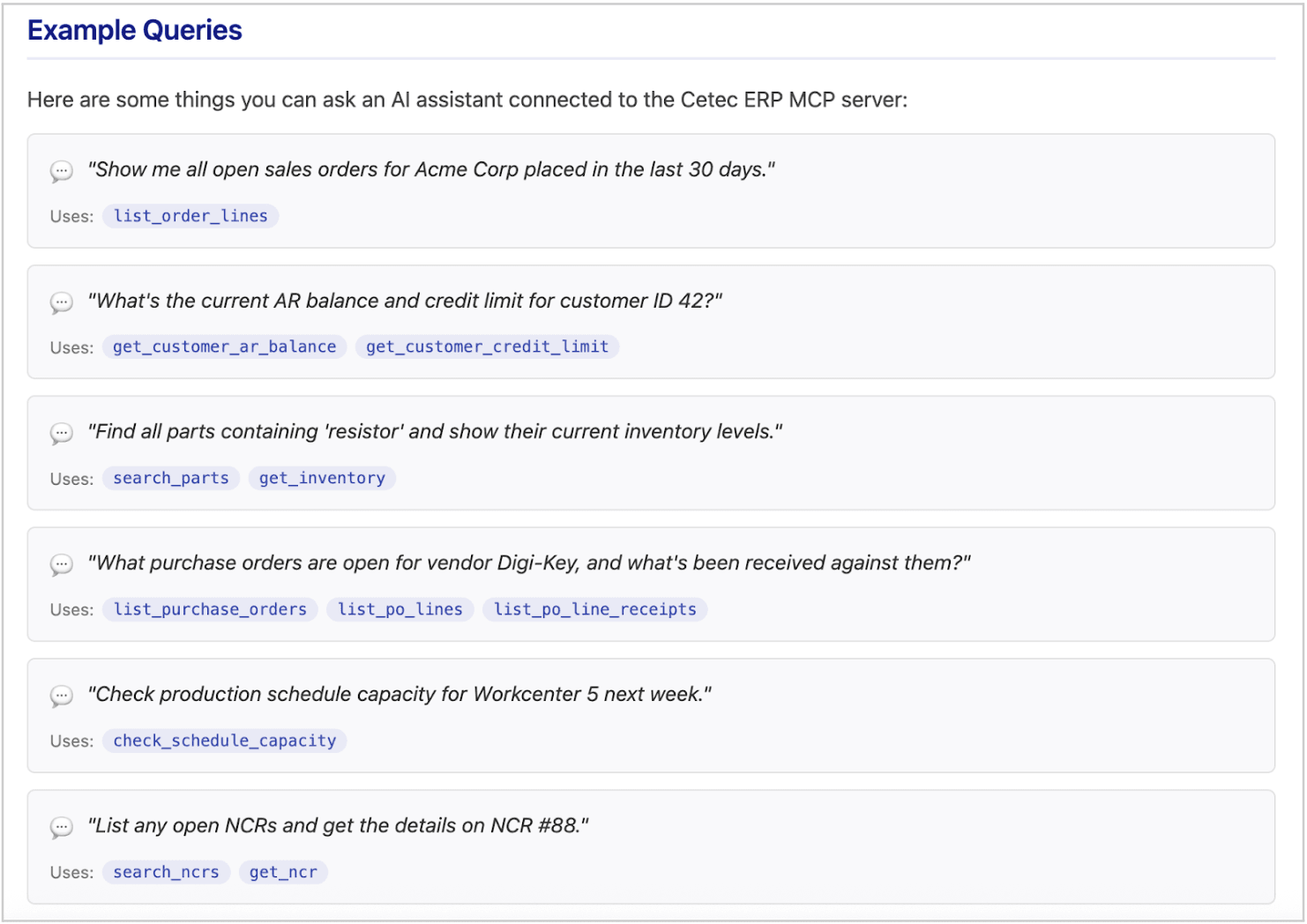
To enable MCP, check out the technical documentation in the Admin >> APIs & More >> MCP.
Note that API charges may be incurred - generally, the first 1,000 API calls are free in Cetec ERP! See API Pricing on our website for details. Visit this blog for more information.
New Version Of Pick Parts Module
We have (finally) re-written the work order >> pick parts screen into GO/react (i.e. “new version”). Improvements include faster page load times to help process issuing material against extremely large bills of material and bin quantities that dynamically update as you pick from them.
Expensing Generic Costs to Work Orders
You can now expense a generic cost directly to a work order. To do so, just punch in the work order number on an expense entry. You can also create a new expense directly from a work order (see the “Expenses” tab on the left-side menu of any work order.
These expenses flow everywhere you care about: job cost/margin reports, multi-level cost analysis trees, and even the Projects module. We’ve also included a new expense import tool for teams using external expense tracking software.
Aggregate Estimate Vs Actuals KPIs On Project View
In the Projects module, there is now a set of new KPIs and reporting which summarizes and breaks out estimated costs against actual costs of any and all quotes, orders, and invoices linked under a Project.
Mass Replace Component Revs
You can now update a component revision across every single BOM where it’s used in one fell swoop. To do so, head to a component/subassembly part number, go to its BOM record, navigate to the “BOM Use()” tab on the left side-menu, look for the new mass-replace component rev function toward the bottom of the page. Visit our guide.
Navigation Menus Will Now Default To Point To New Versions
For new users of Cetec ERP, if a new version of a certain list/report in Cetec ERP exists, then the main navigation menus will take you to that new version by default.
Thank you for reading our Spring 2026 newsletter update! Check out the technical release notes below for a full list of all the updates which are making their way to version 4.23 of Cetec ERP.
Version 4.23 Release Notes:
- ECO Order Holds: Order "hold" capabilities can now be set per individual order line via the ECO module, with the same flexibility of header-level holds of demand vs production vs invoice blocking.
- Pre-allocation Through Subassembly Work Orders: Parts that are allocated to a customer are now qualified (via the “preallocation” feature) for use on internal build orders that are linked/nested to the customer top-level order. This is useful for multi-level BOM work orders which are destined for a certain end-customer.
- Auto-Voucher Commissions: Commission breakdowns are now tied directly to voucher statuses. When a voucher is paid, the commission status updates to "Paid" automatically.
- Custom Object Notification Attachments: You can now configure custom notification rules to include document attachments with the email notification.
- Global Part Uniqueness: A new config "Parts - Enforce Globally Unique Partnum Across All PRCs" allows you to block the creation of duplicate part numbers even if they have different PRC codes.
- Commission Qualifiers: Added bonus column qualifiers to commission rules for more granular commissions mapping.
- Locked Bin Allocation: The "use locked bins in allocation/waterfall" config now supports a "2" setting, allowing "locked/usable" bins to be qualified for inclusion in material forecasts (while still keeping strictly "locked" bins out.)
- Quote Line Imports: The new Quote module now supports importing "source comments" during a quote line import.
- Historical Demand Filter: Added a "future date type" search filter to the Historical Part Demand report, letting you toggle between work start date and ship date.
- PO Grouping: You can now group PO lines by their respective vendor PO line number on the PO PDF (new version only).
- Enhanced WIP Reporting: The WIP Material Report export function has been optimized for faster speeds with larger datasets.
- Bank Reconcile Cleanup: New tools in the bank reconcile module allow for easier deletion of bad/unmatched imported lines or duplicate amounts.
- Ontime Shipment Totals: The Ontime Shipment report now includes resale and cost totalers in the footer of the report.
- Build Estimate Scrap Factor: Build estimates now factor in scrap factors and scrap adders defined on the BOM for more accurate demand planning.
- New text editor tool: Improved styling tools for large text areas, including the homepage bulletin board and work instructions.
- List By Bin Sorting: The Inventory List by Bin report is now sortable alphanumerically by the Receipt column.
- Persistence of pre-allocation through/beyond a Warehouse Transfer transaction: Pre-allocations (hard allocations) now "stick" to material even after a warehouse transfer to a different site.
Deprecations
- The “classic version” of the user interface (black/grey) will be completely deprecated in version 4.23.