
Customer Sticky Notes in Cetec ERP for Customer Service
Customer-facing teams juggle a steady flow of small but important details, from delivery preferences and credit issues to quality concerns and follow-up promises. If those details stay in someone’s head or on a paper sticky note, they are easy to miss when a new quote, order, or invoice is created.
Customer Sticky Notes in Cetec ERP provide a visible way to keep those reminders tied to the customer record and surfaced on day-to-day transactions. When your team can immediately see critical context about a customer, it is easier to protect the relationship and avoid errors that impact service and repeat business.
How Standard Customer Notes Work in Cetec ERP
Within each customer record, Cetec ERP already supports dated notes that capture calls, issues, and other activity. Users can log what happened, when it happened, and any follow-up needed, building a running history of interactions with that customer.

Marking a Customer Note as Sticky
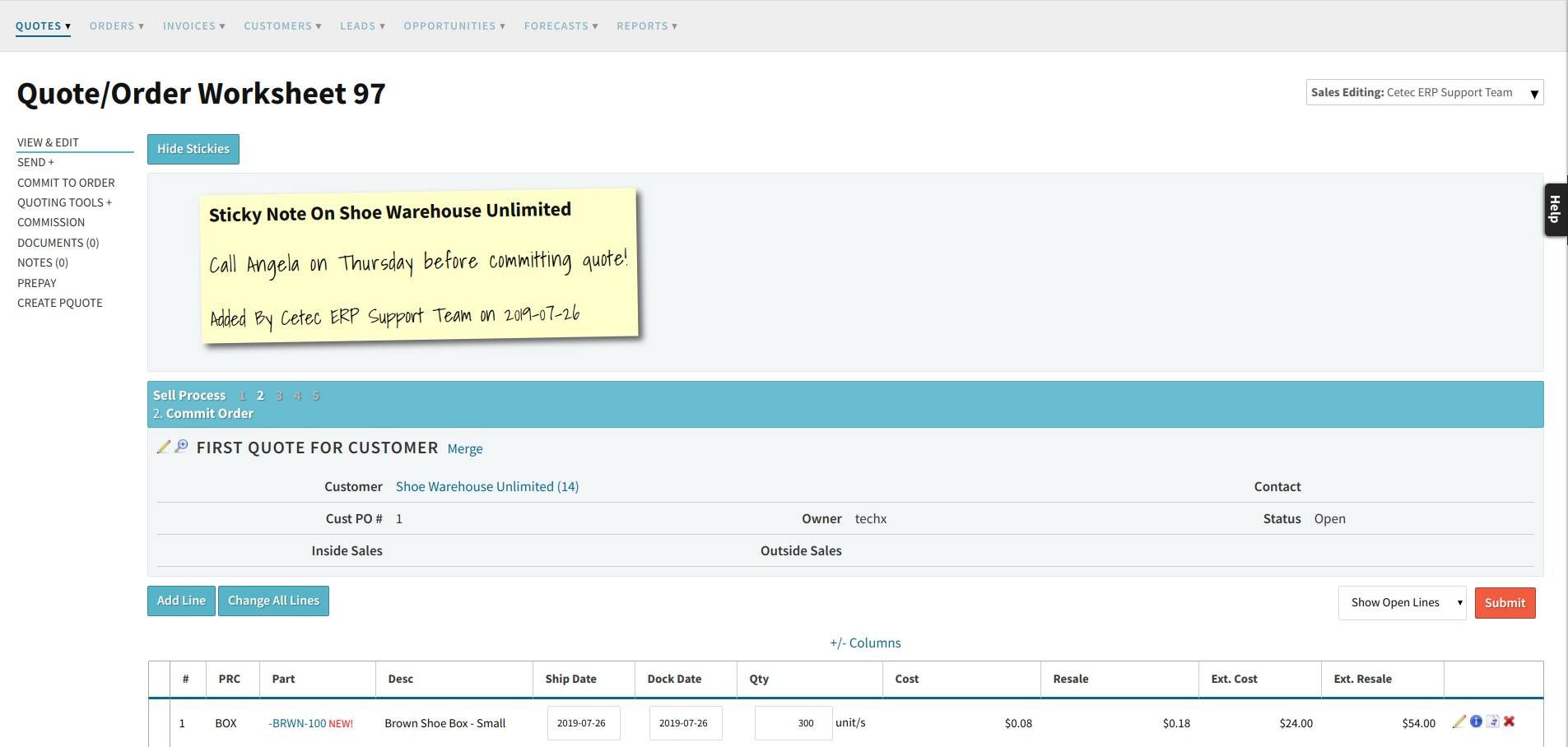
Customer Sticky Notes extend this standard notes feature. When you enter a new note on a customer record, you can mark it as sticky. A sticky note is promoted from general history to a visible reminder that appears in the header area across that customer’s quotes, orders, and invoices.
Typical examples include shipping instructions, communication preferences, escalation points, or quality flags that every user should see before committing to a price, promise date, or shipment. Because the sticky note sits at the top of each transaction for that customer, it follows the work wherever it is created in Cetec ERP.


Using Sticky Notes on Quotes, Orders, and Invoices
Once a note is set to sticky, it appears automatically when your team creates or reviews a quote, order, or invoice for that customer. The reminder is visible in the header so users see it before they adjust pricing, commit to a date, or release product to ship.
Users can choose to show or hide sticky notes on specific transactions, which lets you balance visibility with screen space. The important point is that the information is there when it is needed, without relying on someone to remember to check a separate screen or external note.
Timed Reminders and Email Notifications
When you create a sticky note, you can also set a timed reminder. At the scheduled time, Cetec ERP sends an email to the user tied to the note and initiates a calendar event invitation. This keeps important follow-ups, such as promised callbacks or scheduled reviews, from slipping through the cracks while work continues across other customers and orders.
Operational Benefits for Sales and Customer Service
Because customer Sticky Notes live inside the customer record and appear on day-to-day documents, they support consistent handoffs between sales, production, and shipping. Everyone sees the same instruction and can act on it without asking for extra clarification or digging through emails.
- Reduce missed commitments by putting key reminders directly on quotes, orders, and invoices.
- Give new team members quick context on sensitive accounts or special handling requirements.
- Help align sales, production, and shipping activity around the same customer expectations.
- Keep reminders in one system of record instead of scattered across personal notes and inboxes.
Key Takeaways
- Customer Sticky Notes start as standard dated notes on the customer record and can be promoted when they are marked sticky.
- Sticky notes display in the header of quotes, orders, and invoices so users see key information before acting.
- Timed reminders send email notifications and calendar invitations to help users follow through on customer commitments.
- Using Sticky Notes as part of Cetec ERP’s CRM capabilities improves communication across sales, production, and shipping teams.
Conclusion
Customer Sticky Notes in Cetec ERP turn small but important customer reminders into visible, shared instructions that follow work across your system. By keeping these notes tied to the customer record and surfaced on every new quote, order, and invoice, your team can provide more consistent service, protect critical accounts, and avoid preventable mistakes in day-to-day customer interactions.