Attaching Part Images To Part Records In Cetec ERP Receiving
Receiving is a common point of failure in many manufacturing businesses. A wrong part accepted into stock can drive non conformances, rework, and recalls long after the original shipment was received.
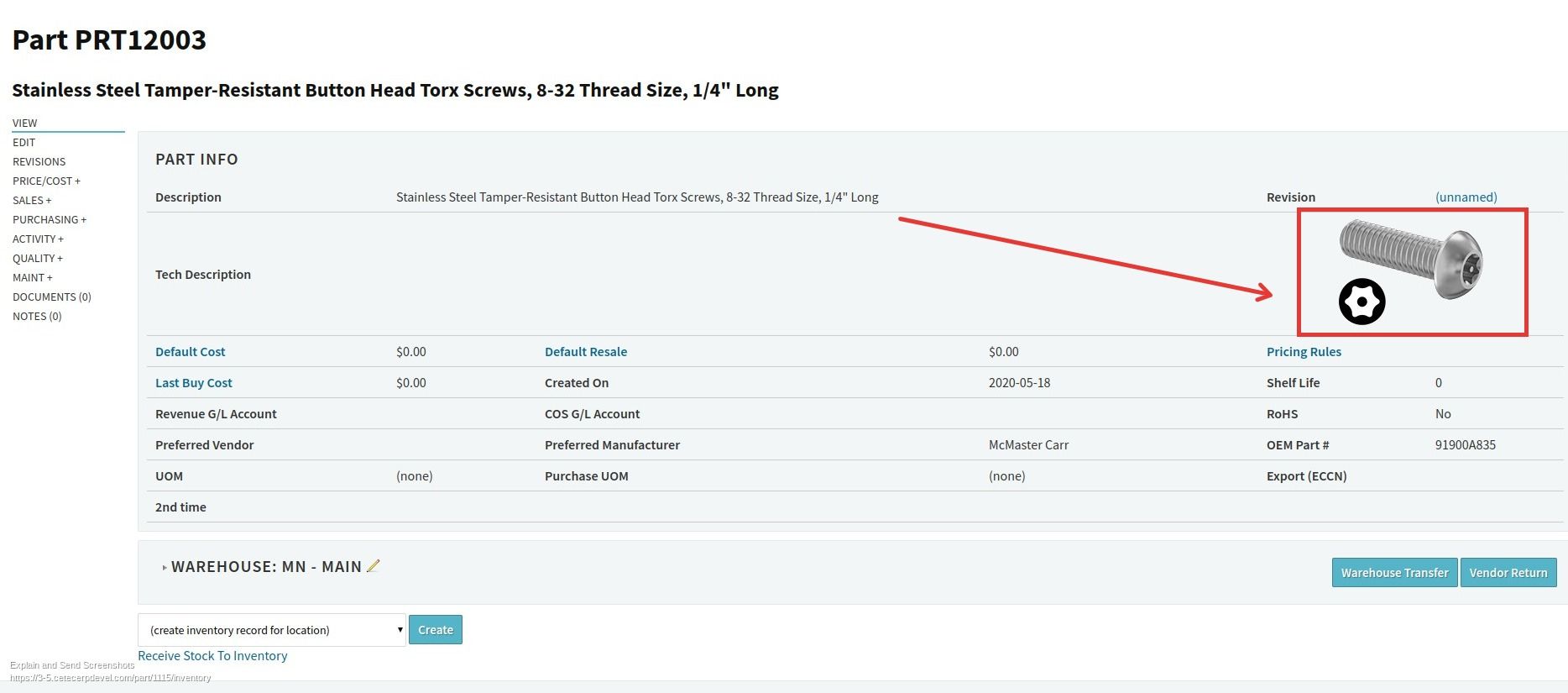
Cetec ERP lets you attach an image directly to a part record so that image is available everywhere the part is used. When you add that part to a purchase order line and receive it, the image appears on the receiving screen and gives your team an immediate visual check against what is on the dock.
Why Visual Checks At Receiving Matter
Even with barcodes and part numbers in place, many issues still come from simple misidentification. A component that looks similar to another, a label that is hard to read, or a vendor packaging change can all lead to the wrong item being accepted into inventory. Once that happens, the error usually does not surface until production or final inspection.
Having a clear product image available on the receiving screen adds another layer of control. The receiver can compare the part in front of them to the reference image tied to the part record, catching obvious mismatches before they affect work orders, shipments, or customers.
How Part Images Behave In Cetec ERP
In Cetec ERP, the part record is the central object that other transactions rely on. When you attach an image file to the part record, Cetec ERP can reference that image wherever the part is used, including on purchase orders and at receiving.
When a user adds a part to a PO line and later receives that line, the system publishes the part image right on the receiving screen. The receiver does not have to open a separate window or dig through shared folders to find a picture. The visual is presented alongside the PO and quantity details while they work.

Uploading An Image To A Part Record
To use this feature, start from the part record in Cetec ERP. Open the documents or attachments area on the part, upload the image file you want associated with that part, and save the record. The image will appear on the part record itself and will be available to display when that part is referenced in other transactions, including receiving.
Once the image is in place, your team does not need to repeat any setup per purchase order. Any future PO lines and receipts that use that part will automatically show the same image to the receiver.
Key Takeaways
- Receiving is a high risk step where visual confirmation can prevent non conformances and recalls.
- Cetec ERP lets you attach an image to a part record so that image follows the part into purchasing and receiving.
- When a PO line is received for that part, the image is presented on the receiving screen for a fast visual check.
- Uploading the image once at the part record level keeps the control automatic on every future receipt of that part.
Conclusion
Attaching images to part records in Cetec ERP is a small configuration step that supports better quality at receiving. By giving your team a clear visual reference while they receive parts against purchase orders, you reduce the chance that simple identification mistakes turn into non conformances, rework, or recalls later in production.