If you know a component consistently consumes more material than the BOM calls for, you need that reality reflected in planning. Otherwise you will under-buy, short materials at kitting, and end up doing last-minute substitutions or partial builds.
In Cetec ERP, the clean way to plan for expected scrap is to capture it on the permanent BOM revision. Two related fields apply here: scrap factor and scrap adder. They both affect extended component quantity on an order, but they behave differently.
Where to Edit Scrap Settings on a BOM Revision
To edit scrap factor or scrap adder on a BOM component, open the BOM part record, click Revisions in the left-side menu, then click Edit BOM on the revision you want to change.
How Scrap Factor Changes Extended Quantity
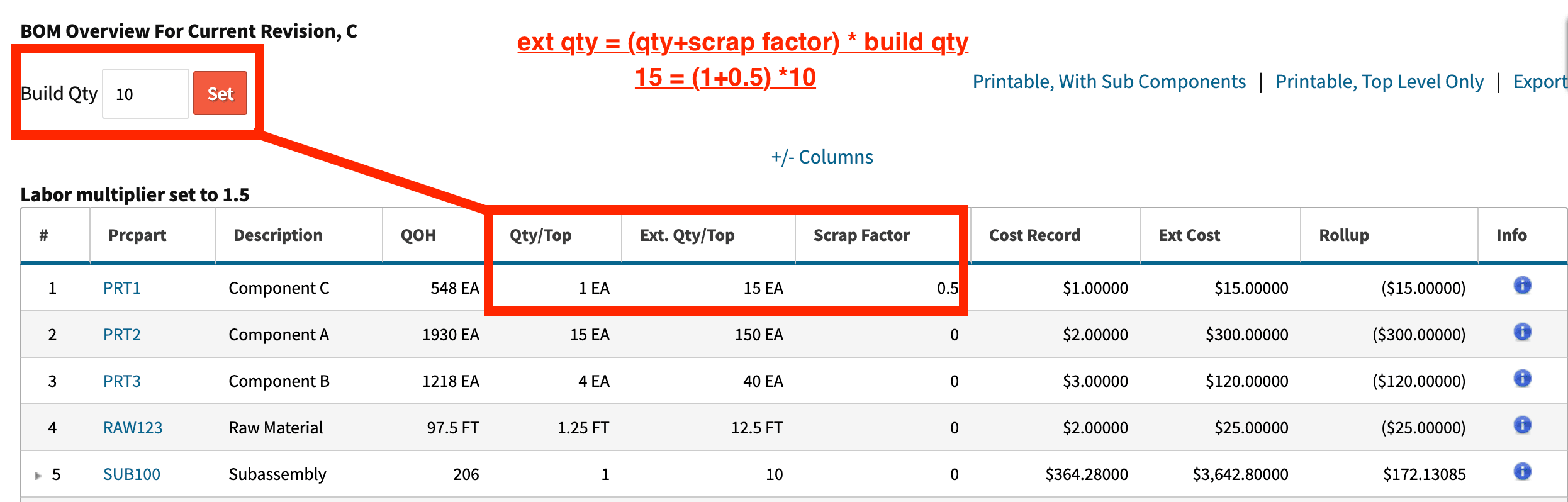
Scrap factor adds to a component’s quantity per top-level assembly. That adjusted per-assembly quantity is then multiplied by the build quantity on the order.
Extended quantity calculation:
ext qty = (qty + scrap factor) * build qty

How Scrap Adder Changes Extended Quantity
Scrap adder is applied after the extended quantity has been calculated. It is added once per order line, and it does not scale with build quantity the way scrap factor does.
Extended quantity calculation:
ext qty = ((qty + scrap factor) * build qty) + scrap adder

How to Decide Which One to Use
Use scrap factor when scrap scales with the number of assemblies you build, such as cut-to-length material that consistently runs long or trim loss that repeats each unit. Use scrap adder when you expect a fixed amount of extra consumption that is not tied to build quantity, such as a one-time setup loss on the order.
A note on scrap factor entry: you can enter the value as either a number (0.25) or a percentage (25%).
Key Takeaways
- Capture expected scrap on the permanent BOM revision so planning reflects real consumption.
- Scrap factor adds to quantity per assembly and then scales across build quantity.
- Scrap adder is added after the extended quantity is calculated and does not scale across build quantity.
- Choose scrap factor for per-unit waste, choose scrap adder for one-time order-level loss.
Conclusion
Scrap factor and scrap adder both help you plan material needs in Cetec ERP, but they represent different scrap behaviors. When you pick the one that matches how your process actually consumes material, your purchasing and kitting quantities stay aligned with the way the job runs.