Production Scheduling in Cetec ERP
When order volume is high, keeping a realistic production schedule is difficult. If your team cannot see labor capacity, material availability, and backlog in one place, you end up reacting to problems instead of planning around them.
Cetec ERP includes a production scheduling system that uses sales backlog, part lead times, and estimated labor to project when work can be completed inside the capacity you have. Cetec ERP also provides several guides and tutorials to help you set up and use that scheduling system effectively at your manufacturing business.
Laying the Groundwork for Scheduling
Before you rely on any scheduling engine, you need to define the basic assumptions that drive it. In Cetec ERP, that starts with configuration around labor capacity and production demand. The How-To Production Schedule Setup guide walks you through these settings so the schedule reflects how your factory actually runs.
- Model labor capacity by defining work centers and the hours available per day.
- Capture realistic production assumptions such as routing times and queue behavior.
- Align backlog planning with part lead times so material constraints are visible in the schedule.
Once these elements are in place, the scheduling system has a solid model of your capacity and demand, and schedule output becomes more useful for daily decisions.
Using the Gantt Chart to Manage Work Orders
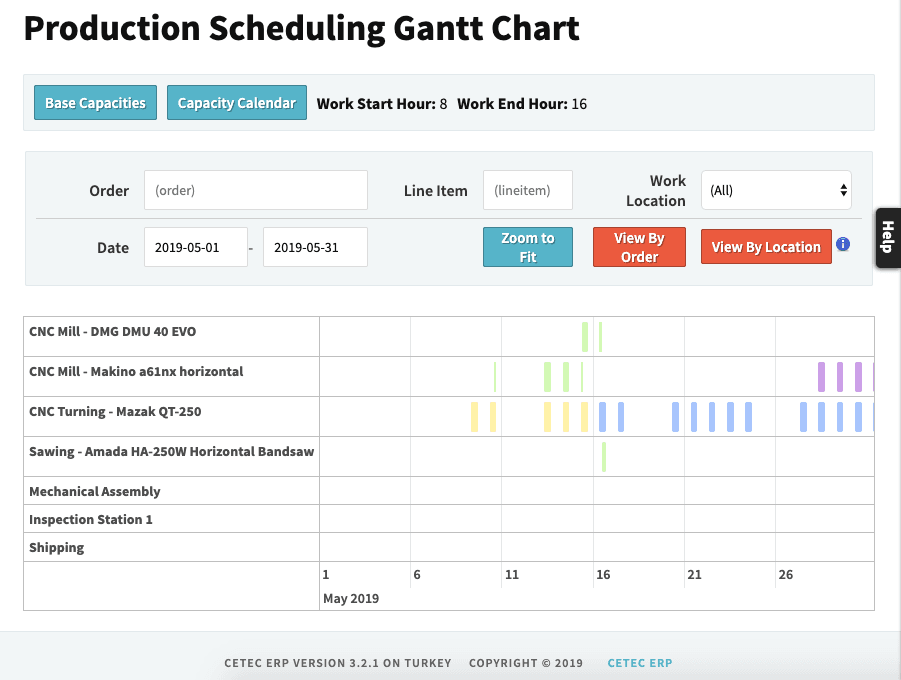
The How-To Use the Production Scheduling System guide focuses on day-to-day use of the scheduling tools, especially the Gantt chart view. From this view, you can evaluate whether new work orders can be completed on time, identify open capacity, and move jobs to relieve bottlenecks.
- Check the impact of new orders on existing commitments before you promise a date.
- Find areas with available capacity and pull work forward when possible.
- Adjust job sequences to relieve overloaded work centers and create a more balanced schedule.
Handled this way, Cetec ERP scheduling gives planners a single place to validate dates, update priorities, and keep production teams working on the right jobs at the right time.
Building a Solid Understanding of Scheduling Concepts
Scheduling concepts can be confusing if you only look at screen behavior. The Scheduling 101 tutorial explains the broader assumptions behind the Cetec ERP scheduling model. It clarifies what problems the scheduling tools are designed to solve and how those tools interpret capacity, constraints, and order priorities.
This context helps your team understand why the schedule looks the way it does and what levers you can move when you need to change outcomes. Without that understanding, the schedule may feel opaque or inconsistent, even if it is working as designed.
Seeing Scheduling in Action
If you want a quick visual overview, the Scheduling Overview Video shows the scheduling tools in a live Cetec ERP environment. It gives a concise walkthrough of how the Gantt chart, capacity views, and order backlog come together once the system is fully set up.

Key Takeaways
- Cetec ERP production scheduling uses labor capacity, part lead times, and backlog to project realistic completion dates.
- Configuration work on labor and demand modeling is required before the schedule can reflect how your plant actually runs.
- The Gantt chart view helps planners test scenarios, check feasibility, and move jobs to relieve bottlenecks.
- Training resources such as Scheduling 101 and the overview video give your team the background needed to trust and use the schedule.
Conclusion
A production schedule is useful only if it reflects real constraints and is understood by the people who use it. By combining configuration work, day-to-day use of the Gantt chart, and the available training materials, your manufacturing business can use Cetec ERP scheduling to plan proactively instead of reacting to surprises on the shop floor.