Standard pack quantities are common when you stock or ship parts in fixed packaging. The complication is that customers sometimes need less than a full pack, and you still want the system to reflect how the part is normally packaged and handled in the warehouse.
In Cetec ERP, you can set a standard package quantity on the part’s warehouse data, then choose whether quotes and orders must follow that standard quantity (as exact multiples) or whether partial quantities are allowed.
Set a Standard Package Quantity on the Part
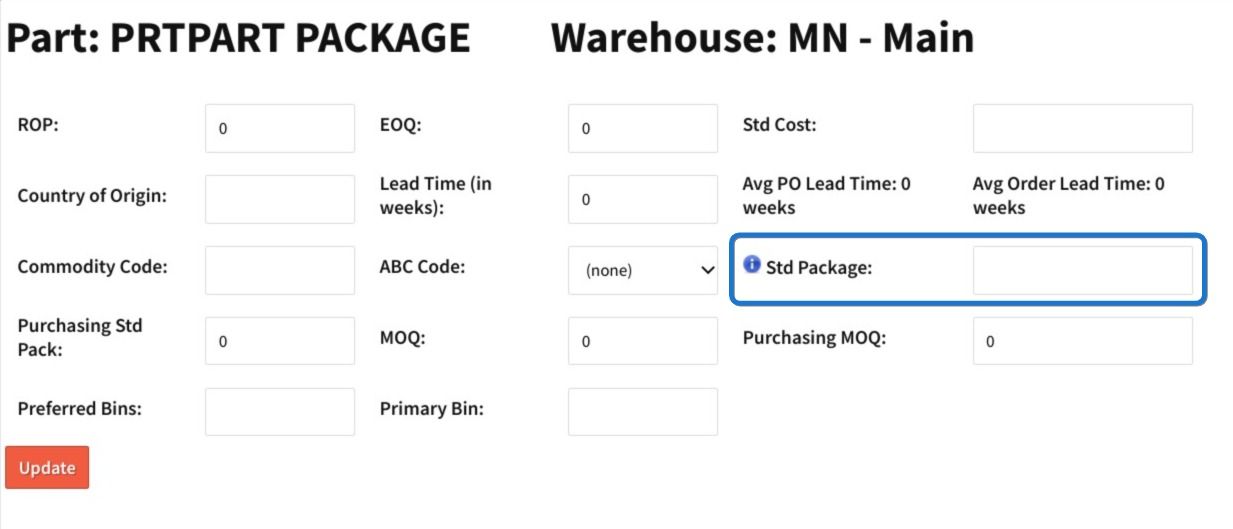
Start on the part record. Scroll to the warehouse section for the relevant warehouse and click the pencil icon to edit that warehouse’s fields.

Enter the value in the “Std Package” field, then click Update to save. This sets the standard package quantity for that part in that warehouse.

Allow or Enforce Standard Quantities on Quotes
After the standard package quantity is set, you can decide whether users must quote and sell that part only in exact multiples of the standard package. This is controlled by a configuration setting (admin access required).
Go to Admin > Config Settings > Config Settings, then search for the config setting named “quote_enforce_qty_min_mult”.

Set the value to 0 to allow quantities other than the standard package quantity. Set the value to 1 to disallow quantities other than the standard package quantity (enforcing exact multiples). Click Set to save the change.
How to Decide Which Setting to Use
Use 0 when you want a standard pack quantity for warehouse handling and purchasing, but you still need flexibility to sell partial quantities based on customer demand. Use 1 when you need strict pack-size enforcement so quotes and order quantities stay aligned with how the part is packaged and shipped.
Key Takeaways
- Set “Std Package” on the part’s warehouse record to define the standard packaging quantity.
- Use “quote_enforce_qty_min_mult” to control whether quotes and sales must be exact multiples of the standard package.
- Choose 0 to allow partial quantities, and choose 1 to enforce standard package multiples.
- Standard pack settings help keep warehouse handling consistent while still matching how you sell the part.
Conclusion
Standard package quantities are a small configuration detail that affects how parts are handled day to day. By setting the standard package at the warehouse level and choosing whether to enforce multiples on quotes, you can keep packaging discipline where you need it without blocking legitimate partial-quantity sales.