Cetec ERP Version 4.22
Hello again, from Cetec ERP.
Below is a writeup of some things we’ve been doing in the new year, along with a full list of technical “release notes” (at the bottom) for version 4.22. We hope you’ll enjoy reading!
What’s new?
We’re into the winter season and Q1 of the year 2026 AD. Speaking of new years, one of our resolutions, every year, is to make our product better and to make your lives in manufacturing easier.
Now, you may have heard some whisperings of a newer technology — something called “Artificial Intelligence”, also known as “A.I.”

Ever with a finger on the pulse of technology, we recently did a New Year’s “A.I.” exercise. We deployed some AI tools to help us analyze the most common, anonymized complaints about Cetec ERP over the past five years, and had it rank the most frequent issues.
We took a few of the top items and wrote some new code we think will help. Check it out.
MRP: Demystifying “Sum Required Qty” (Suggested Build/Buy)
The MRP module in Cetec ERP wants to “help”. It will detect not only short material, but also late material. There is a rather sophisticated algorithm which delivers a suggested “sum required qty”, i.e. the sum total of any and all discrete supply/demand signals which are suggestive of some kind of action to be taken to address not only the shortage, but also the varying instances of lateness, in aggregate.
There is an old proverb which Cetec ERP users frequently remind us of: “K.I.S.S.” (Keep It Simple, Stupid). Sometimes, buyers/planners simply want to know, “what is my ultimate shortage at the end of the day?”
To address this, version 4.22 will now include a column called “Activity End Qty”. This will represent the total amount of material you have remaining, positive or negative, at the bottom of the waterfall (i.e. at the end of your material forecast for that item).
For those among you who are consistently befuddled by the “sum req qty” value, go ahead and hide that confounded column from your MRP, and set the new “Activity End Qty” to show instead! Easy.
Retroactive Inventory/Receipt Cost Adjustments
“Dear Cetec, my CANCEL RECEIPT link is greyed out and disabled. We received this part at the wrong cost. How can we fix it? I think Cetec is broken…” - said every user of Cetec ERP, everywhere, ever.
This is a longstanding complaint among our user base. The Cetec ERP system is designed carefully to maintain product traceability, from receipt of inventory to usage of the inventory. Sure, a receipt of material may have been incorrect, but what if that particular lot/receipt has already been issued to a work order, consumed onto a subassembly, or shipped to a customer?
Until version 4.22, we’ve advised what is essentially the only path to correct an inventory receipt that has already been paid for, used, modified, merged, or backflushed. Following these advised steps amounted to a whole heap of manual financial adjustments and exception processing (e.g. inventory adjust the parts that were incorrectly received, ensuring the GL posting created from that adjustment correctly backed out the GL posting of the original receipt, i.e. reversing the credits/debits of the incorrect amount created at the time of receipt, etc.)
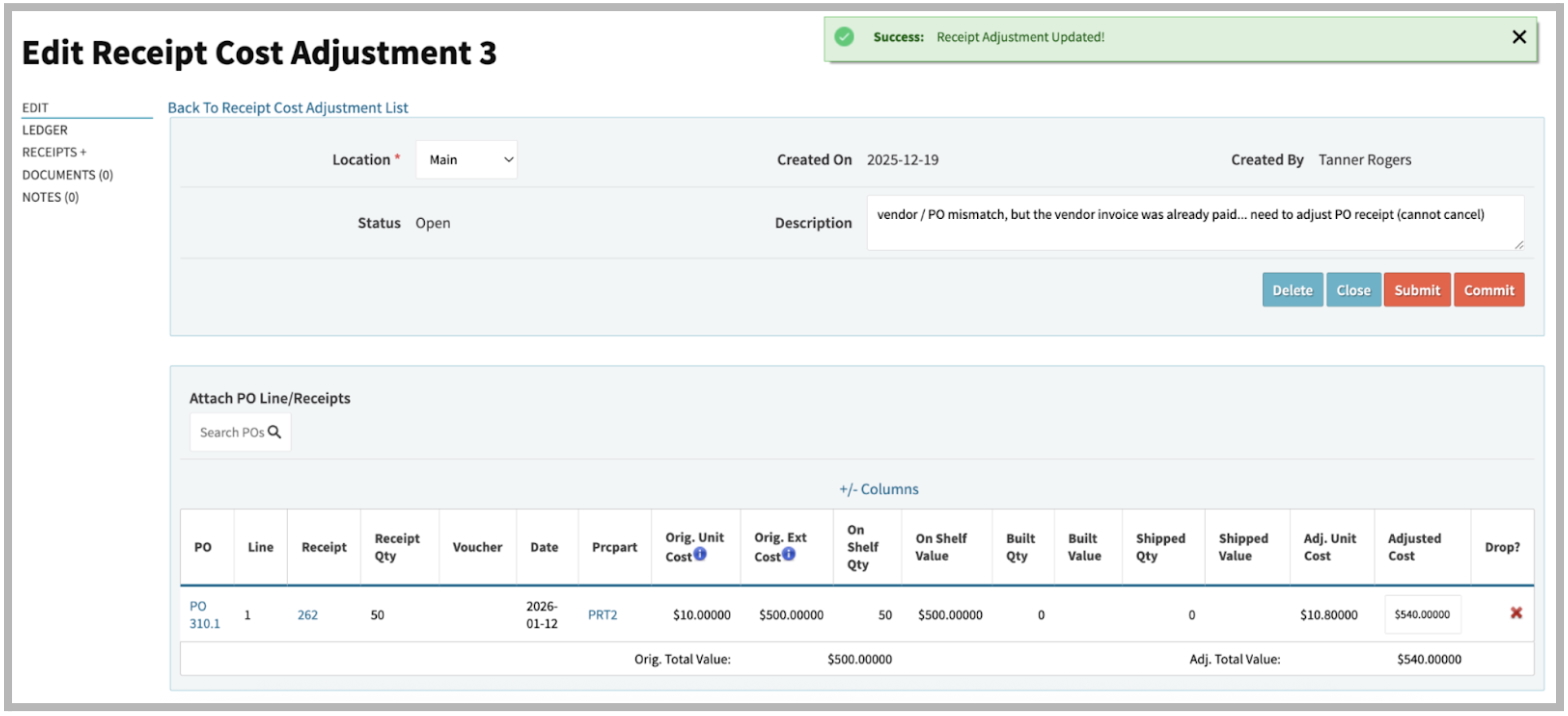
The new “Receipt Cost Adjustment” module in version 4.22 will help automate those financial adjustments. Specifically, it will attempt to intelligently post the adjusted delta $ amount (between the original incorrect receipt cost/quantity and the corrected cost/qty) to inventory, accrued purchases, and cost of goods sold.
This has been under careful design and development for many moons, and we are eager to release it. We hope this will solve many headaches for your purchasing, accounts payable, inventory, and cost accounting personnel. Watch our guide here.
Vendor Invoices Received Before Items Arrive (Simpler Two-Way Match)
It’s a fairly common practice for vendors to invoice you before the goods you’re paying for actually arrive. However, the best practice is to perform a three-way match (PO, Receipt, Invoice) before approving payment.
That’s a catch-22. What do you do with those invoices while waiting for the items to arrive at the receiving dock? Do you stack them up on your desk and check on them every once in a while?
In version 4.22, you can now process invoices and approve for payment based on a two-way match between the PO Lines and the Invoice Amount.
Note: this is technically riskier! You may end up receiving items at a different cost than the PO and voucher matched to, and end up with a hanging “accrued purchases” amount to reconcile (note: our AP Validation account audit tool has been enhanced to flag these for you if that happens!) Read the blog here.
Even Better Financial Reports
In our previous release, we announced a new reporting format for the P&L. We are now introducing a new version of the Balance Sheet, and a brand new “GL Report View”.
Note: the Ledger Report view does not replace the existing Ledger module, but is a new report/view altogether.
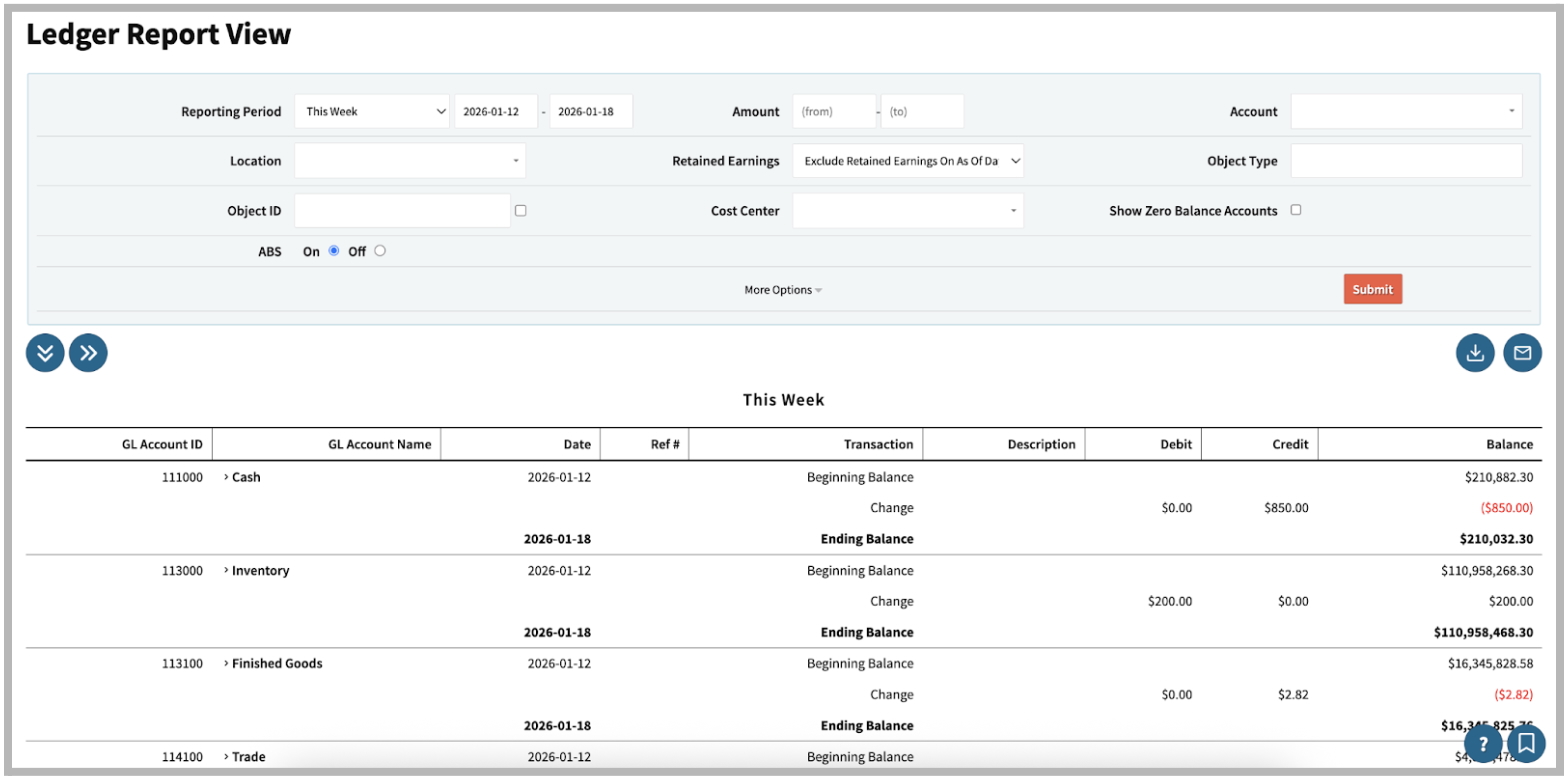
These new report views were inspired by your requests for the financial statements to be presented in “reports format”, which we now understand as a certain paper-esque style with font and structure that a CPA/controller would be used to seeing in commonly used small/med accounting systems.
The new version of the Balance Sheet in Cetec ERP also comes with more robust date/period reporting filters, and of course, the ability to export to Excel.
Important: New Version Vs. Old Version Updates
Cetec ERP has been announcing and releasing “new versions” of screens/modules recently and consistently.
A note about custom “access control” user restrictions. Access control settings block users from visiting specific URLs in your Cetec ERP environment. With new versions come new URLs. Therefore, these new versions do not support any custom “access controls” you may have set up to block users’ access to the “old versions” of the same screens.
For example, imagine you had a custom access control rule to allow a user to view a sales order, but to block editing of the sales order. This user would be allowed to navigate to the old version of the sales order view, switch to the new version and edit the sales order.
We would strongly encourage an admin user at your company to review your custom access control settings for your users and user roles, and migrate to the new “Security By Role” module to manage custom restriction settings. The new versions of Cetec ERP modules do support Security By Role restriction settings.
Here is a tutorial on how to use the “Security By Role” features in Cetec ERP.
Thank you for reading our Q1 2026 newsletter update! Check out the technical release notes below for a full list of all the updates which are making their way to version 4.22 of Cetec ERP.
Version 4.22 Release Notes
Further UI/UX Enhancements To Line Split/Merge
In version 4.21, we announced improvements to the line split/merge functions to help automate movement of partial work order quantities. In 4.22, we have pushed further to create a user experience that is faster and easier. From the new version of the work order, head to the left side menu > Maintenance > Split/Merge, and notice a cleaner view of all lines available to split and/or merge. Select (via checkbox on the far left column) a single order to split, or multiple orders to merge. Upon clicking Split, this will popup a window with further options for splitting/merging lines.
Full Bonus Column Pass Through Traceability
New in version 4.22 is the ability to use the “create PQuotes / POs” from sales orders (or work orders) which establishes a link between purchase order and source sales order (or work order). It is through this link that the bonus column data can “pass through”.
To do so, you’ll need to create identically named bonus columns (i.e. bonus columns with identical technical names) on the Quote Header and PQuote Header respectively, and/or the QuoteLine and PQuoteLine respectively; this is done in Admin » Maintenance » Bonus Columns.
Then, bonus columns defined on order headers and/or order lines will pass their data through to respective purchase orders and/or purchase order lines created from the “Create PQuote” menu on the left side-nav of any sales order or work order.
Furthermore, order headers themselves can be auto-populated with linked bonus columns defined on the Customer record, as can order lines be auto-populated with linked bonus columns defined on the Part record. Furthermore, bonus columns defined on purchase order lines can be set to auto-populate their respective lots/receipts of material received against PO Lines, and even flow through to traceability reporting on lot/receipt metadata as consumed in production and sold to the customer. (This behavior was already supported in Cetec ERP prior to version 4.22).
These new enhancements were inspired by a desire to achieve greater supply chain traceability requirements for DPAS (Defense Priorities & Allocations System).
Enhanced Support For Automatic Put Away to Primary Bin
Previously, if you had the “Auto Put Away Stock At Receipt” config setting enabled, then this would necessarily entail bin merging and the attendant risks/consequences (thus the warning in the description of this config setting: “Cetec ERP will merge Bins to primary bin automatically at receipt. This will DESTROY TRACEABILITY and merge Bin Costs and is not recommended!”)
However, now, setting the same config setting to ‘2’ means you can have the system do auto-putaway to primary bin, but if a bin merge is going to occur, instead of merging bins, apply the suffix scheme (-1, -2, -3) to keep fifo lots/bins separate.
New Report: Sales By Customer
There is now a report (see Sales » Invoices » Sales By Customer) which aggregates total sales revenue into buckets by customer. Drill down within each bucket for a detail of the invoices comprising the total revenue per customer.
Lock Orders From NCR Screen
If an NCR is associated with a BOM/part number, any orders for that part are now able to be locked from the NCR screen. See new side bar item “Orders” on the left side of the NCR (new version only!) - this behavior is similar to the “freeze orders” function available on ECOs. Orders will unfreeze upon closure/resolution of the NCR.
Default Non-Inventory Flag On PRC Category
We have added a non-inventory flag to the PRC code, so that new parts (with that PRC) are automatically set to “non-inventory” at the time of part creation. Additionally, this applies for part record creation via Quote line / PQuote line add/edit (you will need config “create_part_from_pquote_disallow” and “create_part_from_quote_disallow” turned OFF for this to work).
Part Spec Group (Substitute Material / AVL) Hot Swap Enhancements
The order-specific BOM screen now contains a link to “swap short components”; clicking this link will attempt to swap any short material on the order-specific BOM with any other components available.
Previously, this would have been done manually for each component on the BOM; this is now automated by simply clicking the link to swap all possible components at once.
This same automation will run for ALL order-specific BOMs (at least those whose work orders are unpicked and unreleased) at the time of regular recurring MRP/allocation refreshes. This will only occur if you have the config setting “Allow Hotswap based on Partspec match” enabled.
Check PDF Tweaks
Minor layout changes to the default check PDF template to enlarge the MiCR account number and routing number font and to move the MiCR line slightly upward.
Sales Order Tax Group Override
There is now a Tax Group field on Quotes (Order Entry) allowing you to manually set a tax group on a quote/order. Previously, you were beholden to whatever tax group was automatically set on the quote/order by way of the Customer tax group.
New PQuote PDF Options
The PQuote PDF preview now lets you show/hide comment 1, comment 2, and external source comments.
Enhancements To The “View Work” Report
The following new columns are now available on the View Work report (Production » Mgmt » View Work):
- Unit Est Spent: Time required to complete a specific build operation per unit (piece).
- Location Est Spent: Total time required to complete a specific build operation at a given location/status, irrespective of quantity.
- Unit Location Est Spent: Time required to complete a specific build operation per unit (piece) at a given location/status.
Inspection Details Excel Export Now Supports Custom Forms
The inspection details Excel export will now contain results from data collected in inspections via Custom Forms (previously, it only supported data collection via default inspection form values).
Speed Improvements To Balance Sheet Report Loading
Unclosed retained earnings normally appear as an alert at the top of the balance sheet in Cetec ERP; loading these was causing unnecessary slowness when attempting to load a balance sheet. Now, if retained earnings are open, the loading/alerting of those will be backgrounded so the balance sheet itself can quickly load.
Toggle “Sticky” Notes Now Supported On Vendor Records
The “new version” of the vendor master module now supports toggling Notes to sticky.
Batch Reschedule Orders (Finite Mode)
The batch reschedule feature announced in 4.21 only supported users running in “infinite” schedule mode; the batch reschedule functionality has now been extended to support “finite” scheduling as well (see Production » Scheduling » Batch Reschedule).
Kit Audit Enhancements
Kit audits will now support creating/linking an NCR from a single kit audit component failure; previously an NCR could be linked only to the entire Kit Audit. Note: this is supported via the new version of the work order only.
Upcoming Deprecations
The “classic version” of the user interface (black/grey) will be completely deprecated in version 4.23.
The old Fedex Ship Manager custom integration will be deprecated with this release (version 4.22). All customers who previously relied on this integration will be guided to our ShipEngine API as the primary method of Shipping integration.