- Blog/
Accounting and Financial Reporting in Cetec ERP for Small Manufacturers
The tension in an ERP system is who wins out: accounting or operations? Systems tend to favor one or the other. Strong financial systems are rigid and limited operationally. Robust operationally minded systems either skip accounting, favoring the QuickBooks plug-in route, or they are very bare bones. Historically, Cetec ERP, as an ERP for small and medium-sized manufacturers and distributors, has leaned heavily towards operations: time savings, data accuracy, and operational efficiency provide the heaviest, most immediate ROI.
While the accounting has always been robust in its offering, covering the necessities of running a business and providing real-time, operationally driven data and reporting, the improvements have been a bit undersold.
How is Cetec ERP delivering value for CFOs, controllers, bookkeepers, and accountants at small or mid-sized manufacturing companies? This post seeks to answer this question.
Accounting Driven by Operations
Cetec ERP unites accounting and operations seamlessly. Operational activity drives ledger activity. When material is received, there is a debit to inventory and a credit to an accrued liabilities account. When a work order is completed, there is activity reflecting the consumption of raw materials, labor, and overhead posted to expense accounts, and debits to finished goods for these values. When that product ships, these values are posted to COGS, real-time.
Everything is driven by granular GL Transaction Mappings, or accounting rules, so your accounting team has full control of impacted accounts. These range from system-wide mappings to per-part and per-vendor mapping overrides.
As a perpetual ledger (posting as transactions happen), month-end closing processes shrink drastically, as your reports are real-time. The P&L, Balance Sheet, and the rest are caught up.
Inventory is valued at standard, average, actual, or FIFO cost. The G/L holds your home currency, and foreign-currency transactions convert at the daily exchange rate.
Financial Statements and Reporting
The P&L and Balance Sheet come in statement format, the layout a CPA, a lender, or a board expects: account numbers, indented account hierarchies, and subtotals for net sales, gross profit, and net income. Both export to PDF ready to send, and to Excel when you want to work the numbers. Neither needs to be rebuilt in a spreadsheet.
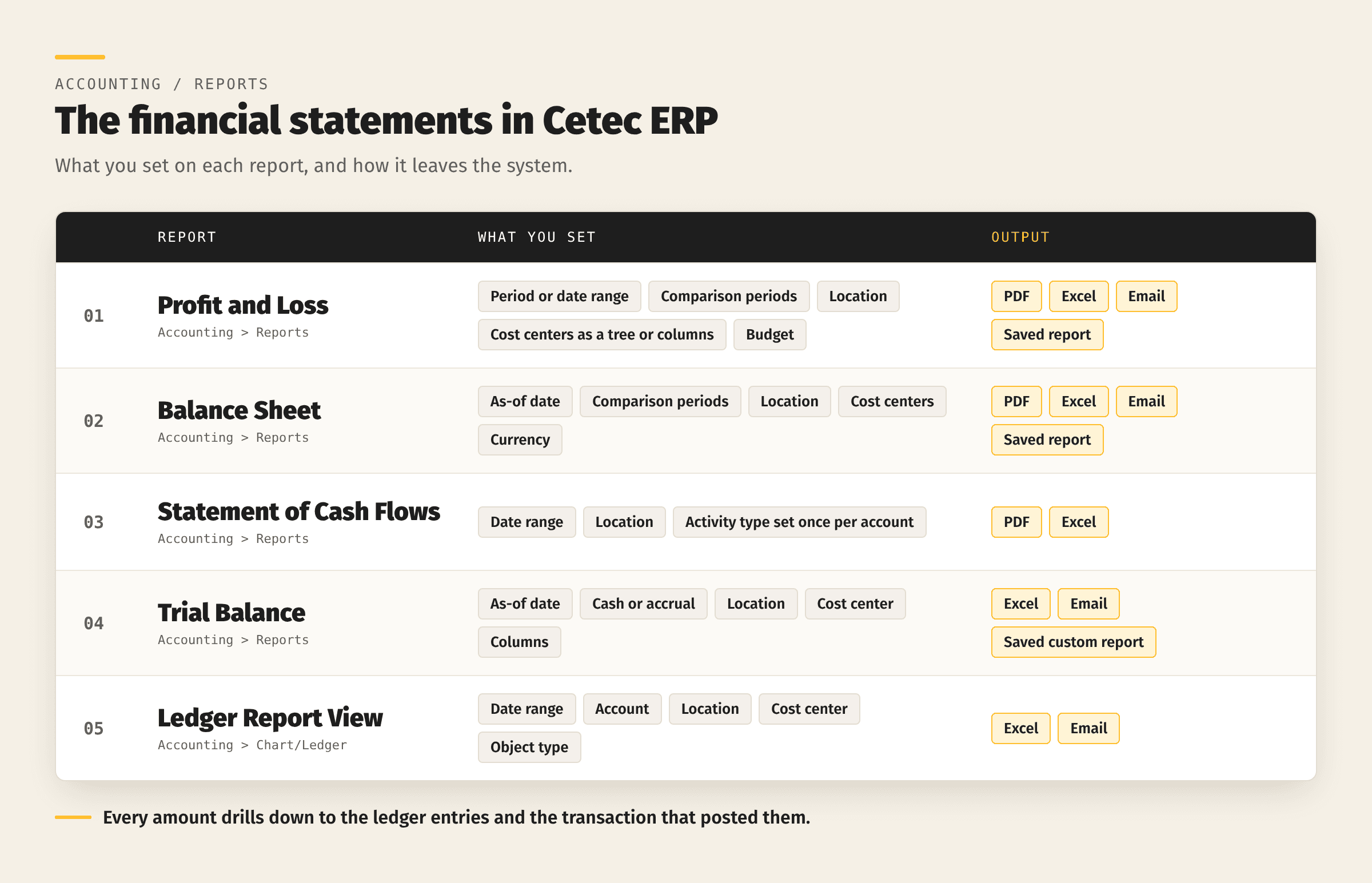
The financial statements in Cetec ERP: what you set on each report and how it goes out.
The P&L runs for any period, with comparison periods and budget columns. Cost centers display as columns for a departmental P&L, or as a tree under each account. The location filter selects one location or several, so each entity reports on its own or consolidated. Filters save with the report, so the same report runs next month, and any report can be emailed from the screen.
Every figure drills down to its source. A P&L line opens the ledger summary for that account, then the debits and credits behind it, then the invoice, receipt, or work order that posted them.
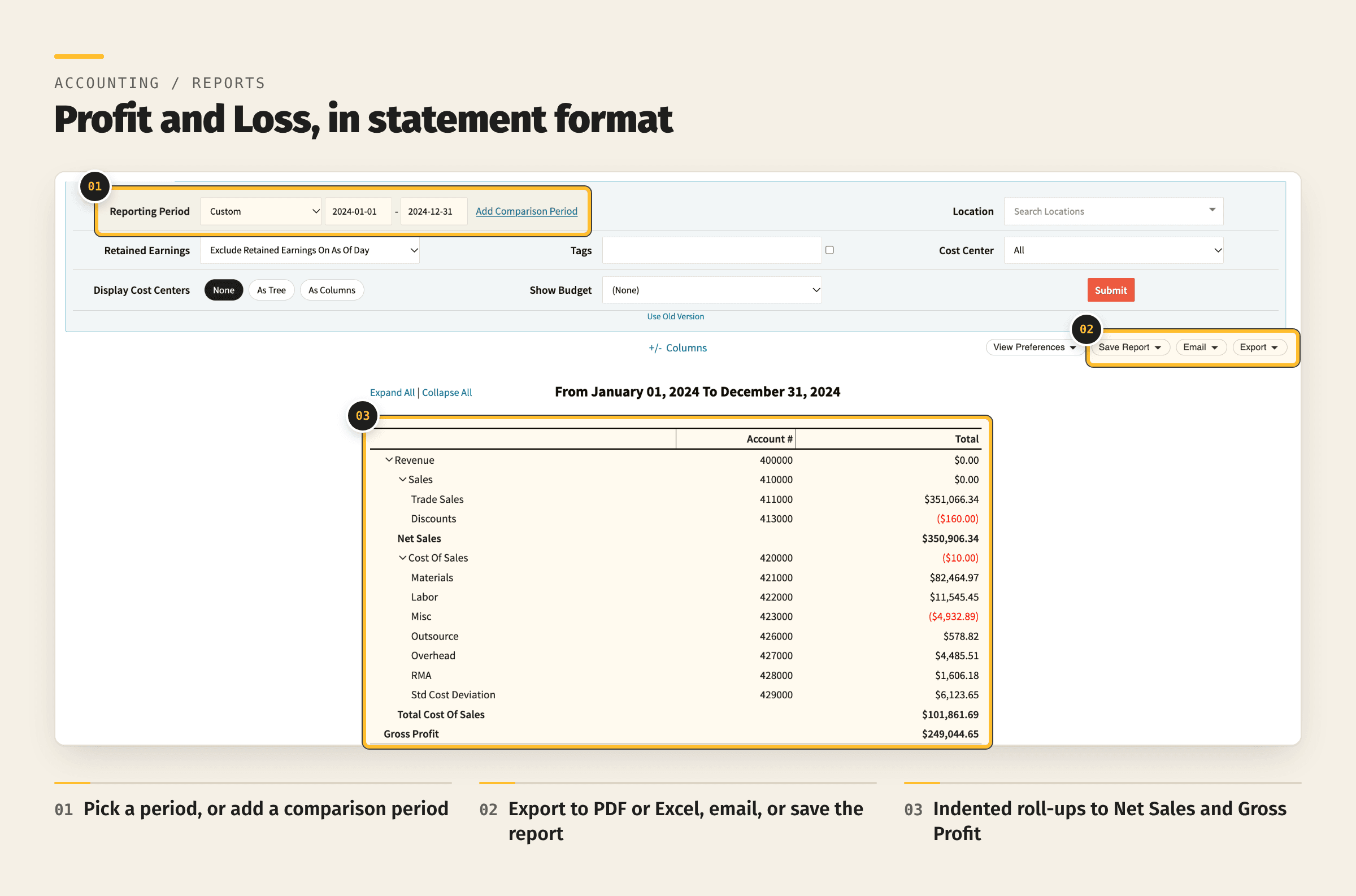
The Profit and Loss in statement format, with export, email, and saved report options.
The Statement of Cash Flows is driven by an activity type on each G/L account: cash, operating, investing, or financing. The default chart of accounts comes mapped, and new accounts get an activity type when they’re created in the Account List. The statement starts from net income and ties to the P&L for the same period.
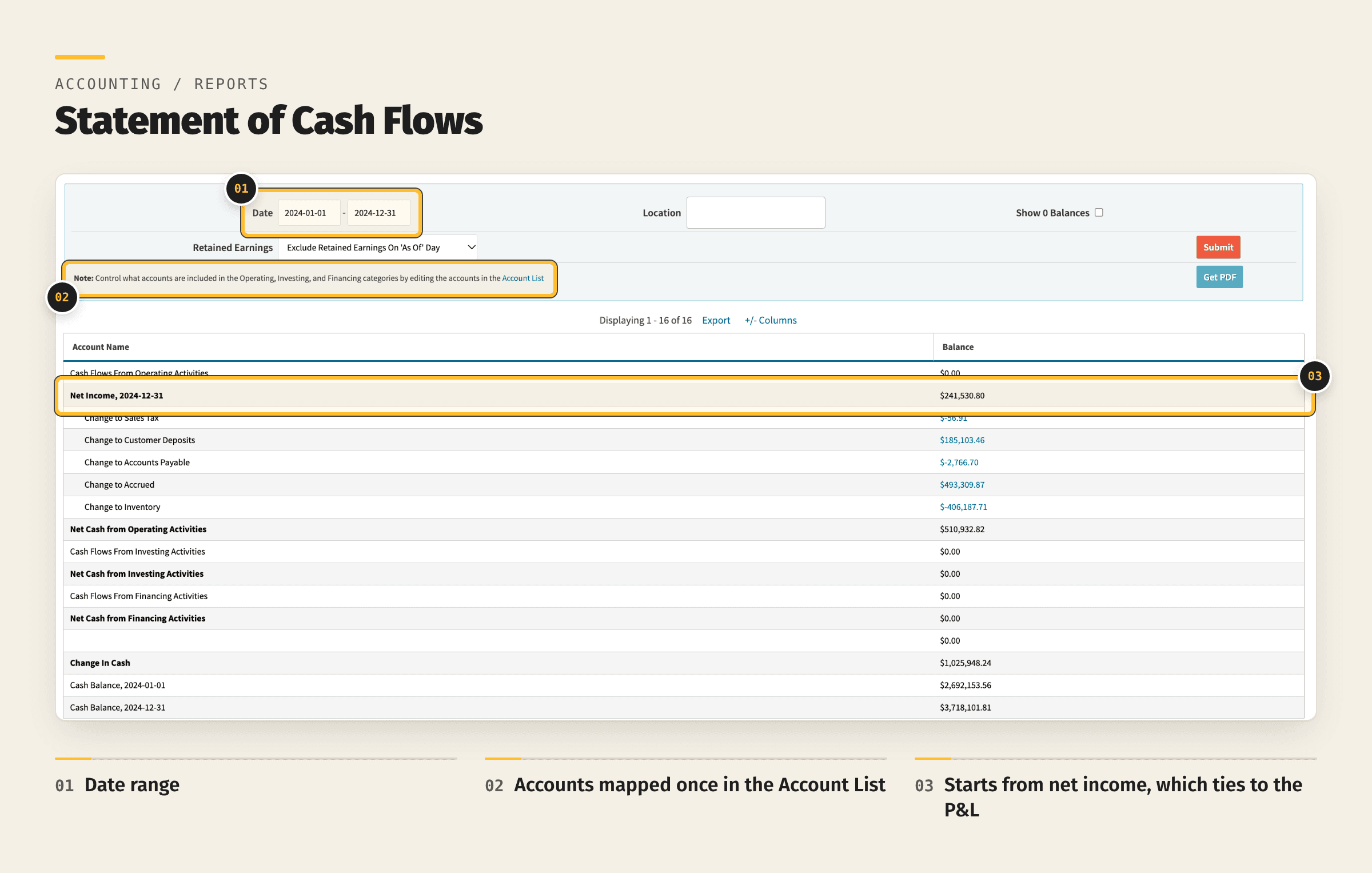
The Statement of Cash Flows starts from net income for the period.
The Trial Balance runs on a cash or accrual basis, with columns you choose and save as a custom report under Accounting > Reports. The Ledger Report View lists every split for a date range, filtered by account, location, cost center, or object type.
Custom Reporting and BI
The standard reports cover the monthly financial package. For reporting beyond that, the Cetec ERP BI Platform puts Metabase on top of your live Cetec ERP data. Reports are built once, saved, shared, and scheduled to refresh, with drill-down from summary figures to the transactions behind them.
The BI Platform is $2,000 per month, or included with the Enterprise support plan. It isn’t required for the standard financial statements.
Accounts Payable and AP Automation
Accounts payable starts at receiving. The receipt accrues the liability, and the voucher moves it to A/P once the vendor invoice is matched. A three-way match of PO, receipt, and invoice approves the voucher under the approval rules you set. For trusted vendors or long lead times, a two-way match approves the voucher against the PO before the material arrives.
AP Automation creates those vouchers from the vendor invoice. Invoices sent to your AP email address, scanned, or uploaded are read with OCR and AI and converted to vouchers with the invoice PDF attached. Vouchers that match the PO and receipt are approved. Mismatches and duplicates go to an exception queue for review before payment. AP Automation is $250 per month for up to 250 vouchers and $1 per voucher after that.
Vendors are paid by check, ACH, wire, credit card, or cash. Batch check runs print from Cetec ERP, and ACH payments export as a NACHA file for your bank.
Accounts Receivable and Cash Application
Invoices post to A/R when orders ship. Credit lines, terms, and holds are set on the customer. Cash application splits a lump payment across invoices and customers and handles short pays, unapplied cash, and credit memos.
Customers can pay by credit card, prepayments included, through the card processing built into Cetec ERP. Statements and A/R aging run by due date or invoice date.
Bank Integration and Reconciliation
Cetec ERP integrates directly with banks and brings bank and credit card transactions in for reconciliation. If your bank isn’t supported yet, we’ll work with you to add it. Statements can also be uploaded as .xls, .xlsx, or .csv files.
Reconciliation is under Accounting > Audit > Account Reconcile. Cetec ERP matches statement lines to ledger entries and marks them cleared. Your team reviews the lines that didn’t match and closes the reconciliation when the difference is zero.
Month-End Close
With a perpetual ledger, month-end is mostly verification. Cetec ERP takes a daily snapshot comparing A/R detail to the A/R balance, A/P detail to the A/P balance, and inventory detail to the inventory balance. Ledger Detail vs. Balance Sheet, under Accounting > Audit, shows where they differ.
The Periodic Accounting Tasks checklist covers the rest: bank, credit card, and loan reconciliations, inventory by bin against the balance sheet, accruals, and closing prior years to retained earnings from the prompt on the P&L or Balance Sheet.
WIP is posted with one monthly entry. The WIP Aging Report under Production > Orders gives the material and labor on open work orders, which post as a ledger entry dated the last day of the month and reverse automatically on the first day of the next.
The Accounting Dashboard
The prebuilt Accounting dashboard shows A/R and A/P aging, weekly cash in and cash out, inventory value, and discounts taken. It can be duplicated to add, remove, or resize widgets, and shared with a role or with individual users.
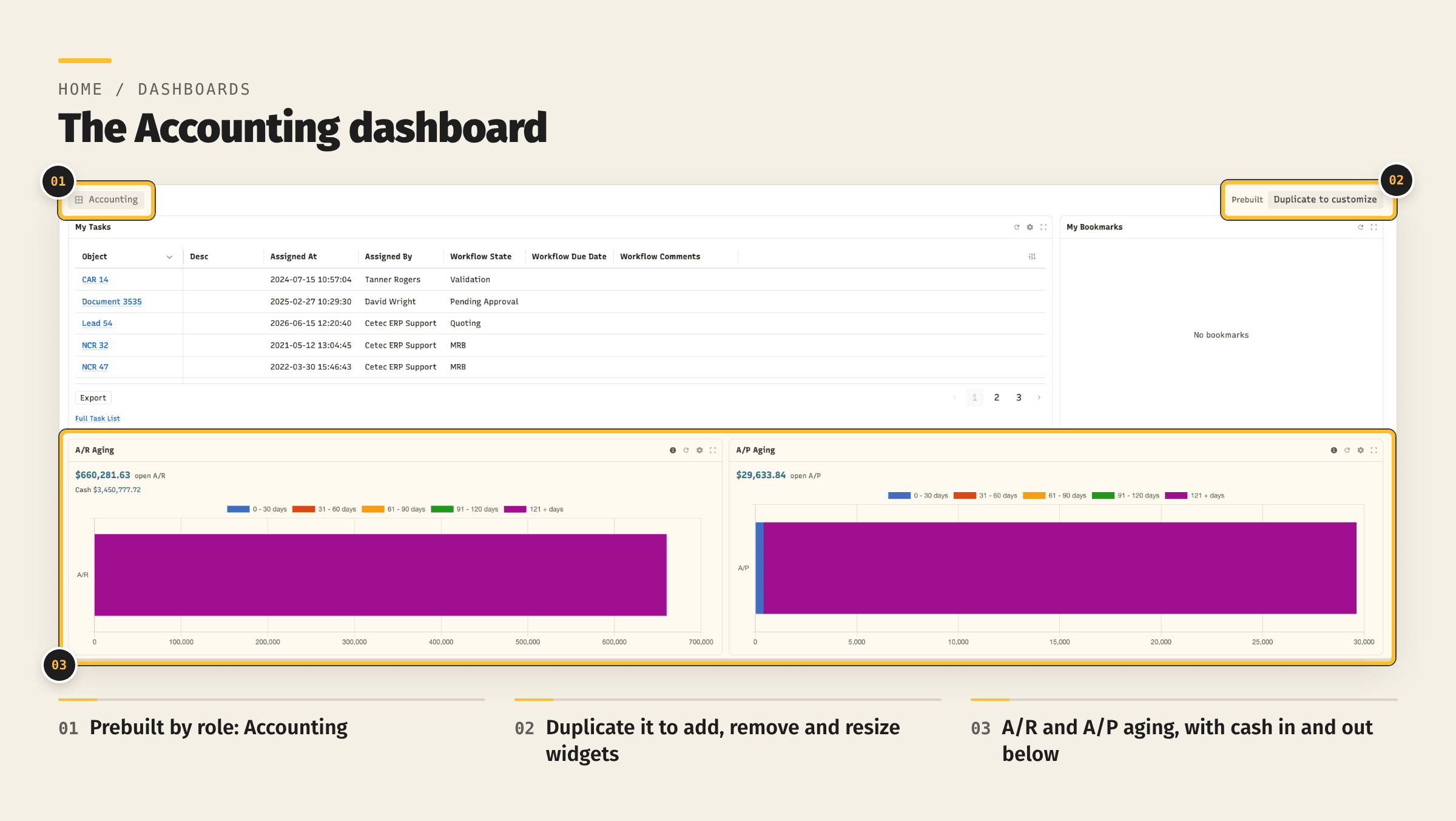
The prebuilt Accounting dashboard.
Keeping QuickBooks Online
Cetec ERP also syncs to QuickBooks Online. Invoices post when orders ship or close, approved vouchers push as bills, and customer and vendor records update. In that setup, A/R, A/P, bank reconciliation, and the financial statements run in QuickBooks Online, and Cetec ERP runs orders, purchasing, inventory, and production.
Most of what this post covers is given up in that setup, so it’s worth weighing before deciding.
FAQs: Accounting in Cetec ERP
Do I need Excel to produce financial statements in Cetec ERP?
No. The P&L and Balance Sheet print in statement format and export directly to PDF.
Can Cetec ERP report on a cash basis?
Yes. The Trial Balance runs on a cash or accrual basis, and the P&L has a cash or accrual view. [Confirm the P&L and Balance Sheet.]
Can Cetec ERP report on more than one entity?
Yes. Transactions carry a location, and the P&L and Balance Sheet filter on one location or several. Cetec ERP also separates intercompany activity from trade receivables. [Confirm how eliminations are handled.]
Does Cetec ERP post WIP automatically?
No. WIP is posted with a monthly reversing entry from the WIP Aging Report.
Does Cetec ERP handle fixed assets?
Yes. Fixed assets and tools are tracked in the Tools module with a cost, salvage value, and monthly or yearly depreciation. Equipment built in-house moves from inventory to the fixed asset account with an inventory adjustment. [Confirm depreciation methods.]
Do custom financial reports cost extra?
The standard statements, saved reports, and Trial Balance layouts are included. The BI Platform is $2,000 per month, or included with the Enterprise support plan.
What does accounting cost in Cetec ERP?
Accounting is included in the Cetec ERP subscription at $50 per user per month, with a 5-user minimum. AP Automation is priced separately.
See It in a Demo
Book a demo and bring last month’s financials. We’ll run the P&L, Balance Sheet, and cash flow, drill from a P&L line to the transaction behind it, and reconcile a bank account. Or start a free trial and run the statements yourself.
Related articles
