Cetec ERP Version 4.21
Hi, from the Cetec ERP Team!
We spend our days writing software to help make running small/medium manufacturing and distribution companies easier, faster, and better.
That only works if you all know what we’re doing! We’re updating our newsletter format to make it a little easier and more interesting. We’ll highlight the important stuff first. At the end, we’ll include a long list of technical documentation of the new code that exists in Cetec ERP version 4.21. Version 4.21 is currently available in beta environments with a rollout to live environments in December 2025.
Thanks for reading!
What’s happening?
This Fall of 2025 was a busy season. Let’s talk about what we’ve been doing these past few months.
Everyone Hates The “Old Version” vs. “New Version” Toggle (So Why Are We Doing It?)
We talk a lot about how Cetec ERP can help your company run more efficiently. Know what’s not efficient? Many of you have coined terms for it: “circling the drain”, “the spinning wheel of death”, “time to go get a cup of coffee”.
Richard C. Hemmings’ velocipede featuring a transversing-wheel. Artist: Robert Pittis Scott. Date: 1889
We don’t want our users to have to come up with even more creative phrases to describe the time it takes for a web-page to load in the software. That’s what our “new versions” are about.
We’re re-writing every screen, module, and report in the system into a new programming language to optimize for ease of use and speed, especially in those areas where larger data sets are squeezed through a process which causes the spinning wheel of death.
However, we also realize: people hate change. We don’t like it either. Therefore, we want to give you an easy way to stay on the older (more stable) code. That’s what “old versions” are about.
As we continue to forge toward the elusive holy trinity of “good, fast, and cheap (ahem, inexpensive)”, we would encourage you to train your users to not be shy about clicking into the “old version” facing any issue with a “new version” page that is hot off the presses (i.e. less stable/proven than the decades-proven old version). Onward!
Scheduling!
Speaking of new versions of things. The angels of manufacturing heaven rejoice any time a new scheduling feature is announced. Scheduling remains “The Thing” everyone wants to talk about, and we are continuing a perpetual effort to create tools to make scheduling easier.
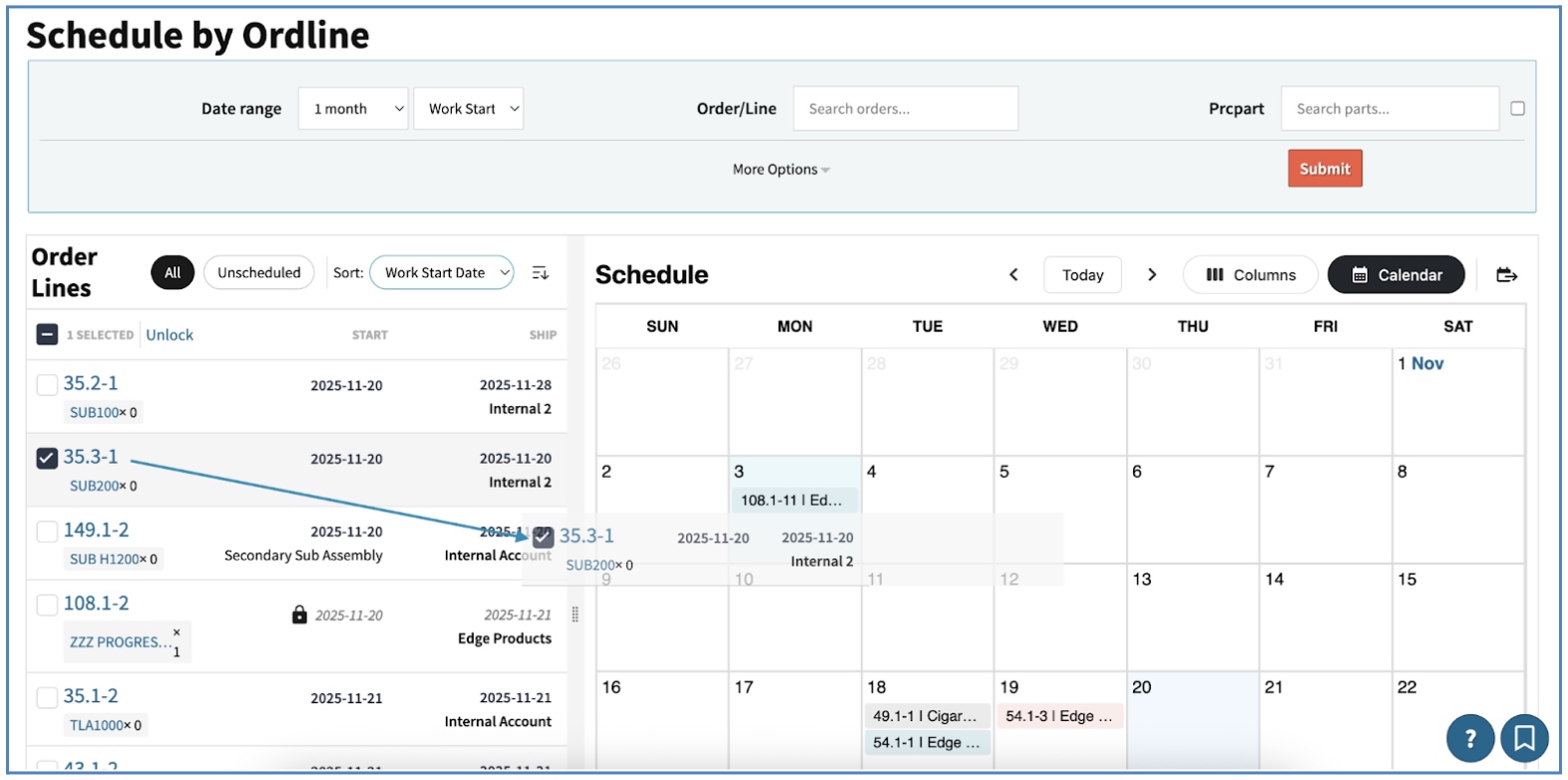
The latest and greatest (coming in 4.21) is a new module called “Schedule By Ordline” , our new drag-and-drop “EZ Scheduling” tool. This lets you filter down to the orders you care about, see them next to a calendar view, and simply drag orders into the schedule.
Cetec ERP will auto-schedule those orders based on your existing configuration and capacity rules, forward or backward, finite or infinite. You can also grab any scheduled order directly on the calendar and move it to a new date to reschedule it on the fly. When you need deeper visibility, you can drill into the Gantt Chart to troubleshoot or fine-tune. Schedule by Ordline hopefully makes scheduling (and rescheduling) dramatically easier, especially for contract manufacturers who live in constant change.
Tariffs!
Tariffs have been a headache for a lot of our customers this year. Even if you’re not technically paying the tariff, suppliers are passing those costs down, and you have to track it and roll it forward to your customers without surprises.
For 4.21, we expanded upon the tariff capabilities introduced in version 4.20. Tariffs in Cetec ERP are modeled as line taxes, which gives you the flexibility to manage large, constantly changing tariff schedules and country-of-origin datasets, and leverage that data to automate a few things.
The big addition in 4.21 is qualifiers on Tax Groups. You can now auto-apply tariffs on sales orders and invoices based on the HTS and COO of the part. If a component in a BOM carries a tariff, Cetec ERP can pick that up too (first-level of BOM only). If you pick from bins with mixed COOs, Cetec ERP will choose the tariff based on the actual bin used.
One important note: COOs on parts and bins are shifting to be based on the country code ID from the AddressCountry table. Your team should review and update these. This change is what allows Cetec ERP to reliably match COO to the correct tariff logic.
Every order update including invoice/ship, recalculates line taxes, so if a tariff rate changes, it flows forward automatically. Future enhancements will include improvements to the Tax Authority/Group import tool, which will help you keep your tariff data current and manageable as they continue to shift and change.
This gives you a clean, reliable way to capture tariff cost from your suppliers and pass it forward with accuracy and transparency.
Partial Movement Of Work Orders (Pieces, Partials, Splits)
Many manufacturers deal with the movement of partial quantities through the shop floor at different rates. Portions of an order move forward while others lag behind, even though everything is still part of the same lot and eventually needs to come back together. This is especially common in EMS and PCBA environments, where panels or groups of boards rarely stay perfectly aligned as they progress through production. We’ve consistently heard the same question: “How do I track partial movements through the shop floor?”
Cetec ERP has long supported the ability to register “pieces completed” associated with time entries and logging notes of partial movement of material within a work order (and the attendant reporting of these logs).
This existing functionality is sufficient for many, but for robust reporting around real-time statuses of discrete groups of parts moving independently through production, the only real option is to split the work order into separate work orders. The problem with this is that splitting work orders can be transactionally heavy and not amenable to shop floor operators who do this kind of splitting constantly throughout the work day (and therefore need a faster, easier way to do it).
In 4.21, we added new tools to make splitting lines easier to manage. When you split a line, you can now assign a work location and important order tags, giving you better visibility and context as those partials move through different stages. We also introduced a new de-split (i.e. “merge”) page, where you can see the full split-line structure and the respective statuses of each split. You can select exactly which splits you want to recombine and merge them back into a single line when they meet up again (or simply complete/invoice the lines as they successively reach finished goods.)
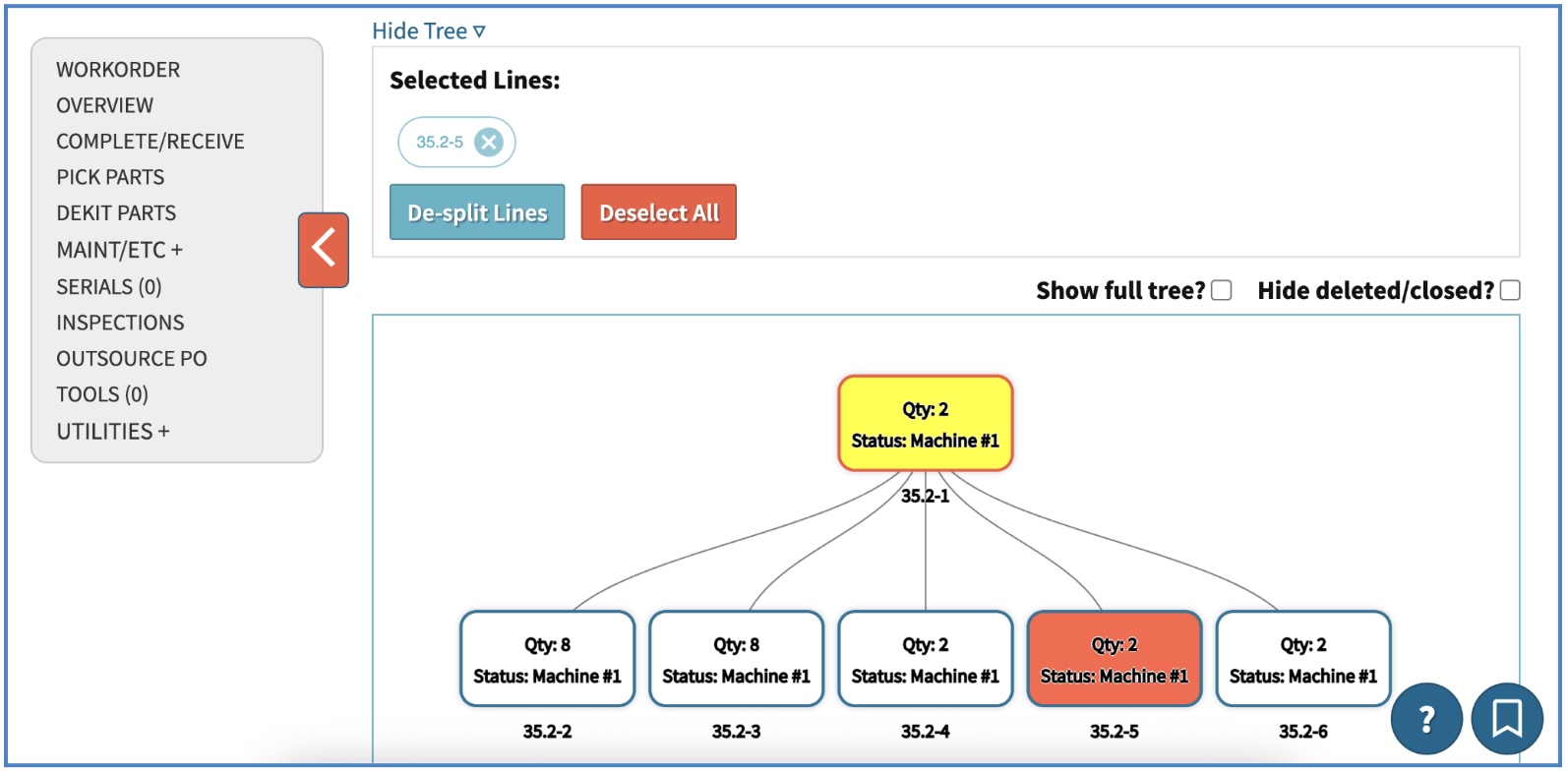
This gives clearer visibility to actual progress across the shop floor, while still keeping everything tied together under the same work order.
Enhancements include: 1- assign a work location (at the time of work order split) to the work order you’re splitting off; 2- “tag” a split to ensure ease of reportability against specific kinds of splits; 3- print a customizable work order ticket/plate associated to the work order split you’re creating; 4- easily see a visual tree of splits which relate to one another via the original source of partial movement/split; 5- merge splits back into each other via this visual tree. Visit our guide here.
Better Financial Reports (New Accounting » P&L)
“ERP systems are either strong in manufacturing or strong in financials.” - nonsense!
A longstanding design pattern for accounting reports in Cetec ERP was based on consistent feedback from users re: the propensity among CPAs/CFOs/Controllers to export their financial statements to Excel for inevitable further manipulation and presentation of the report.
However, many of you requested an option for financials to be presented in “reports format”, which we eventually learned to interpret as a paper-style PDF format with font and indentation a CPA/controller is accustomed to seeing in more standardized accounting packages.
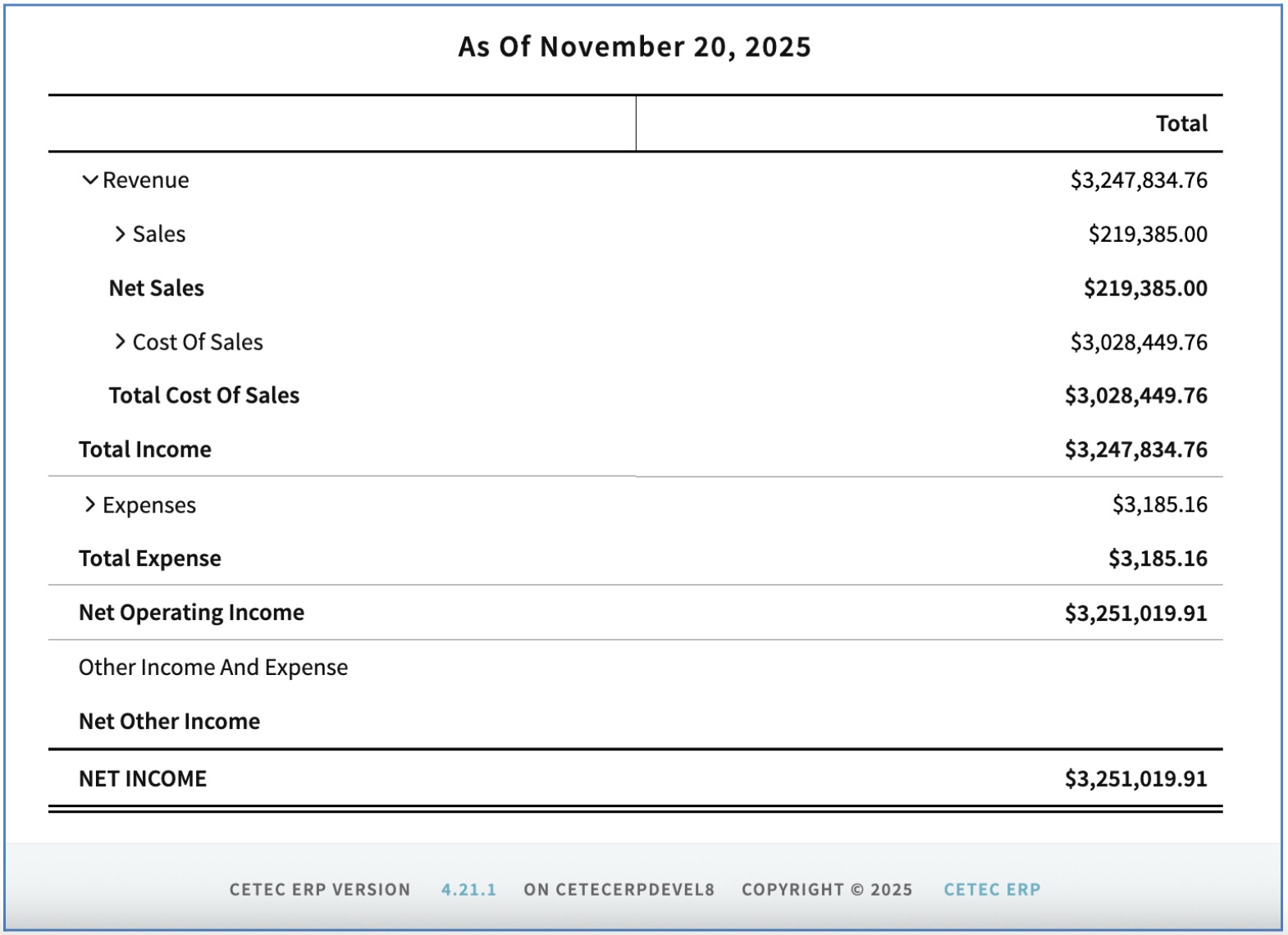
The new version of the Profit & Loss report in Cetec ERP is designed to offer this new presentation format along with additional filtering and reporting mechanisms that a larger share of accounting professionals are accustomed to seeing. Note: you can still feel free to export it to Excel!
Bells & Whistles
Hey, we’re a hip tech company based in Austin, TX, are we not? What’s a new release without some cool bells and whistles to announce? Check out the following automation and customization options available in Cetec ERP version 4.21.
Object Notifiers
Create customized email alerts/notifications against additional business objects! Previously, you could only setup notifiers for objects that already supported alerts natively. Now, you can customize your own business rules, conditions, triggers against business objects of your selection. See technical release notes for more details.
Tasks/Reminders
Customize task assignments and reminders to your employees. Previously, task assignments were required to be created from an existing supported business object. You can now create generic task assignments and associate them to a business object of your choice. See technical release notes below for more details.
OCR/AI Enabled Document Scan & Attach
Scan a paper/PDF document and OCR/AI will read it, match the records, and attach it to the corresponding transaction in Cetec ERP. See technical release notes below and our website for more information!
A/P Automation
A/P vendor invoices can now be sent to your company A/P email address (or scanned into an OCR-capable scanner) to auto-create A/P “vouchers” in Cetec ERP, automatic link of PO Line Receipts via vendor invoice remittance, and automatic attachment of the vendor invoice PDF to the Voucher object in Cetec ERP. See release notes below and our website for more information!
Custom Automation Services
We’ve built a framework within the Cetec ERP system to let you upload a file/document and select your own custom script to ingest the document and operate against it to import and automate data entry utilizing the data in your file. If your team is spending hours re-keying spreadsheets, building the same reports for customers or management every week, or updating data by hand, we can automate it inside Cetec ERP with processes built around your documents. Work with our consulting and development teams to build custom upload/import programs specifically keyed to .csv spreadsheets or documents your team relies on, whether customer PO spreadsheets, custom BOM reports, weekly production management reports, supplier forecasts, etc. Special pricing applies ($315 per hour of dev).
Thank you for reading our Winter 2025 newsletter update! Check out the technical release notes below for a full list of all the updates which are making their way to version 4.21 of Cetec ERP.
Release Notes (technical)
Side-Menu Navigation Bar Update
On the new versions of modules that support attaching documents, writing “notes”, or logging “tasks”, within the side-navigation menu of these modules, the Documents, Notes, and Tasks links have been aggregated into a dropdown menu called “Utilities +”.
Tariff Enhancements
New tariff enhancements include the ability to set qualifiers on Tax Groups. Qualifiers include: HTS code, Country of Origin, and (more broadly) part number.
Country of Origin (COO) may be set first at the warehouse location (“LNAME”) level, then (as an override) at the part inventory record level, and finally (again as an override) at the bin-location/FIFO level.
HTS code is set at the Part master record level.
With the proper qualifier, a customer sales order can detect whether the parts being built/sold contain such a COO or HTS value, and the system can qualify a tax group (i.e. tariff percentage or flat amount) to be auto-applied as an associated charge to the order/invoice. Order updates, material issuance (i.e. pick parts), and invoice/shipping will trigger the lookups for tariff qualification and auto-application of tariff charge to your customer.
See updated How-To tutorial documentation on our website at cetecerp.com for more information on how to use the new tariff functionality.
Schedule By Ordline
Schedule By Ordline (Order Line) is a new tool to help make getting work orders on the schedule easier. Using the Schedule By Ordline tool, you can search/filter to restrict results to a group of order lines you care about scheduling, view the orders next to a calendar, and drag the orders into the calendar view to schedule them.
Dragging and dropping an order into the calendar will automatically schedule the order to the date you drop it into, scheduling the work order’s work location sequence forward or backward (based on your toggle/selection) against those work locations’ daily capacities, and honoring your existing scheduling configuration settings (e.g. Hours Per Work Day, etc.)
You may also simply select any work order already scheduled inside the calendar view and drag/drop to re-schedule it on a different day.
New Versions Of Modules/Screens/Reports Now Available
Cetec ERP releases ‘new versions’ of various modules, screens, and reports in Cetec ERP which are re-written into newer code and optimized for speed and ease of use. Check out some of the ‘new versions’ we’ve recently released below. If for any reason you would prefer to remain using the ‘old version’ of any below module or report, simply click ‘old version’ at the top of the respective screen or report. The system will “remember” your preference for new vs old the next time you load the page.
The following modules/screens/reports now have a “new version” link you can explore:
- Price List (Parts » Pricing » Price List)
- PO Receipt Document List (Purchasing » Receipts » Receipt Docs)
- Projects Module (Sales » Quotes » Projects » Select Project)
- Project Prepayment (Project » Prepay Side-Nav)
- Forecasts Module (Sales » Forecasts » Forecast List » Select Forecast)
- Vendor Module (Purchasing » Vendors » Vendor List » Select Vendor)
- Quote Module (Sales » Quotes » Quote List » Select Quote)
- Order Module (Sales » Orders » Order List » Select Order)
- Order Edit & Order View are the only two pages within the Order Module that currently support a “new version”.
- Vendor Returns (Parts » Vendor Returns » Select Vendor Return)
- Profit & Loss Statement (Accounting » Reports » Profit And Loss)
Vendor Quality Approvals Enhancements
See new enhancements to vendor audit and supplier evaluation process controls via Vendors » Quality Approvals. You can now track multiple quality approval tracks even for a single vendor, in addition to routing vendor approval steps (through a new customizable VendorQualityApprovals workflow on the VendorQualityApprovals business object), and by attaching Notes, Documents, and assignments to a vendor approval process.
You can also now view and control/toggle open and historical Vendor Quality Approvals records from the vendor record itself; see “Quality Approvals” tab on the left side-menu of any vendor record.
Enhanced Split / Merge Modes (For Easier Tracking Of Partial Movement Of Work Order / Project Quantities Against Discrete Order Lines)
We have made enhancements to the order line “split” functionality for ease of use in situations where splitting work order quantities is a frequent, constant task. Enhancements include:
1- you may now assign a work location (at the time of work order split) to the work order you’re splitting off;
2- you may “tag” a split to ensure ease of reportability against specific kinds of splits;
3- you may print a customizable work order tag/plate associated to the work order split you’re creating;
4- you can easily see a visual tree of splits which relate to one another via the original source of partial movement/split;
5- you can easily merge splits back into each other via this visual tree.
Visit our guide on our website.
Pricing Rules Enhancement
Previous to version 4.21, if you wanted to key/apply a pricing rule to a category of part number, your only option was to rely on that category existing in the part number itself (you could key a pricing rule to a portion of the part number using % to identify which portion of the part number to match against).
Now, you can set up “custom qualifiers” for pricing rule part matching. You can match against a %portion% of a part description, part external key, or part bonus column.
Matching against a part bonus column is especially powerful. This allows you to assign any number of different parts (with completely different part numbers/descriptions) the same bonus column value. Then, if you create a pricing rule to key against that bonus column value, it will match any parts that are assigned that bonus column value.
Re-name “Short Per Avail” Column To “Short Per Shelf”
On Release To Production and Production Order List reports, the column previously named “short per avail” has been renamed to “short per shelf”.
MRP Alert For Different Source Types
If a build/buy suggestion is derived from more than one source, the “Sum Req Qty” column will highlight to indicate to the user that multiple different sources might be competing to justify the suggested build/buy quantity. The “source type” column will indicate “Multiple”.
“Technical Description” Is Now A Show/Hide Option On Packing Slips
You may now show/hide the part tech description field on Packing Slip PDF documents.
In-App Data Import Tool Speed Optimizations
We have introduced some speed optimizations to self importing of data via Cetec ERP interface (i.e. for new customers importing starting sets of customer, vendor, part data, etc.)
Cost Center Is Now Available On Quote List & Order List Reports (View By Line/Header)
Previous to version 4.21, cost center was only available in “view by line” mode. It is now available on both Quote List and Order List reports in both line/header search modes.
Pricing Rules Import
There is now a data import tool in-app to let you mass import pricing rules.
Fix: A/P Details PDF
We have fixed an issue where the A/P Details PDF totalers were not matching the A/P Details totalers screen.
Quickbooks Online Integration Enhancement
When pushing a voucher to create a “Bill” in Quickbooks Online, the vendor invoice “terms” will now flow through and update the AP terms for the Bill in QBO.
MRP Export Enhancements
Exporting the MRP report will now include columns for customer supplied yes/no, allocation part spec alerts, part synonyms, and ECOs.
Speed Optimization For Order Pulse Dashboard
The “order pulse” dashboard widget has been optimized for faster loading times.
Highlight Cost Field (Price Variance Alert)
The cost field on vendor PQuotes and POs will now highlight based on the purchase price variance (PPV) of the part being purchased. Use configuration setting “Highlight Cost If PPV Greater Than”. If the proposed cost of what’s being purchased creates a variance greater than that config value, the cost field will highlight.
CRM Opportunity Object Now Contains Comments/Notes Field
The Opportunity object in the CRM portion of Cetec ERP now supports bonus columns (user defined fields) and now contains a text area field for comments/notes specific to that opportunity.
Customer Sales Overview KPIs Now Show Foreign Currency
The Sales Overview KPIs on the customer record previously only displayed the sales numbers in your home currency. Cetec ERP now publishes the foreign currency translation of those numbers in parenthesis (based on whatever “default currency” is set on the Customer).
Part List Report Now Contains Columns For Scrap Factor & Scrap Adder
The parts list (new version) now contains columns for scrap factor and scrap adder.
Part Create Sanitization (No Backslashes)
If you attempt to create a part number that contains a “\” character, the system will now error out, preventing you from creating part numbers with “\” characters.
Source External/Top-Level Customer Columns
There is a new column on the Production Order List (new version) called “Top Level Customer”. In cases where work orders are created directly from a single customer sales stock order, that source sales order’s customer is able to be referenced from the work orders created for it.
There is also a new column on the Release To Production (new version) list called “External Customer” in the same vein.
Part Request Shortage/Demand MRP Config Setting
There is a new config setting (re: how Part Requests affect shortage/demand in MRP) called “Part Requests Drive Demand”. As background, there are two valid use cases for using a part request.
In one case, all needed material is correctly issued to Production, but one or more parts break or are no longer usable, and a part request is issued to replenish material. In this case, the part request is a bona fide demand signal; more parts are needed than originally thought. Thus, the part request creates a shortage in allocation and in MRP to build/buy more of that part. In this case, you’d want to turn ON config setting “Part Requests Drive Demand”.
In the other case, warehouse personnel made a mistake and production (for whatever reason) hasn’t been given all the parts they need to begin work. In this case, you don’t need to build or purchase more material; you simply need to send a request to the warehouse to deliver more parts to the floor. In this case, you’d want to turn OFF config setting “Part Requests Drive Demand”.
Note: there is a new version of the Part Requests module coming soon. In the new version, this will not be an “either/or” system-wide config setting, but rather housed in a PartRequestReasonCode option to be handled (and defaulted) on a per-part-request basis.
Charge Lines Now Allowed On Vendor Returns
We have added the ability to add lines with transaction code of “charge” to Vendor Returns. This allows companies to itemize freight cost to the vendor return to be included in the vendor return total and therefore able to be passed to the debit memo (vendor credit) associated with the Vendor Return.
“For Order” Column On Vendor PO List Now Includes Outsource POs
Previously, the “For Order” column on the PO List only showed linked workorders, i.e. when a PQuote/PO was generated from a workorder, a reference link is created referencing the source sales/workorder on that PO, such that it is clear that the PO is “for order” x. Now, we have allowed outsource POs created from workorders to qualify for inclusion in that same “for order” column on the vendor PO List report.
Bookmarks UI Cleanup
User in-app bookmarks with lengthy names used to overflow and create issues, especially when attempting to click the red ‘x’ to delete a bookmark. We’ve now cleaned up the presentation of lengthier bookmark names to make it more readable and easier to click on (and delete, if necessary).
Tracking Of Highest Credit Limit Ever Assigned To A Customer
There is now a new field on the Credit Overview section of a customer which will display the highest credit limit that has ever been assigned to the customer.
Part Merge Enhancement
Previously, if documents were attached specifically to part revisions, and then a “merge” was attempted between parts, there were issues effectively moving the old/obsolete part’s revision-specific documents to the new part. We have enhanced the part merge function to support this.
Filter Out “Completed” Schedule Entries
The “Schedule By Location” report now includes a filter to exclude schedule entries which have already been completed by production.
Preferred Manufacturer Now Filterable On PO Receipt List
The Purchase Order Receipt List now contains a search filter to filter on the part’s “preferred manufacturer” value.
Customer/Vendor Credit (Credit Memo & Debit Memo) List Totalers
Vendor Debit Memo and Customer Credit Memo Lists now have column totalers against $ amounts per line, provided all lines are the same currency.
Custom Fields On Sales By Part Report
The “Sales By Part” report (Sales » Invoices » Sales By Part) now includes the ability to report on a part’s user defined fields (i.e. “bonus columns”).
Additional UOM-based Rounding Support
Rounding precision settings configured at the UOM level (in Admin » Maintenance » Data Maintenance » UOM) will now apply to the “Qty Per Top” and “Ext. Qty Per Top” values in the BOM Overview report for a part number.
Config Settings Names Readability
Configuration settings “names” containing an “_” underscore character have been updated such that the _ character has been replaced with a [space] character. E.g. a config setting named “cost_use_last_buy_cost” will now be labeled with a name “Cost Use Last Buy Cost”.
Scan/Put-Away Multiple Receipts At A Time
There is a new feature in Cetec ERP that enables scanning/stocking of multiple receipts into a single bin location from a single screen. This is helpful if you’re wanting to move different material receipts all at once to a single location in the warehouse or on the shop floor.
See “Move Other Receipts To Same Bin” section at the bottom for the Receiving » Put Away screen and the Receipt Put Away screen. You may type or scan in Receipt IDs of additional receipts to move to a different bin location in one fell swoop. Note: by default, if multiple receipts of the same part number are attempted to move together, the system will create bin locations with sequential suffixes (e.g. “-1”, “-2”, “-3”, etc.) to house each receipt.
Tie Recurring G/L Entries To Specific Vendors Or Customers
Cetec ERP already supports the generation of journal/ledger entries which auto-post on a recurring schedule. To better support using the recurring G/L entry function to model recurring transactions against specific vendors and/or customers, you can now associate a recurring entry to a vendor or customer record.
Scheduling: Manual Schedule Entry/Segment Creation
Previous to version 4.21, the only possible way to generate new schedule entries on a work order schedule would be to do so via the automated forward scheduling or backward scheduling function within the “schedule” tab of a workorder, which relied on a labor plan to exist on the work order to schedule against. Now, you may manually create a single schedule entry on a work order independent of the forward/backward scheduling process. To do so, click the light blue “create schedule entry” button at the top right of the Scheduling Entries table within the Schedule tab of a work order. This will prompt you to select a work location to schedule and a start time to begin the schedule entry at.
Allow RMA Creation From An Internal “Build To Stock” Invoice
Previous to version 4.21, RMAs could be created from an invoice record, but only if that invoice was for an external customer. Now, you may create an RMA from an invoice even if the invoice was intercompany (e.g. for a Build To Stock work order invoice record).
PO Line # Now Visible Inside Dropdown From Voucher
When processing a vendor invoice (voucher), upon selecting which PO Line Receipt you are getting invoiced for, the PO Line Numbers will now be visible within the dropdown select menu.
Re-name Column On Sales Order Bookings Report
What was previously named “Enter Date” on the Bookings report has been renamed to “Bookings Activity Date”. This was done to help prevent confusion between the date of bookings activity compared to the original order entry date.
Receipts Invoiced Report Now Shows Voucher Date
Cetec ERP contains a report providing detail on vendor PO Line Receipts invoiced versus not yet invoiced (i.e. GRNV “goods received not vouchered”). This same report will now show the vendor invoice date if the receipt has been invoiced and is thus linked to a voucher.
Enhancement To “Create PQuote” (From Order)
Previous to version 4.21, if you wanted to create a PQuote from a work order or sales order, the Create PQuote screen would default to showing an aggregate view of demand for like parts into a single row. Now, there is a checkbox where the user can decide whether to combine the total quantity demanded for like parts, or to break out lines to mirror QTY and delivery dates even of the same part number.
Remove False Positive Underpick Alert If Material Is Floor Stock
Previous to version 4.21, Cetec ERP would flash a warning to the user if the user had “unpicked” parts as a safe check, in case a user reduced pick quantity on accident. A problem arose when attempting to update picked parts, specifically for component / raw material inventory marked as floor stock (i.e. “auto” pick). Items marked as “floor stock” by definition are unpicked and auto-picked every time the pick parts screen is updated. Therefore, we made a change to not flash the underpick warning if the raw material is marked as floor stock.
Invoice / Job Cost Comparison Report Search Enhancement
The invoice cost comparison report may now be searched/filtered against the GM (Gross Margin) % value of an invoice line.
Batch Reschedule Function
You can now multi-select work orders to batch reschedule. See Production » Scheduling » Batch Reschedule.
First, use the search filters at the top of the page to narrow down the work orders you are wanting to reschedule. Then, select one or more work orders from the list of results, and click the Batch Reschedule button.
If scheduling backwards, set the date you want to apply as the acting Ship Date, and click submit. This will set all orders you selected to that Ship Date, and auto-set the Work Start Dates backward in time based on the labor plans for those work orders (and your company-wide “hours per workday” configuration setting).
If scheduling forwards, set the date you want to apply as the acting Work Start Date, and click submit. This will set all orders you selected to that Work Start Date, and auto-set the Ship Dates forward in time based on labor plans and “hours per work day”.
NOTE! The batch reschedule function is currently only supported under the INFINITE schedule mode, and will only appear in your scheduling navigation menu if you have config setting “finite schedule disabled” turned ON. Support for batch rescheduling of finite work order schedules is slated for version 4.22 of Cetec ERP.
New Fields Reportable On Tool Maintenance List
The Tool Maintenance List report (new version) now includes columns for tool description, tool serial number, and tool model.
Object Notifiers
The new “Object Notifiers” feature in Cetec ERP allows you to create customized email notifiers against additional business objects in the system.
Previously, a user was tethered to only those business objects which already natively supported email notification rules (e.g. receipts of parts, daily shipments/invoices, work order milestones.)
Now, you can create notification rules against a business object of your selection, and set up your own conditions and triggers (e.g. a business object reaches x threshold) around when an email should be sent and to what email address.
To enable this feature, turn ON config setting “Enable Custom Notifier”, log out, log back in, and head to Admin » Maintenance » Custom Notifier Rules. Note: currently supported business objects include NCR, PO, Receipt, PQuote, Part, and Quote.
Tasks/Reminders
The new “Tasks/Reminders” feature lets you create customized tasks, with task due dates and email reminders, as generic tasks for a user. Previously, tasks and due dates were required to be created from an existing business object.
To create a generic task and assignment, head to Admin » Users » Task List and click the blue Create Task button. Within a task, you may assign a specific business object and object ID (e.g. “Part” and [specific part number] ), attach documents, set email reminder dates, user assignments, and descriptions. Tasks (and their due dates) will appear in the Task Queues on user profiles.
Document Scan/Attach Automation Via OCR
Cetec ERP now offers automated document attachment via OCR (Optical Character Recognition). With an OCR-capable scanner, you can scan a PDF/paper document and the OCR reader will read the document, identify the record, match to the proper transaction record in Cetec ERP, and automatically attach the document to its corresponding business object in Cetec ERP. If a document scanned cannot be matched, the remainders are sent to a review queue for followup.
Common applications include:
1- scanning of a vendor PO packing slip to lookup the corresponding PO Line Receipt record in Cetec ERP and auto-attach the packing slip as a document to the PO Receipt object;
2- scanning a paper work order traveler packet and auto-attaching the PDF to the correct work order in Cetec ERP.
Note: Special pricing applies. Subscription $750 per month + $1500 Setup.
See our website for more information!
A/P Automation
A/P vendor invoices can now be sent to your company AP email address (or scanned into an OCR-capable scanner) to auto-create A/P “vouchers” in Cetec ERP, automatic link of PO Line Receipts via vendor invoice remittance, and automatic attachment of the vendor invoice PDF to the Voucher object in Cetec ERP.
Note: Special pricing applies. Subscription $250/month (includes 250 vouchers; additional vouchers $1 each)
See our website for more information!
Custom Automation Services
Work with our consulting and development teams to build custom upload/import programs specifically keyed to .csv spreadsheets or documents your team relies on, whether customer PO spreadsheets, custom BOM reports, weekly production management reports, supplier forecasts, etc. Cetec ERP has created a structure within the software, first to upload the file/document/spreadsheet into Cetec ERP, and then to utilize these customized scripts to ingest the document (and the data within) and to trigger the actions in the script.
If your team is spending hours re-keying spreadsheets, building the same reports for customers or management every week, or updating data by hand, we can automate it inside Cetec ERP with processes built around your documents.
Special pricing applies ($315 per hour of dev).
Thank you for reading our newsletter blog!