
Version 4.24 is here. This newsletter will first highlight some major new features. Then you’ll find the longer technical “release notes” section at the bottom.
Summer 2026 · A Feast Of Features
Version 4.24 is possibly our largest release to date, with a significant collection of new features, UI/UX improvements, speed improvements, and more! Several long-requested capabilities are now live, from line-level order holds and invoice workflow approvals to AQL-based inspection sampling. We have also continued our multi-year effort to rewrite legacy modules in modern Go/React, with the Work Order screen, ECO module, Invoice, BOM Quote, Project, Budget, MRP Assisted Purchasing, Cycle Count, Skid, Customer Opportunity, and PO Receipt all receiving full rewrites in this release (“new versions”).

Tales of the Catfish God: Earthquakes in Japanese Woodblock Prints (1855)
Major New Features
Fully Revamped Work Order Interface
Version 4.24 brings a rebuilt Work Order screen, which is likely the most heavily used screen in Cetec ERP.
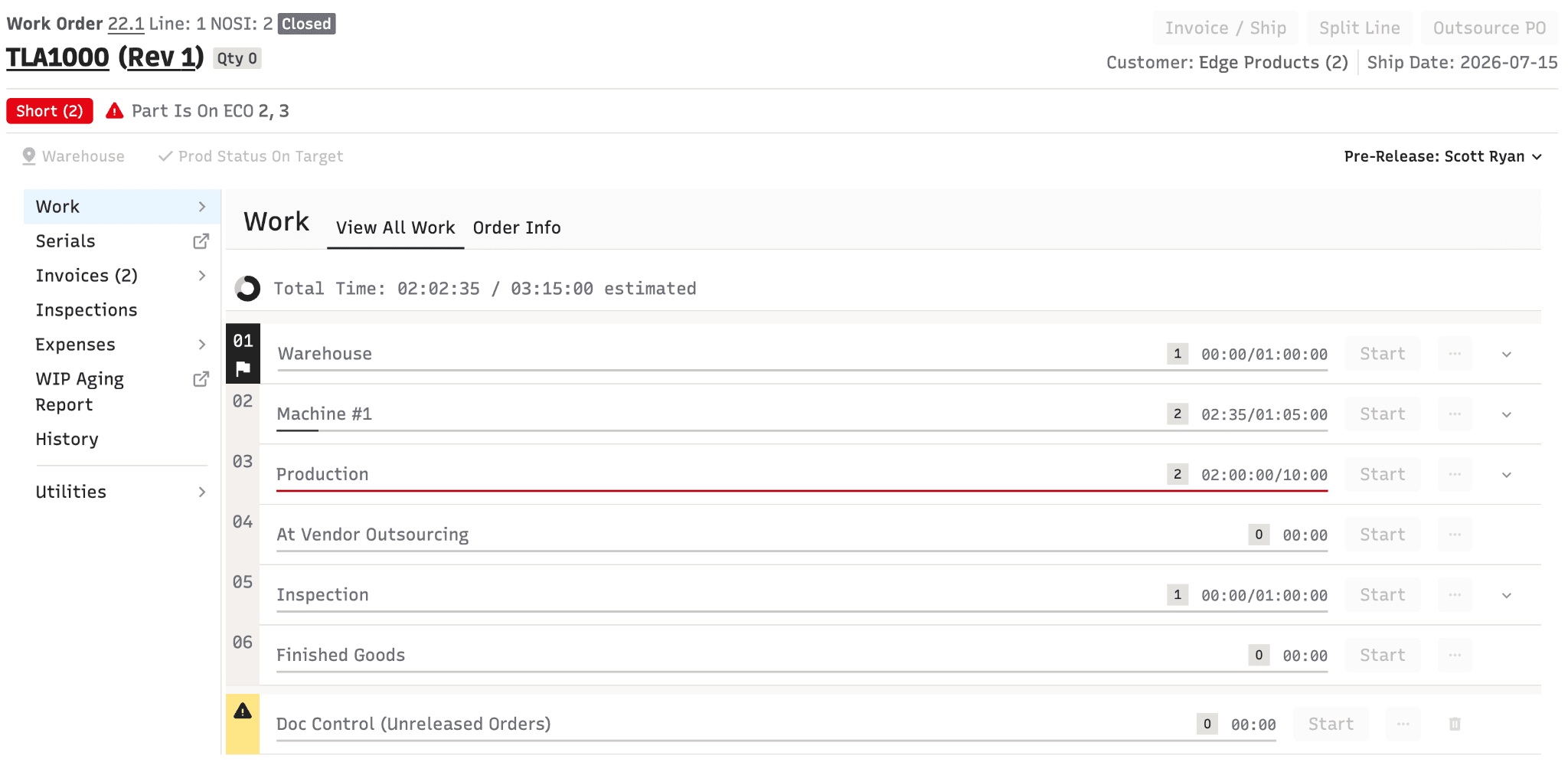
We know updates to a screen this heavily-used will be disruptive to your shop floor users who have become accustomed to the previous version.
In the past month, we’ve sent out focused newsletter updates about this topic in order to help you prepare your team for this: an overview video, a training slide deck, updated documentation, and task-specific how-to guides.
See training documentation and the full new work order announcement here.
(Note: the "Use Old Version" link will also be available for users who need extra time to adjust.)
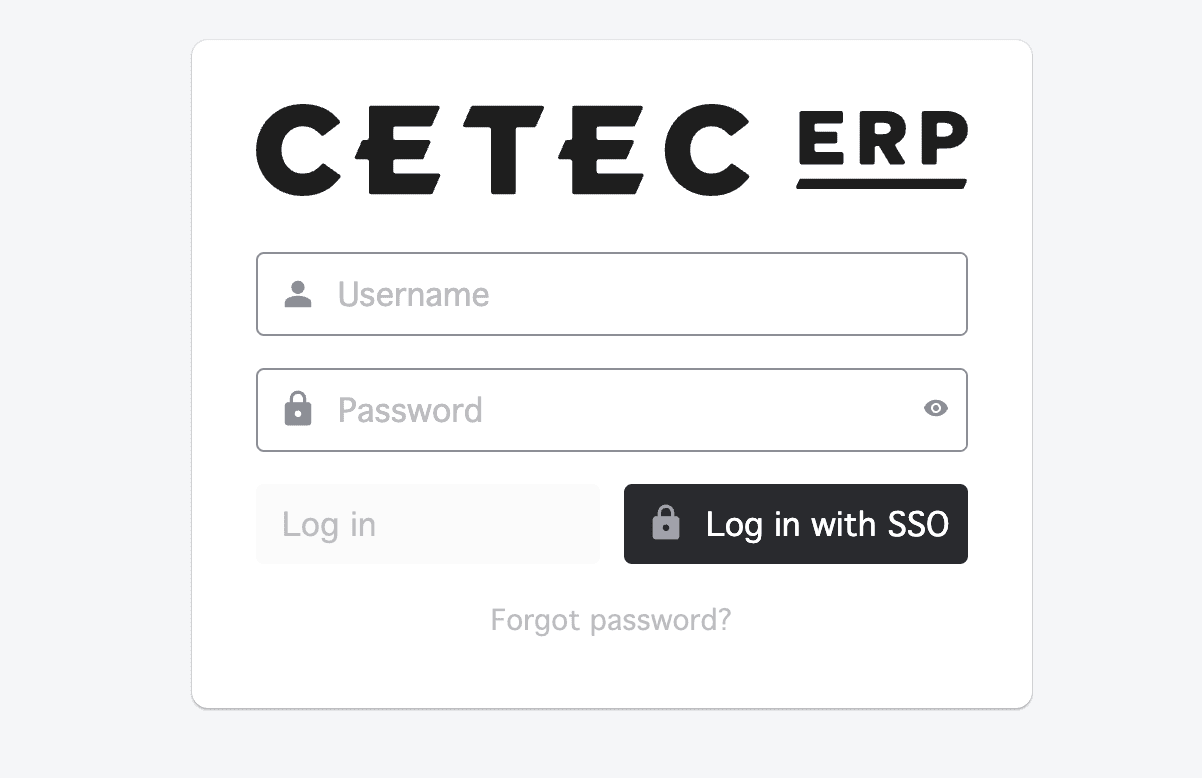
Redesigned Login Screen
The Cetec ERP login screen has been redesigned with a modernized layout and updated visual styling. The refresh particularly improves the appearance when accessing Cetec ERP via SSO (Single Sign-On), where the previous design was considered dated. The new design presents a cleaner, more professional first impression for all users, whether logging in with username/password or through an SSO provider
In-Browser Document Preview Panel
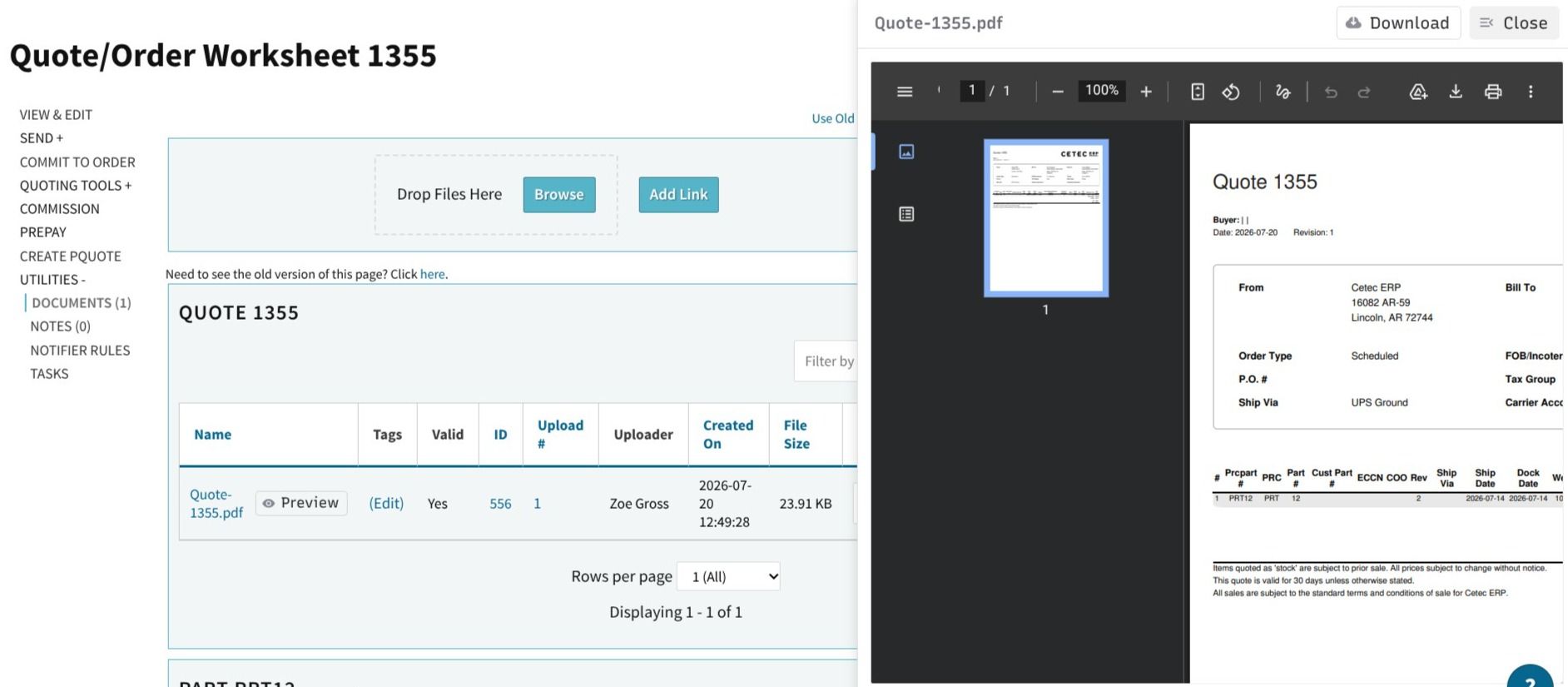
When viewing documents attached to any record (e.g. purchase orders, quotes, work orders, customers) there is now a preview option which opens a slide-in preview panel on the right side of the screen. PDFs, images, and text files can be read directly in the browser without leaving the record you were working on. The download button remains available in the panel header and if you click the name if you still need a local copy. This eliminates the common frustration of accidentally downloading dozens of files while trying to review attachments, and keeps your workflow on the same page.
Cash Basis Accounting
Cetec ERP now supports cash-basis accounting as an alternative to the standard accrual method. Under cash basis, revenue and expenses are recognized when cash is actually received or paid rather than when transactions are recorded in the system. A configuration toggle switches the accounting mode, and parallel reporting views are provided for the Trial Balance report so companies can see their financials under either method. This is particularly useful for small to mid-sized manufacturers whose tax reporting uses cash basis while their operational reporting uses accrual, as it eliminates the need to maintain a separate system for cash-basis records. Visit this how to and blog for more!
Work Instruction E-Signature / Password Verification
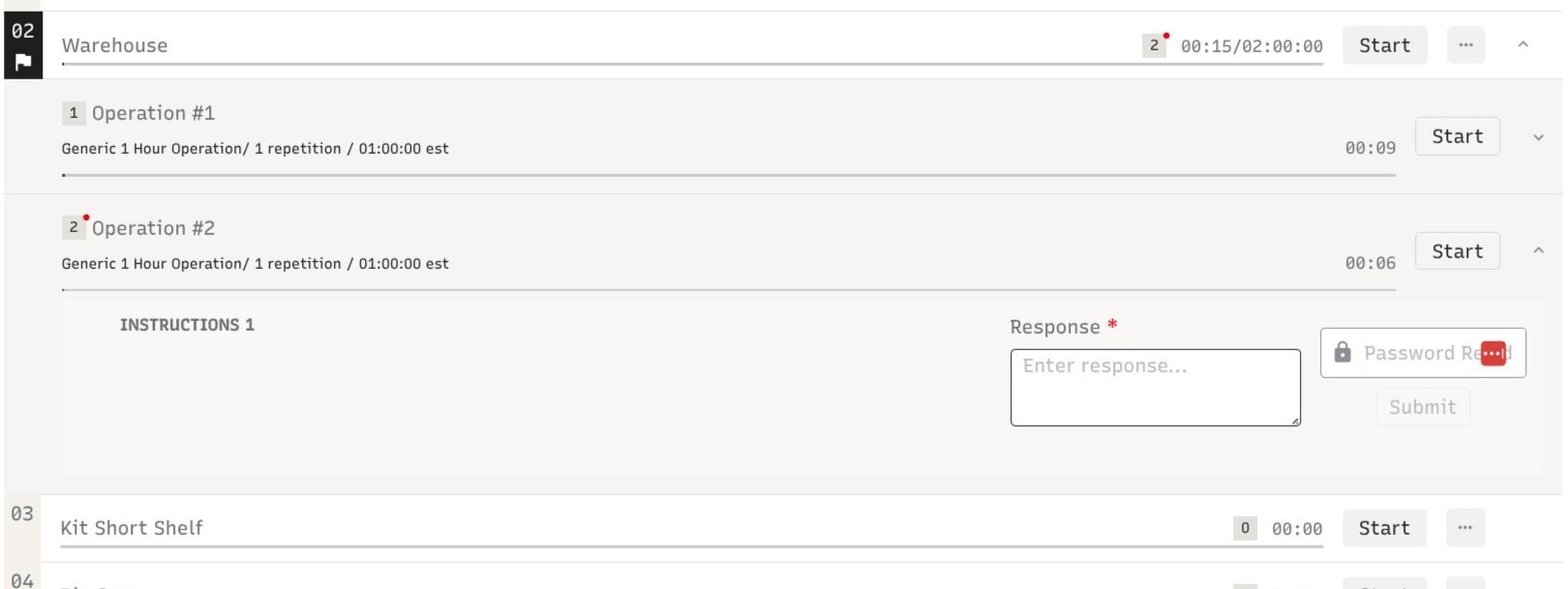
Work instructions can now be configured to require a worker to enter their Cetec ERP password before they can submit a response to a specific step. This feature was built to support FDA 21 CFR Part 11 electronic signature requirements - ensuring that when a worker acknowledges or completes a critical step on a work order, the system captures a verified, user-attributed electronic signature rather than a simple click. The password prompt appears inline on the work instruction step and must be confirmed before the response is accepted. This is configurable at the individual step level, so you can apply it selectively to the steps that require compliance documentation without adding friction to routine steps.
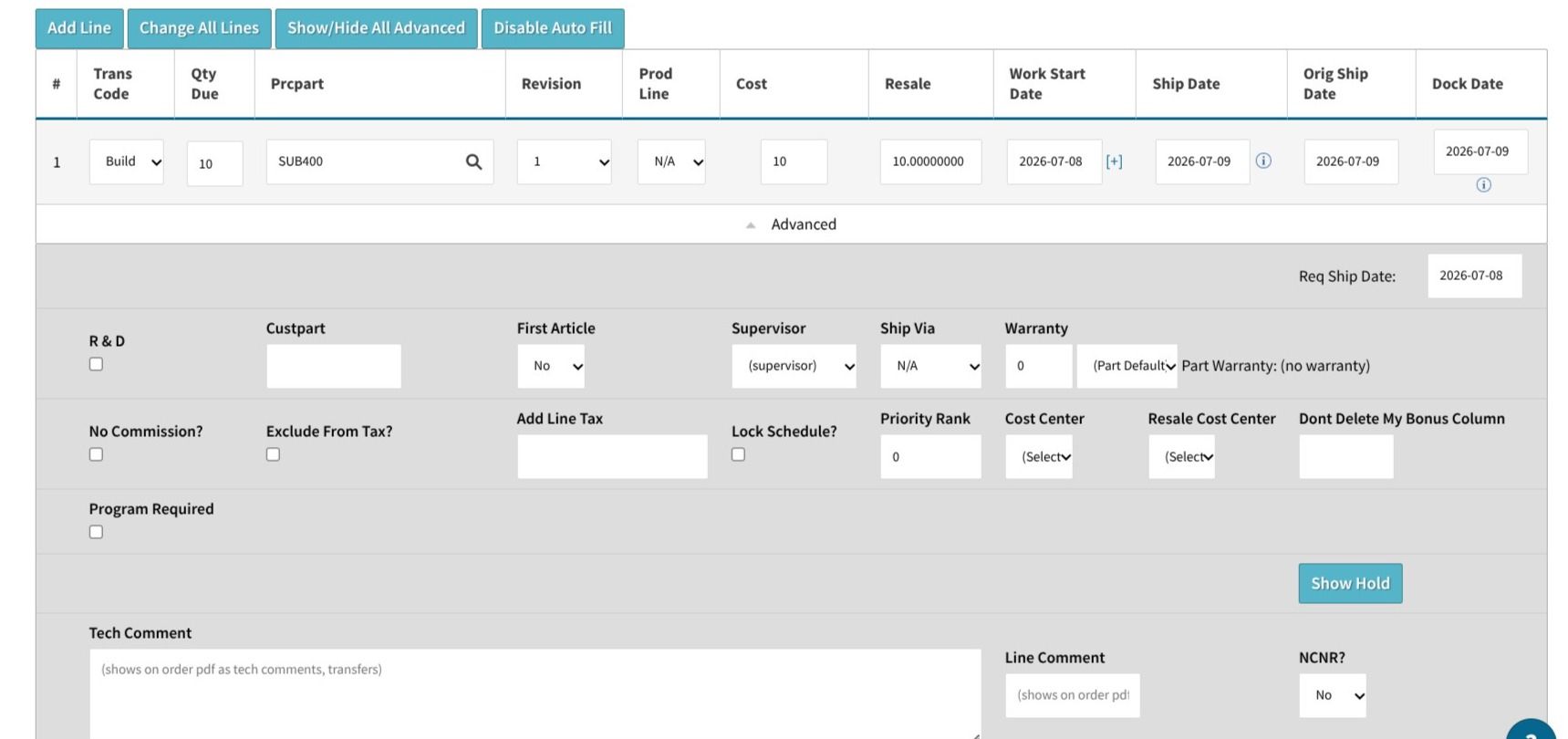
Order Line-Level Hold with Hold Comments
You can now place individual order lines on hold independently of the rest of the order. Previously, holds were an all-or-nothing setting at the order level. If one line needed to be paused, the entire order had to be held, which could delay unrelated lines that were ready to ship. With line-level holds, fulfillment teams have much more surgical control: hold a specific line that is waiting on material, a customer change, or a quality review while the rest of the order continues through the workflow. An optional hold comment field lets your team document the reason, so anyone looking at the order later understands exactly why that line was stopped. MRP also correctly excludes demand from held lines, preventing buy recommendations from being generated for material that is intentionally paused.
Invoice Workflow Approvals
Invoices can now participate in Cetec ERP's configurable approval workflow system - the same workflow engine already used for purchase orders, ECOs, and vendor quality records. The invoice view page displays the current workflow status and provides a dropdown selector to move the invoice through approval stages. This is particularly valuable for companies where invoices must be reviewed by a manager or finance lead before they are released to the customer, or where a multi-step internal approval process is required before billing. Configuration is done through the standard Cetec ERP workflow setup, so your existing workflow rules and stage definitions apply.
AQL (Acceptable Quality Level) Sampling Plan Support
A full Acceptable Quality Level (AQL) sampling framework has been added to Cetec ERP's quality inspection system. Administrators can now define AQL sampling plan tables through Data Maintenance, specifying inspection type, lot size ranges, AQL values, and the required sample size for each combination. The system then uses these tables to automatically look up and suggest the correct sample size whenever an inspection is performed. AQL fields, AQL Value, Lot Size, and Sample Size, are now available on three inspection screens: Incoming Inspections, In-Process Order Inspections, and Kit Audits. When a user enters an AQL value and lot size, the system automatically fetches the required sample size from the table with a live loading indicator. Users can manually override the suggested sample size if needed. AQL data is saved with each inspection record and shown in the audit history, giving quality teams a complete, traceable picture of how sampling decisions were made for each lot. Visit the how to and blog.
Tag-Based Access Control for Parts, Orders, and Customers
A new optional security layer allows administrators to restrict record-level visibility based on tags. Parts, orders, and customers can be tagged, and those tags can be linked to specific user roles. Users who do not have a role associated with a given tag will not see records carrying that tag. This is designed for companies that need to segment data access within a shared Cetec ERP instance. For example, restricting certain customers or product lines to only the team members who work with them. The feature is off by default and must be explicitly enabled in configuration settings (Enforce Object Access Rules: set this to 1). Once enabled, tags can be assigned through the standard record edit screens.
Automatic Picking of Pre-Allocated Inventory on PO Receipt
When inventory is received on a purchase order and that inventory has already been "pre-allocated" (hard-reserved) to a specific work order, Cetec ERP now automatically executes the pick at receiving time. Previously, warehouse staff had to manually perform the pick step after receiving, creating extra work and a window where pre-allocated stock could appear unallocated in reports. This change closes that gap: the moment the pre-allocated material arrives and is received, it is immediately pulled through to the work order. Additionally, a new checkbox on the invoice screen lets users choose to release remaining pre-allocated stock back to general inventory rather than converting it to customer allocation when shipping a partial order, giving more control over what happens to reserved material when an order ships short.
One-to-Many Allocation: Split a Single PO Line Across Multiple Orders
The allocation engine previously matched demand and supply on a strict one-to-one basis: one PO line or inventory bin could only be allocated to one customer order at a time. Version 4.24 removes this constraint. A single PO line, purchase quote line, or inventory bin can now be split across multiple customers or order lines simultaneously. This is a significant improvement for companies that consolidate purchasing (placing one PO for multiple jobs to get better pricing or meet minimum order quantities) and then need to distribute the received inventory across several open work orders. The allocation system now correctly handles these multi-demand scenarios without requiring manual workarounds. Visit the how to on pre-allocation here.
Progress Billing: WIP Cost Buckets on Order Lines
Progress billings which are used for long-running Engineer-to-Order projects where partial revenue is recognized in stages, now support cost buckets tied to individual order lines. This enables Work-in-Progress cost and partial revenue to be reflected on the General Ledger as work progresses, rather than only when the project is fully invoiced. When an order line closes, any prior cost progress billing entries are automatically reversed before normal invoicing takes over, keeping the GL clean. This enhancement gives financial teams better visibility into the cost and revenue position of long-running projects at any point during execution. Visit the how to here.
Enhanced Lead Capture and CRM Contact Management
The "Create Lead" workflow has been significantly expanded with richer fields for capturing prospect and contact information upfront. More detailed data can now be entered at lead creation time, reducing the back-and-forth of returning to fill in missing details later. Email validation is now applied when adding contacts to a lead, catching formatting errors before they are saved. A rebuilt lead import tool using the modern Go backend makes it faster and more reliable to bring leads in bulk from external sources, with improved validation and error reporting.
Vendor Quality Approval: Full Workflow History
Vendor quality approval records now include a workflow history page showing the full step-by-step audit trail: who reviewed each stage, whether they approved or rejected, and when each action occurred. Previously this history was not visible, making it difficult for quality teams to demonstrate that vendor approvals had gone through a proper review process. The history view is consistent with how other approval workflows are displayed throughout Cetec ERP. Vendor Quality Approvals have also been migrated from hardcoded status values to the standard Cetec ERP workflow engine, enabling full customization of approval stages through the workflow configuration interface. Approval statuses are now manageable via Data Maintenance.
Rebuilt Cycle Count Management Page
The cycle count edit page has been rebuilt and significantly expanded. New capabilities include user assignment to cycle counts, enhanced chart and display management, and a streamlined close cycle count workflow. A navigation link from the old version to the new page helps teams transition without disruption. Additional improvements include a Reopen button so completed or closed counts can be reopened for corrections without starting from scratch, better pagination, improved parts search and add functionality, and fixes to the piece list modal and Set All column behavior.
Platform Modernization: New Version Rewrites
Cetec ERP continues its multi-year effort to rewrite legacy Perl/Template Toolkit modules into a modern Go (backend) and React (frontend) stack. "New version" pages are faster, more maintainable, and lay the groundwork for future capability. All new versions are deployed alongside the legacy version with a toggle, allowing gradual adoption. Version 4.24 ships rewrites for the following modules:
- Work Order Screen: A fully rebuilt work order view is now available in the new React/Go version, bringing the core production management screen up to the modern stack.
- Engineering Change Order (ECO): The full ECO lifecycle of creation, BOM red-lines, approval workflows, and part effectivity management, has been rewritten in React/Go. Replaces the legacy Perl/TT implementation. A comprehensive test plan accompanies this release.
- Invoice Module: The invoice module has been rewritten in React/Go, covering the Ledger, Details/Serials, Cost Analysis, PDF, Commission Modal, Packing Slip, Traceability, Documents, and Notes tabs. Part-level cost and serial/lot traceability are surfaced in the new version.
- BOM Quote Module: The full BOM Quote module, quote view, worksheet, BOM sections, configurator integration, notes, and documents, has been rewritten in React/Go.
- Customer Opportunity Module: The Customer Opportunity module is now available in a new React version, covering the opportunity header, pipeline stages, customer notes, workflow-based state transitions, and a full opportunity state history log.
- PO Receipt Module: The Purchase Order Receipt view and edit page has been rebuilt in React/Go with a sidebar showing receipt details, related shipments, incoming inspections, and links to RMAs and inventory.
- Cycle Count Module: A full React/Go rewrite of the Cycle Count module covering creation, item assignment, count entry, variance review, and posting workflows. Includes a comprehensive test matrix.
- Skid / Packing Module: The Skid module (packing and shipping skid management) has been rewritten in React/Go, covering skid creation, line item association, label/PDF generation, and status management. Replaces the legacy Perl/TT implementation.
- MRP / Assisted Purchasing Screen: The MRP Assisted Purchasing screen has been fully rewritten in React/Go at a new URL (/pquote/assisted_purchasing_new). The rewrite modernizes the stack, improves performance, and maintains full feature parity including buy/demand calculations, filter panels, and batch purchasing actions.
- Budget Module: The Budget module has been rewritten in React/Go, covering budget creation, line item entry, period allocation, and comparison reporting against actuals.
- Project Module: The Project module has been rewritten in React/Go, covering project creation, phase and milestone tracking, budget association, and status management.
- Allocation Engine (Go, ~10× Faster): The core inventory allocation engine, the "brain" behind MRP demand calculations, has been rewritten from Perl to Go. Benchmarked at approximately 10× faster than the Perl implementation. The new engine is being rolled out progressively across customer databases. This rewrite also enables the one-to-many allocation capability described above.
- Ledger / GL Import: The ledger journal entry import has been rewritten in Go with tag support for imported entries, enabling teams to tag imported journal entries for improved GL reporting and cost center categorization.
- Build-with-Subs BOM View: The revision-specific Build-with-Subs BOM view has been rewritten in Go/React. The previous Perl endpoint timed out on large BOMs with many substitutions; the rewrite fully converts data loading to Go APIs.
Release Notes
⚠ Note: Some items below may be internal only, reflective of changes made during quality assurance testing — i.e., issues that were never deployed to end users of Cetec ERP.
Features & Improvements
- Rewrote the vendor import using a faster Go backend. The new importer processes 10,000 vendor records in ~1 minute with full validation. Vendor contact import is also bundled in the same file.
- Significantly improved Move to Pick Queue (Release to Production) performance, a query that previously took over 25 minutes now completes in ~13 seconds, preventing timeouts on large production operations.
- Improved invoice creation performance and added database deadlock prevention, expected to resolve speed issues at high-volume production sites.
- Improved the data import experience with a redesigned column mapping interface organized into Required, Suggested, and Optional sections, shared UI components across import pages for consistency, and a new pre-import validation tool to catch formatting errors before import.
- Workflow notification emails now include the stage description (e.g., "Pending Release to Fulfillment") in the message body.
- Added a redesigned interface for the Document Upload Queue, making it easier for staff to review unprocessed uploads and manually associate them with the correct records.
- Added a non-sellable parts filter and column to the parts list.
- Renamed the Revenue by Customer dashboard to the Clear to Build dashboard to better reflect its actual use.
- Added support for scanning external vendor IDs during the receiving process, so barcodes labeled with the vendor's part codes can be scanned directly.
- Added a workflow state column to the incoming inspection list.
- The put-away screen now displays pre-allocation information so warehouse staff can see what incoming inventory is already reserved before putting it away.
- Enhanced the Work-in-Progress aging report to correctly reflect the state of orders on any historical date, not just today.
- Added a login modal that appears automatically when a user's session expires mid-action, prompting re-login without losing their place.
- Minor enhancement to the Project module: users can now set a default ship-to address on a project that auto-populates on quotes created from it.
- Added bulk import for work centers (production lines) from a file.
- Added company logo to PDF exports of balance sheet and trial balance reports.
- Added Auto Release Holds on ECOs: when enabled and an ECO reaches completed status, the system automatically removes ECO-related holds from associated orders while leaving other holds (e.g., credit holds) intact.
- Added a Vendor Invoice Number column to the PO Receipt list.
- Added a new serial/lot format option (REPLACEWITHCOMPONENTLOTATSHIP) that automatically sets the serial or lot code to match the component's lot at time of shipment.
- Added the ability to associate a project with individual purchase quote lines for tracking spend by project per line.
- When receiving against a PO, the system now automatically links the receipt to an existing voucher if the PO line is already vouchered.
- Added a Sourcing Comments column to the order list in line mode
- Added the customer number field to the AR payment screen.
- Added a BOM import option targeting a specific work order, lets users add or replace components without affecting other orders. Blocked if components are already picked.
- Vendor quality approvals now appear in the workflow step history list for a full audit trail.
- Added Customer as a supported type in the Custom Notifier system, enabling automatic email alerts triggered by changes to customer records.
- Rebuilt the Tool Equivalents list page with the modern React interface (sortable/filterable columns, CSV export, column visibility persistence).
- Added permission checks to order inspections so Production Only role users cannot view or edit inspection records.
- Added electronic invoicing (e-invoicing) integration on the AR side — the first phase covering customer setup, validation, and invoice transmission. AP e-invoicing is planned for a future release.
- Added barcode scanner support to the Serial Control page for linking component serials to finished-good serials.
- Added barcode scanning to the Order Batch List so warehouse staff can scan a batch barcode to start or stop work on all lines simultaneously.
- Added the ability to assign a default AR GL account at the PRC (Product Revenue Class) level. Invoices for parts on that PRC debit the PRC-specific AR account; payments are credited to the same account.
- Added barcode scanning to the Edit Order Batch modal, scanning an order status barcode moves all lines in the batch to that status and starts work in one step.
- Migrated Vendor Quality Approvals to the Cetec ERP workflow engine, replacing hardcoded status values with configurable workflow stages.
- On the new PO Lines screen, open and closed PO lines are now shown in two separate tables for clearer visual separation.
- Added Order Batch Work List as a supported type in Custom Documents.
- Added optional columns and bonus columns to the Kit Audit screen.
- Added a Batch Pick Parts PDF button to the Edit Order Batch modal for printing pick tickets for an entire batch at once.
- Added a scan mode for bulk serial imports on the Serial Control page.
- Quotes can now be used as a base object for custom document templates (accessible via the Documents tab on any quote)
- Added custom bonus column support to the My Quotes list view.
- Added "customer PO number" and "revision" to the Generated Serial List, and "reference designator" to the Order Material Report.
- When viewing documents attached to a PO line receipt, users can now see the original receipt documents listed as related objects.
- Work instruction content with HTML formatting now renders correctly, including inline images shown in an expandable viewer.
- Added country and state selection dropdowns to bill-to and ship-to address fields on customer address records in the new version.
- Added customer PO number to skid and packing slip line items.
- Added the ability to mark individual columns as complete within the task module.
- Added an Entered On date column to the ledger list view.
- Added a Required Ship Date column to the Release to Production list in the new version.
- Added a new invoice line detail report type to the tax summary reporting area.
- Vendor quality approval statuses are now stored in a configurable database table (manageable via Data Maintenance).
- P&L and Trial Balance reports now automatically default to landscape orientation when columns are grouped by month or year.
- Added the ability to unset/clear a revision on a part, including updates to the where-used lookup.
- Added estimated cost vs. actual cost columns to the WIP Aging Report.
- Added a configuration option for order line closing at invoice time: when enabled, a checkbox during partial invoicing allows closing the line and returning remaining picked-but-unshipped components to inventory.
- Added AP Payment ID and payment post date to the header of each check section in batch remittance overflow PDFs.
- Added the ability to create Quotes and Purchase Quotes directly from the global search bar via typed commands (e.g., "@create Quote").
- Date field on split lines in the receiving screen now defaults to today's date automatically
- Added an invoice total amount column to both standard and PO tax summary reports.
- Added a currency selector to the vendor return edit page so returns can be processed in the vendor's currency.
- Added a new field to the inventory bin lookup API returning the original quantity in a lot when queried by lot code.
- Users can now create a Vendor Return directly from an NCR or Incoming Inspection record, with the source document automatically linked and cross-referenced.
- Added Vendor filter and Vendor column to the Component and Base Part Shipments report.
- Added a warning banner on the BOM component list when any BOM lines reference parts that no longer exist in the system.
- Country of origin auto-fills on the warehouse location edit when a country is selected; dropdown shows two-letter abbreviation alongside the full country name.
- Parts list API now supports filtering by OEM part number for external integrations.
- Added R&D flag and order status columns to the order list.
- Added a Default Suborder column to the BOM search list and part list
- Upgraded the PO line selector on the receiving screen from a plain dropdown to a smart search field (type to find by part number, description, cost, etc.; Tab auto-selects the first match for scanner workflows)
- Added a For Customer column to the purchase order list.
- Commission payment records are now created, updated, and removed automatically based on AP voucher and payment activity. Manual payment entry fields removed from the commission popup.
- Temporary ship-to addresses on quotes and orders now auto-look up the correct tax group from zip/state; manually selected tax groups are preserved.
- Extended column sorting on the Where Used part list to cover Description, Revision, Status, Qty Per Top, PRCpart, and Reference Designator.
- Added support for importing customer part numbers as part of BOM data imports.
- Significantly improved MRP buy report regeneration speed from ~30 seconds to ~5 seconds on large datasets (controlled by a configuration setting: "BuyReport - Use New Refresh System").
- Added the ability to import customer association assignments (inside sales, outside sales rep pairings) through the data import system.
- Added Ship Qty column to the closed lines section of the order list; added invoice date display to the order view page.
- Linked forecasts to projects, users can associate a forecast with a project, filter the forecast list by project, and see total forecasted cost/resale rolled up on the project edit page.
- AP (vouchers) now supports a configurable auto-approval dollar threshold: invoices below the threshold are approved automatically without manual review.
- The Order Material Requirements report now includes a shortage filter and column to quickly identify and isolate short components across work orders.
- Added serial list as a custom document type for custom template support.
- Added a Last Activity Date column to the part inventory bin data table.
- Added the ability to mark specific parts as excluded from commission calculations on customer commission rules.
- Upgraded AP calculation engine to high-precision decimal arithmetic, eliminating floating-point rounding errors in AP amounts, vendor details, trial balance, and purchasing workflows.
- Serial number search on work order Start Work now looks across all relevant order lines simultaneously rather than only the first.
- Added an Inventory vs. Non-Inventory toggle to the Change All Lines section on PQuote and PO edit pages.
- Added a Part Spec column to the Order-Specific BOM modal on the work order screen.
- Added a Part Cost column to the NCR list view.
- Added a Part Spec Group column to the Build Estimate (What If) screen.
- Added configurable minimum and maximum value limits to number fields in Custom Forms, blocking form submission when a value falls outside defined hard limits.
- Updated NCR edit screen to support linking multiple order lines to a single NCR. Existing single-line NCRs are migrated automatically.
- Added a warning banner on outsource POs and PQuotes when any line is not linked to a customer order line.
- Added search and pagination to the customer addresses section on the customer view page, dramatically improving performance for customers with many alternate addresses.
- Added three new columns to the Orders With Need report on the part detail page: Order Name, Parent Part, and Part Description. Column preferences are now saved per user session.
- Added a Tariff (HTS) column to the sales order PDF.
- Added two new field types to the Custom Form builder: Multi-Select dropdown (searchable, multiple selections) and updated Checkbox field with multiple check options as a group.
- Changed edit permissions for imported invoices and vouchers: users with the appropriate role can now edit them after import.
- Added phone number field to customer and vendor address records; the number auto-populates on quotes/orders when that address is selected.
- Added a public API endpoint for receiving inventory against a purchase order programmatically (JSON: part, qty, location, lot, serial, expiration, inspection results). Enables WMS and scanner integrations.
- Updated the part information page's Open Quotes count to include quotes where the part appears as a BOM component, not just as a direct line item.
- Added re-matching functionality to bank reconciliation for previously unmatched transactions. Also improved auto-matching logic and added table scrolling for bank statement entries.
- QuickBooks Online PO bill push now includes the quantity received on each bill line.
- Added Part Label - Batch (Inventory Layer) as a supported type in Custom Documents.
- Extends the Show Close Incomplete Option config with a new Mode 2 that auto-dekits the remaining kit quantity before closing (Mode 1 = close only, Mode 2 = dekit then close).
- Rewrote the ledger journal entry import in Go with tag support for imported entries (new URL: /ledger/import_new).
- Assigns GL accounts to payment types so expenses post immediately to the correct ledger account on entry; when the expense is later vouchered, the entry is reversed and replaced with a standard AP debit/credit split. Aids credit card reconciliation.
- When merging two parts, inventory record fields (std cost, EOQ, costing lot size, etc.) from the source now transfer to the destination, but only for fields currently empty on the destination.
- Bank Integration improvements: added show/hide column controls to the statement panel, independent scrolling for left and right panels, and an unlink action to remove incorrectly matched bank statement data.
- Merged the Tool Needing Maintenance list into the main Tool Maintenance list, with all filters and columns consolidated. Supports multiple schedule entries per maintenance type in the unified view.
- Added a Total Balance column to the P&L report. When a comparison period is selected, the column aggregates balances across all selected periods.
- Added an admin page for rescheduling nightly batch jobs without developer access or config file edits (/config/nightly_batch_reschedule).
- Added a Revision qualifier column to pricing rules so rules can be scoped to a specific part revision.
- Added GL account bulk import - upload general ledger account definitions via file.
- Added FOB code bulk import via the Go-based data import framework.
- Added the ability to attach documents to object notifier emails by pasting a document URL into the notifier rule.
- Budget module rewritten in Go/React (new URL: /react/budget/:id/edit). Covers creation, line item entry, period allocation, and comparison reporting against actuals.
- Added project assignment at the PQuote and PO line level (not just header), allowing a single PO to split vendor spend across multiple projects per line.
- Project module rewritten in Go/React (new URL: /react/project/:id/edit). Covers project creation, phase and milestone tracking, budget association, and status management.
- Added batch delete and an External ID column to the Forecast list; fixed select-all checkbox.
- Added two line number fields to RMA lines: incremental linenum within the RMA and source_line_num from the original invoice, providing stable reference numbers for fulfillment and integration tracking.
- Added better descriptions to expense log entry type and expense log payment type tables in Data Maintenance.
- Expanded the quality alert text input field to 250 characters.
- Cleaned up and renamed GL account mapping titles and suggested default mapping descriptions; minor adjustments to default chart of accounts for new instances.
- Added the ability to ignore component numbers in the BOM comparison tool.
- Added a workflow state column to the incoming inspection list.
- Adds the ship code field to Metabase reporting database tables.
- Added a redesigned interface for the Document Upload Queue.
- Added vendor sorting for VAT ID, Shipping Instructions, Hold Notes, Buyer, FOB, and Ship Via columns.
- Updated global search results to render as proper HTML links (right-click to open in new tab).
- Added a search box to the ship-to address field on order and quote header edit screens.
- Added a site configuration option to set default view preferences for accounting reports (balance sheet, P&L, trial balance), including whether the sales percentage column appears.
- Added a percent-of-sales column to the Total Balance section of the P&L when viewing data broken down by month.
- Individual locations can now enable Dock to Stock independently even when the global setting is off.
- Added a visible alert on the order view page when tax has been collected on the order (shows in both old and new React versions).
- Improved the inspection edit page layout: consolidated to a single Update button, repositioned failure detail rows, added add-row and delete-selected controls to the failure table, and prevented deleted rows from briefly re-appearing after saving.