
Cetec ERP Version 5.0
We’re pleased to introduce version 5.0 of Cetec ERP!
Take a look below; the important notices are at the top, followed by an outline of new features and functionality. The lengthier technical "release notes" section lies at the bottom.
Fall 2026 · Version 5.0
We are churning on UI/UX work to make Cetec ERP more delightful and easy to use.
That will be the most noticeable thing about version 5.0. This version includes a complete UI revamp of the "new versions" of lists and reports in Cetec ERP (over 200 lists/reports, rebuilt on a single new framework), plus a rebuilt home page dashboard, a new version of the Invoice/Ship screen, and redesigned customer-facing PDFs that look much nicer than the old ones!)

Falling stars as observed from the balloon. | Albert Tissandier, Eugène Cicéri | 1871
On the one hand, we think the new screens look way better and are more user friendly. On the other hand, they are new, and it is always hard to learn new screens when you have been using the same ones for a long time. As such, please share this announcement with your team before the new version arrives. Have your team play in the beta environment (__your_company__.cetecerpBETA.com) ahead of the new release and get accustomed to the new stuff! There is a link to the “legacy” version of the reports for users that wish to continue using the old version of reports.
Notice!
Please notify your employees of the following:
- Redesigned lists are now on by default. Every old list page still exists and shows a banner linking to the new version (click the square [ • • • ] icon at the top right of any list >> View Legacy Page to access the older version of the report).
- The page footer is gone. The version number, server name and copyright moved from the bottom of every screen in Cetec ERP, up to the user menu (top right Cetec ERP user/human icon; see bottom of that menu). The help menu (where you can ask a question, submit a ticket, etc.) also now resides at the bottom of that top-right user menu (see “? Help” menu item).
- The old Part, Vendor and Customer pages are retired. These three record pages now always redirect to the "new version". The per-user "old version" / "new version" switch for them has been removed.
- The old Project screens are retired. The old Project list, edit, quotes, orders, invoices, PO, history, documents and notes pages now redirect to the new Project module.
- The old version of the Work Order split page is retired. Users will be redirected to the new version of the split page.
- The Sales > Quotes > New Quote, Warehouse > Receiving > Receive Parts, Accounting > A/P > Add Voucher buttons have been moved to the black Create + button in the right hand corner. The links in the nav menu will be removed in a future release.
- Customer-facing PDFs look MUCH better! We’re excited about this one. The Quote PDF, Invoice / Credit Memo PDF, Project PDF, order work list (traveler) and packing label have been redesigned (see below). If you would rather keep the previous templates for now, turn on the config "Force Use Of Legacy PDF Templates" (set it to ‘1’).
- A/P Summary and A/R Summary were renamed to A/P Aging and A/R Aging. The old summary pages redirect to the newer Aging reports, which require the Accounting role.
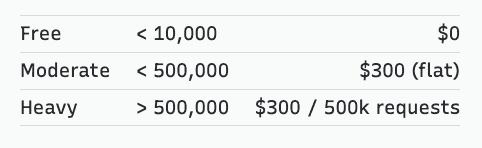
We Lowered Our API Usage Pricing!
We Lowered Our API Use Pricing! New and lower API pricing tiers are published on the pricing page of our website here.
MAJOR NEW FEATURES
Redesigned Lists And Reports (200+ Pages)
Over the past few months we rebuilt more than 200 list and report pages on a single new list framework. Every one of them gets the same set of tools: a filter search bar that allows you to type search all the existing filters as well as more easily see what filters are applied, a column picker with saved layouts that are remembered per user, sorting on nearly every column, Excel export, clickable drill-down links to related records, and hover tips on column headers. They are also served by a faster backend.
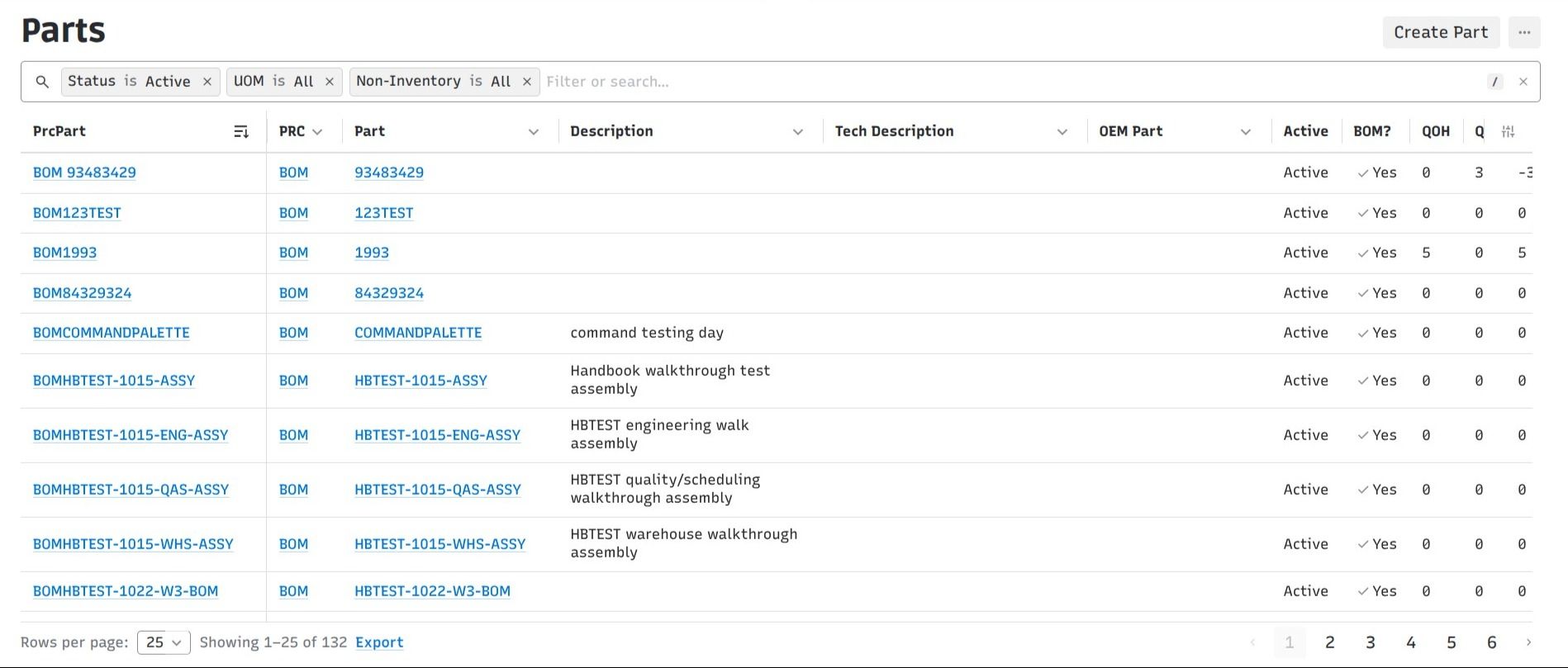
Some specific things worth knowing about the new lists:
- Filters live in the page URL, so a filtered view can be bookmarked or pasted to a coworker. Old bookmarked URLs from the previous versions still populate the filters.
- Custom bonus columns of every type (text, checkbox, select, multi-select, date, radio) can be filtered from the filter search bar.
- Sorting now has a drop down allowing you to sort A to Z, Z to A, or hide the column.
- Currency and number columns, their totals rows and their Excel exports all use the site's "webgrid_currency_precision" setting consistently. Percent columns export as real percentages instead of being multiplied by 100.
- Part numbers respect the "Hide PRCs" site setting in link columns.
- The table now stretches to fill the page instead of capping at 80% of the window height.
- While data is loading, skeleton rows are shown and the sort / column / export controls are disabled so you cannot act on rows that are about to change.
The full list of rebuilt pages is in the "Platform Modernization" section further down.
Rebuilt Home Page Dashboard
The home page dashboard has been rebuilt. Widgets now sit on a drag-and-resize grid with a Customize mode, and every widget shares the same frame (a settings drawer, a focus mode, and a refresh button). Users can create several named dashboards and share one with everyone, with specific roles, or with specific users. Admins can set a default dashboard per role.
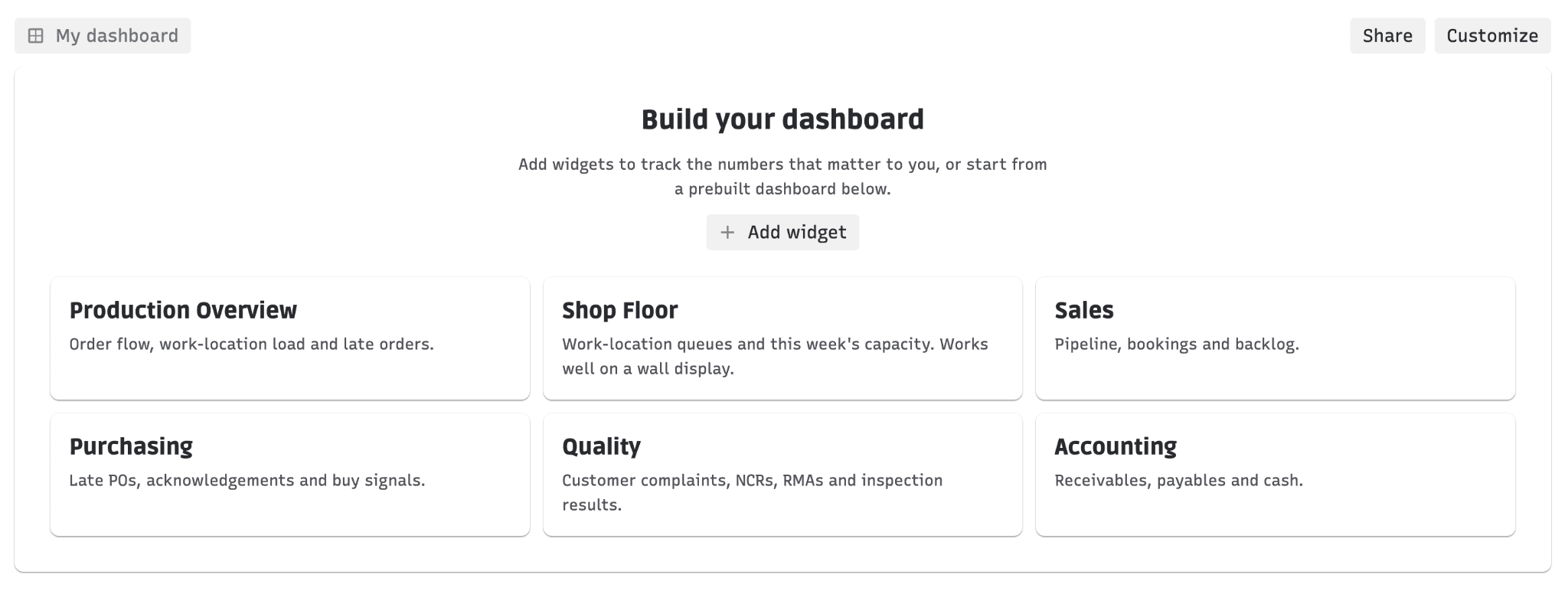
Six prebuilt dashboards ship with 5.0 (Production, Shop Floor, Sales, Purchasing, Quality and Accounting), along with new Order Status, Capacity This Week and Customer Complaints widgets. The My Tasks widget was also rebuilt on the newer table design, grows to fill its widget, and remembers your items-per-page setting.
Command Palette: Create And Navigate From Anywhere
Use Cetec ERP from your keyboard (instead of mouse/drag/click!) with shortcuts.
The global search bar (Ctrl/Cmd + K) picked up several new "@" commands. Simply typing on your keyboard "@create" now offers Work Order, Task, Part, Vendor and Expense, in addition to Quote and PQuote. Each one opens a quick form that mirrors the standalone create screen, and lands you on the new record when you submit. A new "@nav" command searches every menu page you have access to by its full menu path (typing "Production" or "Orders" both find Production >> Orders), so you can jump straight to a page without clicking through the menus. Pressing Space now selects the highlighted action or object the same way Enter does, so a flow like "@n, space, quote list, Enter" works without stopping.
New Version Of The Order Invoice / Ship Screen
The order Invoice/Ship page now has a "new version" built in React. It brings the full invoice-and-ship workflow into the new interface: order lines with pick, relieve and ship quantities, package and tracking entry, freight and credit card / prepaid authorization, ShipEngine shipments with customs lines, adding lines to skids, a Merge Lines button, and a Scale Relieve option. The invoice screen also now lists build-line components that have had nothing picked yet (in red, with the quantity still owed); previously a component with zero picked was invisible and easy to miss before invoicing. The legacy page stays and shows a "Use New Version" link.
Note: this screen is behind a config setting ("Use React Invoice Ship Page") while it gets more mileage. Ask us if you would like it turned on.
Hard Allocation
When enabled, the allocation process now automatically creates and maintains inventory reservations ("hard" allocations) for open order lines, prioritized by the order date you choose, and optionally ignoring orders whose work start date is too far in the future. Parts and PRCs can opt in or out individually and can set an Allocation Buffer (a quantity or a percent). Reservations created by the system show as "System Allocated", and only users with the new "Can Delete System Allocations" permission can remove them or delete the PO lines behind them. See the Allocation category in config settings ("Allocation - Enable Hard Allocation" and friends).
Note: two allocation configs introduced in 4.24, "Order - Auto Pick Preallocated Material On Receipt" and "Default Break Ordline Allocation At Invoice To Checked", now default to off so that existing receiving and invoicing behavior does not change on upgrade. Sites that set them deliberately keep their setting.
Kit Audit Rework
Kit Audit got a real overhaul. A new "Kit Audit Deviation Factor" (e.g. 10%, +2, -1) can be set on a PRC, a part, a BOM component, an order BOM line or a BOM quote component; the most specific one wins and sets the allowed pass range shown on the audit. Kit Audit now shows one row per receipt the component was picked from, and stores an audit detail per receipt. Two optional configs can require scanning each receipt and re-entering your password before submitting ("Kit Audit - Require Receipt Validation" and "Kit Audit - Require Password Validation"). The Kit Audit Report gains a Component Prcpart column.
Document Control: Numbering, Approvals, And A New Document Page
Three related pieces landed in 5.0 for the quality / document control crowd (built with medical device customers in mind).
- Controlled document numbering. Admins define Document Types (a name plus a number prefix) in Data Maintenance. Each document can be given a type and a key, and Cetec ERP builds the Document Number from the prefix plus key. Numbers must be unique, and all revisions of a document share one number. Document Type and Number show on the document view page, as columns and filters on the Document List, and on the document panels of parts, orders, quotes and POs.
- Configurable document approval. A new Admin >> Document Approval Settings screen lets admins decide which documents need approval (by object type and document type), which approval workflow each rule uses, who approves (set on the workflow stages), where documents wait and where they are sent back, plus self-approval and notification toggles. The Docs Pending Approval list gained filters and a preview. This one is behind a per-site feature flag ("Document Approval - Enabled"); ask us to turn it on.
- New version of the document page. A redesigned document page with View, History and Notes tabs. It keeps everything the old page had (parent link, download, Active/Pending, delete, uploader, valid dates, public/protected, public/private URL) and adds editable Tags with autocomplete, an Upload New button for the next revision, Preview on past uploads, and a paged revisions table. Each user opts in via the "Use New Version" link on the old page.
Redesigned Customer-Facing Documents
Five printed documents were redesigned with the 5.0 look: the Quote PDF, the Invoice / Credit Memo PDF, the Project PDF, the order work list (traveler), and the packing label. Your existing options on each document are kept. Empty columns no longer print, documents with 15 or more line columns print in landscape, freight prints only when it was charged, paid invoices show payments and balance due, and the project document replaces internal costs with a billing summary.
Note: the new templates are the default on sites using the Chromium PDF engine (which is the default). If you would rather stay on the previous templates for now, turn on "Force Use Of Legacy PDF Templates".
Part Images In Lists And Line Tables
A part's image now shows up wherever its part number appears in the redesigned lists (parts, inventory, BOMs, quote / order / PO / invoice lines, ECOs, serials, RMAs and more) and in the line tables on the Order, Quote, PO, Invoice, RMA, Skid, Vendor Return and PO Receipt views. Hovering a part number pops up its image (on by default); optional thumbnail columns can be turned on per user from the column picker. The image comes from the part's Image URL on Edit Profile, which now has a preview and a document picker.
Pick Parts (New Version) Enhancement: Multi-Select Serial Numbers
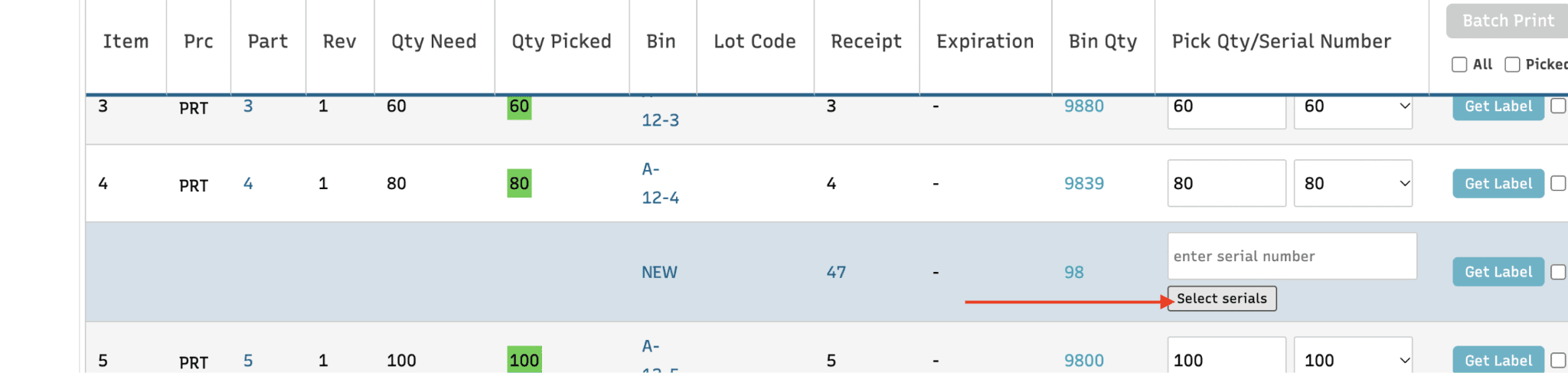
The new pick parts screen now contains a "Select serials" button under each serialized bin opens a checkbox list of the bin's serials with select-all and a filter box, so a picker can tick a whole receipt and untick a few pieces instead of being required to scan every serial or enter every serial number manually
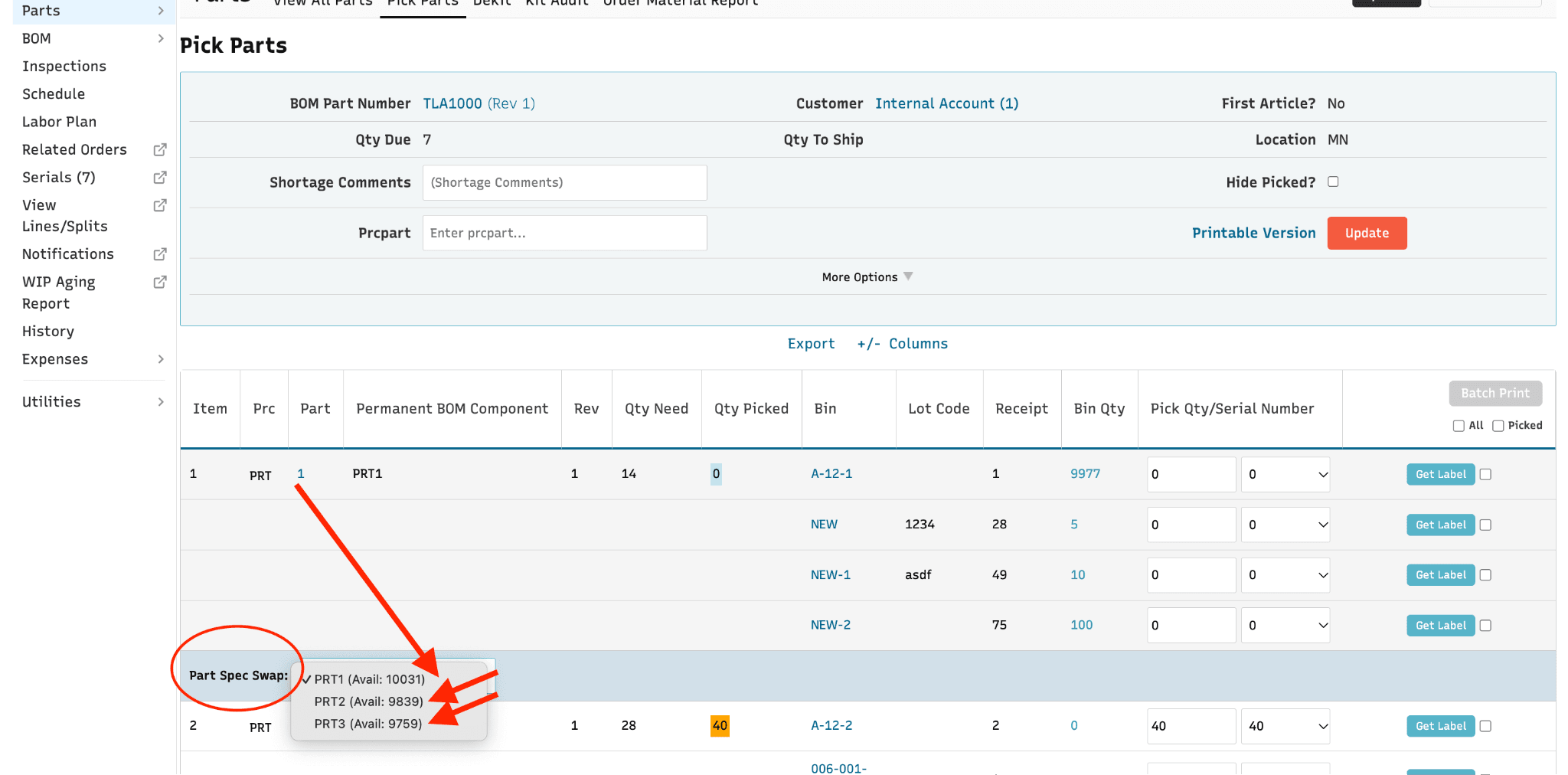
Pick Parts (New Version) Enhancement: Quick Swap To Alternates
Another Pick Parts enhancement! BOM components that belong to a part spec group now show a dropdown of substitute parts (with description and availability). The ability to quickly swap components from the pick parts screen itself has been a longstanding request among Cetec ERP users.
New Data Import Enhancements
The "new version" Data Import screen (Admin >> Data Import) contains several additions and enhancements for version 5.0. Every import below now runs on the newer Go-based import engine, which validates the entire file before writing anything, reports bad rows with a clear message instead of guessing, supports updating existing records, and produces a summary file afterwards that now includes a "Column Mapping" section showing exactly how your spreadsheet columns were interpreted.
- Parts (rebuilt). Validates each row before loading, maps spreadsheet columns to part fields, resolves references like unit of measure, vendor and work center, and can update existing parts as well as create new ones. Note that the new Parts import loads parts and part details only; bins are a separate import now (see next item).
- Bins (new). Create or update inventory bins by part, warehouse and bin, with optional quantity, cost, receipt and expiration dates. With Update Data on, a changed quantity or cost posts a real inventory adjustment to the ledger. After the import, a reconciliation compares the file's bin count, quantity and value against what is now in inventory.
- Part Warehouses (new). Part-by-warehouse settings (ABC code, commodity code, country of origin, EOQ, lead time, costing lot size, minimum order quantity, etc.) can be loaded or updated from a spreadsheet.
- BOMs (rebuilt). Each row names a top level Prcpart and a component Prcpart, so a single file can load complete multi-level, multi-revision bills of material. The whole file is validated up front, including a check that rejects circular references (a part that ends up containing itself).
- Purchase Orders (rebuilt). Each file row is one PO line; the first row for a location and PO number creates the PO and later rows add lines. Lookups that do not match (vendor, terms, FOB, buyer, UOM, ship via, currency, GL, cost center) now fail the row with a message instead of being silently dropped. If the file has no vendor part number, Cetec ERP fills it from an existing Vendor Part cross reference.
- Customers and Customer Contacts (rebuilt). Both support updating existing records and deleting existing data before import. Contact rows are matched on name, email and phone to avoid duplicates.
- Customer Ship Vias (moved). Which ship methods a customer may use, with account numbers. Existing links can now be updated, which the old import never did.
- Cross Parts (rebuilt). The part, customer and vendor must already exist, Cross Type must match an active type, and the same part + cross part pair cannot appear twice in a file. Re-importing updates existing cross parts instead of duplicating them.
- Pricing Rules (rebuilt). Adds an ID column: a row whose ID matches an existing rule updates it, a row with no ID inserts a new rule.
- Shipping Methods (rebuilt). Replaces the broken legacy version. External Key is the lookup; the import rejects a file that would create more than one default shipping method, and it correctly imports the freight carrier code (the old import dropped it).
- Part Spec Groups (rebuilt). Real validation: a rule is required, the top-level part, component and revision must exist, and the component must be on that BOM.
- PRCs (moved). Create or update PRCs including their GL account assignments and the Default PRC flag.
- Data Maintenance tables (moved). Inspection Failures, Business Types and Terms. This completes the move of the Data Maintenance imports to the new tool.
- Expenses. Gains Vendor External Key, GL Account External Key and Location columns, and the "Create Ledger Entries" checkbox is now selectable (previously imported expenses always posted).
There is also a new Data Import Documentation page (linked from the Get Started documentation page and from the import screen itself). It is generated automatically from the current import definitions, so for each import type it lists the required, suggested and optional fields, validation rules, prerequisites, templates and examples.
Note: validation on the new imports is stricter than the old Perl imports (which, for example, would create missing parts or guess cross types). If you have old import files lying around, expect some rows to be rejected with a message the first time through.
NEW FEATURES
Custom Notifier Rules: Part Revisions, Customer Documents, Delete / Restore
A handful of improvements to the Custom Object Notifier (Admin >> Notifier Rules):
- Part Revision is now an object type. You can build a rule that fires when a part revision is created or changed (from the Revisions tab, the Compare page, or an ECO roll). Rules for a revision can also be managed from a new Notifier Rules page in the BOM revision sidebar. Revision inserts and updates now record who made the change, so the notification is attributed to the right user.
- Customer Document attachments. Rules on the Customer object type gain a "Customer Document" choice: Customer Statement, Consolidated Invoice PDF, or Consolidated Invoice CSV. When the rule fires, the email includes that document generated for the specific customer that triggered it. Scheduled notifier emails now go out one per matching record (up to 50 per rule per run) instead of one combined email per rule.
- "Email to primary contact?" is now a per-rule checkbox. Previously every rule automatically emailed the related customer or vendor primary contact. It is now opt-in per rule, so existing rules will stop emailing the primary contact until you check the box.
- Delete and restore. The rule list gains a Status filter (Open / Closed) so deleted rules can be found, and the rule page gains Delete Rule and Restore Rule buttons. Deletions and restores are recorded in object history.
- Notifier Log improvements. A Rule filter that narrows to the rules for the selected object type, a multi-select Event filter, a sortable Sent On column with full timestamps, and an API Response column (Success / Error).
Bank / Account Reconcile: Many-To-One Matching And A Date Window
Two long-requested changes to the Account Reconcile edit screen (new version). First, a single ledger entry (e.g. one payroll entry) can now be matched to several bank statement lines whose amounts add up to it; the picker is a searchable multi-select, and the entry can only be checked off when the selected lines total the entry amount. Second, auto-matching now allows a date window. Previously a ledger entry only matched a statement line when the dates were identical, so checks that cleared a few days later were never auto-matched. Entries now match within a configurable number of days (default 4) either side of the statement date, preferring check-number matches and closest dates. A new Accounting setting, "Bank Reconcile Auto-Match Date Window Days", can be set to 0 if you want strict same-day matching back.
A/P Aging And A/R Aging: Drill-Down, PDFs, Filters
The new-version A/P Aging and A/R Aging reports (formerly "A/P Summary" and "A/R Summary") now drill down in place: clicking a bucket amount on a vendor or customer row expands a sub-table under that row listing only that bucket's transactions, with a sum footer and its own export. Clicking a bucket in the totals strip opens that bucket on every row. The Download PDF button now renders directly from the new screen with the filters you applied, titled "A/P Aging As Of <date>" or "A/R By Customer As Of <date>", and the PDFs now carry the company logo and a formatted header so they look presentable when submitted to a bank. A/R Aging also gains a Credit Hold filter and column, and A/P Aging gains an "Entered On Date" choice in the Date Type selector so vouchers can be aged by the date they were entered.
Statement Of Cash Flows (Report View)
A new report-style version of the Statement of Cash Flows for Accounting users, laid out like the other redesigned financial statements: date range, location (child locations included) and retained earnings options, view preferences for hiding zero-balance accounts, negative number format and colors, plus print, PDF, export and email actions. Account balances link to the ledger for the selected period. The existing page is unchanged.
Auto Apply Rounding Adjustment On A/R Payments
A new Accounting config, "Auto Apply Rounding Adjustment", automatically creates and maintains a write-off row for the rounding difference while you edit an A/R payment, so the payment balances without you adding the write-off by hand. The automatic row is marked with a help icon; deleting it turns off automatic management for that edit session. (While we were in there: the Clear button on the A/R Payment edit screen now also zeros the Payment Amount and resets each invoice's still-owed amount, and write-off amounts no longer display with padded trailing zeros.)
Invoice Workflow Stages
Invoices can now have workflow stages configured in Data Maintenance >> Workflow Stages (object type Invoice). New invoices, bill-only invoices and credit memos start on the first configured stage, and the invoice screen's workflow dropdown picks up stage changes without a server restart. Our support team can backfill a stage onto existing open invoices on request.
Receipt Adjustments For Average Cost Sites
Receipt Cost Adjustments (announced in 4.22) can now be committed on tenants that use average costing, which previously refused them. For average-cost sites the adjustment line shows new columns (Location QOH, On Hand Adj. Delta, Built and Shipped Qty, and Adj. Delta since the receipt), and the ledger postings correct on-hand value, builds and shipments, then rebase the part's average. If the pool hit zero after the receipt, the adjustment posts to the ledger only.
Note: receipt adjustments are now refused when more than one currency is active on the site.
Project Est. Vs. Actual Costs, Reworked
The Est vs. Actual Costs section on the Project screen was restructured so that every Actual links to the report behind it and ties out exactly. A new By Cost Type section covers Materials (in WIP and shipped), Labor, Overhead (now split out from Labor), Expenses and Outsourcing, linking to the WIP Material Report, Shipped Bins, View Work, the Expense Entry list and the PO list, each of which gained a Project filter. Outsource POs now inherit the order's project. This also fixed double counting on partially shipped lines. Relatedly, the Order, Invoice and Quote views now show the linked project's name next to its ID ("Linked To Project ID 12 - Name") instead of just the number.
Part Lead Time: Update Automatically
A new config, "Part - Update Lead Time Automatically". When on, the nightly recalculation sets each part warehouse record's lead time to the higher of its average purchasing lead time and its average sales lead time. Each part warehouse record can override the global default (Follow Global Default, Update Automatically, Never Update) from the Warehouse Info edit modal on the part inventory page, and a new Use Avg button there sets the lead time to the average immediately.
Purchase Price History Graph
The part Pricing page (new version) now opens with a purchase price history graph. Each dot is a PO line for the part, plotted by PO entry date and cost per stocking unit in home currency (foreign currency POs and other purchase units are converted). You can filter by order quantity, turn on quantity bars, compare vendors line by line, and open a table of every PO line with first-received date and actual lead time. Only users who can see cost will see it, and a Show/Hide button remembers your preference.
Serial History From The RMA Screen
On the new RMA screen, each serial on a line now shows as a chip with a badge counting how many RMAs that serial has been on. Clicking it opens a Serial History popup with six sections (open work / service orders, work / service orders, built, shipped invoices, used as component, returns), each linking to the related records. The same view is available as a standalone Serial History page that takes a serial and part number.
Serial Control: Scan To Pick And Associate
On the order Serial Control screen, scanning a serialized component that is on the order BOM but not yet picked now picks it from inventory and links it to the scanned top-level serial in one step. Components not on the BOM or not in inventory give an error and nothing is picked. Either scan order works (top-level first or component first). Separately, top-level serial labels now print as a normal SERIAL barcode instead of a special "TLA" prefix, and the scanner looks the value up against the order's own printed serials to decide what it is.
Order Batch: Active Work View And Consolidated Pick List
When you open a batch from the Batch List, a red "Active Work (N)" button now shows how many operators are currently clocked in on any line in the batch. Clicking it opens a popup listing each active operator, their timer, operation and order line, with a Stop Work button so a supervisor can stop a worker's time on a batch without visiting each order line. The pick list printed for a batch is now consolidated: components are grouped by part across all orders in the batch, with a breakdown of bin, lot code, receipt and pick quantity underneath each part. The batch pick list also became its own custom document ("Order Batch Printable Pick Parts List") so it can be customized independently of the single-order pick list.
View Work: Edit Work Location And Setup
The Edit Work modal on the redesigned View Work list now includes a Work Location dropdown and a Setup? checkbox. The dropdown offers only the locations valid for that order line (the same ones Start Work offers). Changing the location moves the work segment and re-derives its cost centers and labor, resale and overhead rates from the new location. Batch work moves every segment in the batch or none.
Custom Form Builder: Table Fields And Two-Stage Workflow
The Custom Form Builder gains a Table field type. A table field has its own columns (Text, Number, Date, etc.), nested sub-columns under a parent header, column reordering, collapsing and deletion, and lets users add or remove rows when filling the form. For Operation Instruction forms, an optional Two Stage Workflow lets each column be editable, read-only or hidden separately in Setup (Build Process) and in Execution (Work View / Order Inspection), with per-stage row and "N/A" options.
ShipEngine: Void Labels And Return Labels
On the order ship screen each ShipEngine shipment now gets a Void Label button (clears tracking, freight and label documents so new labels can be made) and an "Include Return Label" checkbox for domestic shipments. On the RMA screen, a Return Label row creates or refreshes a return label from the original shipment. Invoiced shipments cannot be voided. The redesigned Warehouse Carrier Accounts list also gains an Edit action, so an Admin can enter or change the carrier account number per ship via per warehouse without leaving the list.
Create Parts On The Fly From Orders
You can now create a brand-new part directly from an order line (when adding a line or changing a line's part), with a Part Description box, the same way Quotes already allowed. It honors the existing "create_part_from_quote_disallow" setting, and the equivalent PO restriction ("create_part_from_pquote_disallow") is now enforced everywhere on Purchase Orders.
Scale Quantities On Change All Lines
The Change All Lines / Update All Lines bulk editor on the new-version Quote, PQuote, Purchase Order and Order screens gains a Scale Qty option. Pick an operator (Add, Subtract, Multiply, Divide) and an amount, and every eligible open line's quantity is recalculated at once, with quote pricing refreshed. Any line that would end up at zero or below blocks the whole update with a clear error.
Commission Defaults: Wildcards On Prcpart
The Prcpart restriction on customer commission defaults now supports "%" wildcards, for both Include and Exclude rows. "400%" matches parts starting with 400, "%903" parts ending with 903, "%400%" parts containing 400. Exclude rows always win over Include rows matching the same line. Applies when commissions are auto-populated on Quotes, Orders and Invoices.
Upload Documents From The Receiving Screen
After you receive one or more lines of a PO, a new Upload Documents button on the Receiving screen opens a popup where you can upload a file or paste a link, and the document is attached to every receipt created in that receiving session. Switching to a different PO starts a new session. Separately, AutoDocs (the Google Drive job that reads scanned receiving documents and attaches them to PO receipts) now handles documents that carry a work order number instead of a PO number, tracing them from the internal order to its PO receipt.
Site Header Banner
A new "Site Header Banner" custom document. If you upload content for it, that content shows at the top of every Cetec ERP screen, e.g. an export control or ITAR warning. Only basic HTML is kept. With nothing uploaded, nothing changes. (The test environment banner, kiosk mode banner, impersonation banner and Active Work links also moved up into the new site header at the top of every page.)
Redesigned Login Screen, Round Two
The login screen (redesigned in 4.24) was rebuilt on the 5.0 design system and now supports four SSO layouts driven by the SSO enforcement setting: password only, password plus SSO, SSO with a vendor / customer password link, and SSO only. If the SSO provider cannot be reached, the password form is shown with an inline warning instead of a dead login page. Login errors appear inline, fields have visible labels and password manager hints, and the default logo is used if the custom logo fails to load.
Data Maintenance: Opt-In Inline Editor
An opt-in editor for simple reference tables in Data Maintenance (e.g. UOM, RMA reason codes, NCR types). With the config "use_react_table_maint_edit" set to 1, rows on the redesigned Data Maintenance list open a new editor where you can edit cells inline, add records and delete rows, saving all changes together. Tables with special validation rules or dropdown columns keep the legacy editor. Off by default.
Expense Entries: Edit In Place
The redesigned Expense Entries list gains an Edit action on each row (restoring the inline editing the classic list offered). The Edit modal lets you change Amount, Currency, Vendor, Pay Method, Type, Group, Expense Date and Notes without opening the full entry page. Vouchered and closed entries cannot be edited.
Test Environment Refresh Frequency
Customers with a test environment can now choose how often it refreshes (Pause, Nightly, Weekly) from their own Cetec ERP subscription page, without contacting support. Saving a frequency for the first time shows a notice that additional charges may apply.
Customer Portal: Filter Invoices By PO And Part
Customer portal users can now filter their invoice lists by PO number and by part. The Invoice Headers page gets PO # and Part filters, and the Invoice Lines page gets a PO # filter alongside its existing Part filter. Totals, paging and exports follow the filters.
Malaysia E-Invoicing: A/P Side And Safeguards
For our customers in Malaysia (MyInvois / LHDN): 5.0 adds the A/P side of e-invoicing (self-billed invoices for foreign vendors, submitted through PwC on a schedule, with status recorded on the voucher and an AR/AP filter on the E-Invoice Submissions list). On the A/R side, a "Re-submit e-Invoice" button appears on invoices in Error, Invalid or Rejected status, buyers with no tax ID get the standard general TIN automatically, and an invoice whose e-invoice was validated more than 72 hours ago can no longer be uninvoiced (the tax authority no longer allows cancelling it; the screen tells you to issue a credit memo instead).
API Additions
For the integrators among you, a few new things in the API (see Admin >> APIs & More):
- Put-away API. Moves a receiving bin into one or more destination bins (merging into an existing bin or creating a unique one), with the same receiving and location permission checks as the screen. Lets scanners and WMS integrations complete receive-and-put-away flows without the UI.
- Time clock API. Creates user time clock entries from supplied start and stop timestamps, single or in batches of up to 500, so an outside payroll or timekeeping system can load clock-ins into Cetec ERP.
- Forecast APIs. List forecasts (filterable by ID, customer, prcpart, external ID and active flag), and create forecasts in batches.
- Quote header partial update. Update only the quote header fields you send (quote name, tax collected, tax type, export comments, shipping instructions, RFQ comments, carrier account) without touching anything else on the quote.
- Allocations in bin and PO line lookups. The bins-by-filter, parts-by-bin and PO line calls now return the inventory allocations tied to each bin or line.
- PO endpoints under /purchasing/pos. Every purchase order endpoint under /goapis/api/v1/purchaseorder is now also available under /goapis/api/v1/purchasing/pos. The old paths keep working (until 5.4) but are deprecated, and their responses include a "message" field pointing to the new URL.
- Documentation. A new "Recipes" section at the top of the API docs with step-by-step workflow guides (updating QOH from an X-ray counter, receiving a PO, moving a work order between locations). The Projects endpoints are now documented. Response shapes for 27 Go endpoints were corrected to match what they actually return.
SMALLER IMPROVEMENTS
A long list of smaller additions, grouped roughly by area.
Sales, Quotes And Orders
- Customer Sales Location on quote lines: a new opt-in config, "Quote - Use Customer Sales Location For Default Line Location", makes new quote lines default to the Sales Location on the customer record, ahead of the user's default location. Useful for intercompany accounts where the customer decides which entity sells. Off by default.
- Clone line, how many copies? the clone-line button on the new-version Quote screen now asks how many copies to make (1 to 50), as the legacy screen did.
- Quote Export CSV: an Export CSV button on the quote PDF / Email tab downloads the quote's lines with header info.
- Order POs column: on the Sales Order list (both versions) each linked PO or PQuote is now its own clickable link instead of plain text.
- Exact order filter: an "Exact?" checkbox next to the Order filter on the Allocation list, so searching order 2585.1 no longer also returns 2585.10 through 2585.14. The Short (N) badge on the work order header now counts only that work order's late allocations, and the allocation list gains a Line filter.
- Allocation list revision column: shows the revision the order requires for each component, and the Bin / PO cells include the supply revision, e.g. "NEW (Qty 217 - Rev 1)".
- Add Comment on the new Order Info page: an "(Add Comment)" link so order comments can be added without switching to the legacy view.
- Order Specific BOM window title: now includes the order and line number so it is clear which line's BOM is being edited.
- Cust Part column on order-specific BOM import: a component's customer part number can be imported with the rest of the BOM.
- Part revision in use: a revision used as a component on an open order's BOM now counts as in use, so it cannot be deleted or deactivated out from under those orders. The Order As Used list gains Part Revision and Revision Required columns.
- Stage filters: a working workflow Stage filter on the redesigned Quote, Purchase Quote, Order and NCR lists.
- Assigned To filter: on the redesigned Lead, Opportunity, ECO, NCR, Order, PQuote, Quote and Customer Complaint lists, "Assigned To" now searches only users actually assigned in that record type's workflow, with your own name first. The Order list also gets an "Unassigned" choice.
- Terms filter and address filters: a Terms multi-select on the Customer list; City, State, Zip, Country autocomplete filters and an Address Type dropdown on the Customer Address list; Credit Code, Business Type, Country and State filters restored on the Customer, Contacts, Opportunities, Leads, Invoice and Invoice Cost Comparison lists.
- Production Line filter: the Production Line filter on the Order List and Est vs. Actual Time report is now a multi-select picker of your work centers.
- Linked to QB customer: the new customer page sidebar shows "Linked to QB customer <name>" when QuickBooks sync is enabled, matching the legacy page.
- Ship and Debit, commissions: minor polish to the Commissions / Vendor Reps table on the customer record (horizontal scroll, single Valid From-To column).
Documents And PDFs
- Serial List document: Part bonus columns (e.g. a manufacturer part number) are now available on the Serial List document for an order line, on both the Top Level Serials and Component Serials tables. Two optional columns were also added to the Invoice Serial List: Unit Resale and Ship To Address.
- A/R Payment remittance PDF: an Issue Date column in the Unapplied Cash section.
- Full Order Plate: the printable Full Order Plate on the order Documents tab is now generated by the new backend and includes the Pick List section for both BOM and stock lines. The static document links on that tab open in a new tab.
- Custom Document List moved: out of Admin >> Config Settings and into the Docs submenu, alongside Documents List and Notes List.
- Legacy Work Instructions editor: now shows a deprecation banner explaining that work instructions are maintained per step on the Labor Plan / Work View and with Custom Forms. Cetec ERP will assist with migrating existing instructions.
Warehouse, Receiving And Inventory
- Receiving scan fills more: when a vendor shipment barcode is scanned on the receiving form, each scanned line now also fills in the part description, technical description, PO line revision and Country of Origin.
- $0 receipt confirmation: a confirmation prompt when you submit a receipt whose cost is blank or $0 while the related PO line has a cost.
- Preferred Manufacturer on receiving: a read-only Preferred Manufacturer field in the receiving screen's Inspection Info section.
- Put Away / Bin Move: shows Expiration Date and Locked status (Unlocked, Locked, Locked/Usable) for the current bin and for the other bins for that part in the location.
- Cycle Count receipt scan: scanning a receipt barcode on the Cycle Count edit page highlights that row and puts the cursor in its Actual Shelf Qty box
- Part Info popup: the blue "i" Part Info popup now shows Date Code, Lot Code and Revision on each bin row of the Inv tab. A shared Part Info row action was also added to the redesigned Part List, Inventory Activity, Forecast and Cross Part lists.
- Vendor cross parts on PO save: a new Purchasing config, "Automatically Create Cross Part When No Vendor Part Exists on Convert to PO" (on by default, which matches prior behavior). Turn it off if you manage vendor part numbers manually and want to stop accumulating unwanted cross parts.
- Waterfall restyle: the part Waterfall page was restyled with the 5.0 design components. No change to the numbers.
- Assisted Purchasing remembers your version: clicking "Use New Version" on the legacy MRP page saves that choice and sends you there automatically next time; switching back saves the old version as your preference.
- Pricing page tidy-up: the explanatory notes on the part Pricing page moved into a tooltip on an info icon beside Resale Qty Breaks, and clicking the icon opens that part's Pricing Rules list.
Production And Quality
- Work View sidebar counts: Materials and Status on the new Work View now show counts of open part requests / shortages and status alerts, e.g. "Materials (3)". Print Labels, Invoices, Test Results and WIP Aging Report open in a new tab.
- Expand all / Collapse all: a button on the new Work View next to Total Time to open or close every location's and operation's instructions at once.
- Operation titles: the operation header on Work View shows the operation's actual title instead of "Operation #1", instructions are numbered under one header, and the Outsource PO button shows a badge with the count of outsource POs (and opens in a new tab).
- Perm BOM Comp column: the component list on the new Work Order view shows the part the permanent BOM specifies, highlighted when the order BOM differs (a substitution).
- Kiosk mode banner: the Currently Scanned User notice for kiosk mode users is now an orange banner under the top navigation on every page, updating immediately when a different badge is scanned.
- Work List sorting: the Start and Stop columns of the OTD Work list are now sortable.
- Scheduled Late filter: on the Production Scheduling list, find schedule entries whose Work Stop falls after the order line's Ship Date; late rows are tinted light blue.
- Gantt hover tip: the Order Schedule Summary hover tip now includes the order's name, when set.
- Order Material Report sorting: column sorting on most columns of the Order Material Report, including forecast rows.
- AQL value autocomplete: the AQL Value field on incoming inspections, order inspections and kit audits is now an autocomplete that lists the AQL rows from Data Maintenance for that inspection type (plus rows set up as "Default"), showing each value's lot size range. Lot Size pre-fills from the receipt qty or order balance due.
- Incoming Inspection Rules permissions: two new access functions, "Can View Incoming Inspection Rules" and "Can Edit Incoming Inspection Rules" (Admin and Manager by default).
- Buyer column on Incoming Inspections list.
- Vendor return from an NCR: the new return now starts with the Vendor PO number from the NCR's PO and the Description from the NCR's non-conformance details.
- Tool Maintenance list: the "Next Maint. Date" column is now sortable.
- Satisfaction Cases: a "Commented By" filter on the customer complaint case list, a much faster list (closed-case loads dropped from about 10 seconds to under 1 second on a large database) that refreshes itself every 30 seconds while the tab is visible, and a cleaner Graphs modal with a date range picker.
Accounting
- Customer Statement totals: total rows on the Credit Memos and Unapplied Cash tables of the new-version Customer Statement, and a totals footer on the Unapplied Cash list.
- Check Register defaults to the new version: the Check Register link in the Accounting menu now opens the new-version list.
- Ledger list: an Active column and filter (Active, Pending, Inactive), a "Ledger Summary" button that opens the Ledger Summary page pre-filtered to the object on the list, a shared GL Account search box in the filter drawer (also on Bank Reconcile and Back-Dated Ledger Entries), and faster searches.
- Pay Expenses / Invoice Commissions: rows already on a voucher show a disabled checkbox with a tooltip explaining why, so they cannot be included in a bulk pay action.
- Clear to Build by Customer: the amounts in the Totals row are now links that open the Order Lines list for that date range across all customers, as the old page did.
- GL Lock Date: the "GL Lock Date" config is now stored as a real date, so non-date values are rejected on save. The Config Settings list also gained Hints and Valid Data Type columns (hidden by default).
- Invoice list sorting: about twenty more columns on the redesigned Invoice list are sortable, including Tax, Freight, Total and Unpaid.
- Invoice POs PRC filter: now a dropdown of your PRC codes instead of a free-text box.
- SG&A tooltip: a hover tip on the "SG&A Total" row in the BOM quote worksheet footer explaining that SG&A does not transfer to the quote or to COGS.
- Quotes With Zeroed Retainage: a new System Audit section listing quotes with a retainage percent set but a zero or missing retainage amount (from an earlier rounding bug), so they can be found and recomputed.
Admin And Platform
- Billing category on user edit: the user edit screen shows "Current billing category: Production Only" or "Full User" under the role picker, updating as roles are changed.
- User list links: on the redesigned User list the User ID and Username link straight to the user edit page.
- Bonus Columns page: a redesigned Admin >> Maintenance >> Data Maintenance >> Bonus Columns page that lists each object type with the number of active bonus columns.
- Usage Log page URL: usage statistics now record which page the user was on when each request was made; a "Page URL" column appears on the Usage Log list.
- Ticket reminder emails: the daily "Ticket N Needs A Response!" reminder is now properly formatted, links to the ticket, shows days since the last comment and who wrote it, and users with several stale tickets get one digest email instead of one per ticket.
- Create button in a new tab: Cmd/Ctrl + click or middle-click the Create button on the new Satisfaction Case list (and the Edit action on the BOM List) to open in a new tab and keep your filters.
- Charts in modals: the inventory pie charts on the redesigned PRC list and Part Overview page moved out of the page body and into a "Show Chart" modal, which fixes the table scroll area on those pages.
- Hover tips on column headers: where a column has a description, its header shows a dashed underline and hovering displays the help text, across every redesigned list.
- Consistent Intercompany filter: one All / Yes / No filter option on 19 redesigned lists.
- Shared Order # search and Customer search: a type-ahead Order # search on about 18 redesigned lists and a standardized Customer filter on roughly 45, with the Kit Audit Report allowing several customers at once.
- Work Location filter: a standard Work Location (order-line status) filter search on Production Scheduling, Batch Reschedule, Orders To Pull, NCR, Labor Efficiency, Piece Efficiency, Workorder Movement, Tool lists, Work Location Demand, Order List and Est vs. Actual Time.
- Receipts row action: on the redesigned PO list in PO Lines view, the Receipts action only appears on lines that have actually received quantity, and lists each receipt's number, quantity and date.
- Customer Complaint AI reply (groundwork): a backend service that drafts an AI-suggested reply for a saved customer complaint, behind an upcoming "suggested response" button on the complaint screen.
PLATFORM MODERNIZATION: REDESIGNED LISTS
Cetec ERP continues its multi-year effort to rewrite legacy Perl / Template Toolkit modules into a modern Go (backend) and React (frontend) stack. Version 5.0 is the release where the list and report pages got that treatment nearly across the board. Every page below is a "new version" built on the shared 5.0 list framework described at the top of this newsletter. The old page remains in each case, reachable from a banner on the new page (and vice versa).
Sales And CRM (37): Bookings Summary list; Clear to Build by Customer dashboard list; Commission Breakdown list; Component/Base Part Shipments list; Contact List; Customer Address List; Customer List; Forecast List; Forecast Overview list; Forecast Summary list; Lead Analysis report; Lead List; Lead Movement Report; Lead Programs; Lead Sources list; LOI List; My Quotes; Ontime Shipment Report; Opportunity list; Opportunity Pipeline view; Opportunity Programs list; Order Bookings list; Order Commission Breakdowns; Order Lines dashboard (Order Status Dashboard); Order List; POS (invoice) List; Price List; Pricing Rules list; Project; Quote Commission Breakdowns; Quote List; Resale Price Breaks list; RMA List; Ship And Debit Associations; Ship And Debits list; Skid; Top Level Serials/Warranty list.
Parts, Inventory And Warehouse (21): Allocation List; Bin Piece/Serial List; BOM Inventory Cost Breakdown list; BOM Inventory Usage list; BOM List; BOM Production Statistics; Cross Part List; Cycle Count list; Full Inventory; Historical Demand (part demand) list; Inventory Activity list; Inventory Overview report; Inventory Usage report; Inventory Within BOMs; Part List; Part List By Bin; Part Spec Groups list; Parts by Warehouse (Inv) list; PRC; Receipts Pending Put Away list; Warehouse Transfers list.
Purchasing And Receiving (13): Cost Price Breaks; PO Cost History; PO Receipt Documents list; PO Receipts Without Documents list; PQuote list; PQuotes Needing Approval list; Purchase Order list; Receipt Cost Adjustments; Vendor; Vendor Contact List; Vendor Performance list; Vendor Reps list; Vendor Return List.
Production And Scheduling (36): Batch Reschedule; Clock In/Out list; Employee Piece Efficiency list; Est. vs Actual Time report; Generated Serial List; Labor Efficiency report; Labor Variance; Late Components; Manage Pick Queues; Order As Used list; Order Batch; Order Material Report; Orders To Pull In; Part Request Approval Thresholds list; Part Request List; Parts To Release; Pick Queue list; Production By Production Line; Production Order List; Production Scheduling list; Production Time By Location; Schedule By Location list; Schedule By Production Line; Stop All Work (Active Work) list; Tool Check In/Out History list; Tool Equivalents list; Tool List; Tool Maintenance; Tool On-Time Maint Details; User Time Clock list; User Time Stats list; View Work list; WIP Aging Report list; WIP Material Report list; Work Location Demand list; Workorder Movement report.
Quality (12): CAR List; ECO/ECR; ECO/ECR Change; Incoming Inspection Rules list; Incoming Inspections list; Inspection Details list; Inspection Failures list; Kit Audit Report (Yield Rate Details) list; NCR List; Part Quality Alerts list; Satisfaction Cases (customer complaint); Vendor Quality Approvals.
Accounting (46): A/P Payment list; A/R List (Receivables); A/R Payment Invoices list; Account Reconcile list; AR Payment list; Back Dated Ledger Entries; Budget List; Cash Accounts & Balances; Commission Payments list; Credit Card Transactions list; Credit Memo; Currency Reconcile list; Debit Memo; Deposit List; EC Sales Report; Expense Entries list; Expense Groups list; Finance Charges list; General Ledger list; GL Audit Trail list; GL Settings (GL account mapping) list; GL Transaction Mappings list; Internal Invoice Reconcile list; Intrastat report; Inventory Activity Vs Ledger report; Inventory Value report; Invoice As Used list; Invoice Commissions list; Invoice Cost Comparison list; Invoice List; Invoice Serial List; Invoice Standard Cost History list; Invoice Vendor Commissions list; Ledger to Detail Reconcile report; Part Activity Vs Bin list; Part Standard Cost History list; Pay/Voucher Expenses list; Recurring Ledger Entries; Retained Earnings list; Sales by Customer list; Sales By Part list; Take Cash list; Tax Authorities maintenance list; Tax Groups list; Vendor Unapplied Cash list; Voucher Split.
Admin And System (28): Access Control list; Background Tasks; Cetec UniversitERP user class list; Custom Document list; Custom Form (template) list; Custom Notifier Rules; Custom Tables admin list; Data Expiration list; Data Maintenance list; Document Upload Queue; Documents; Documents Pending Approval list; Email Log; External API Log; Notification Rules list; Notifier Log list; Processes list; Security By Role config list; System Messages list; Task; Unit Conversions; User Access Grid; User List (Admin, Customer Portal, Vendor Portal); User Login History list; User Navigation Access Grid; User Tokens list; Warehouse Carrier Accounts list; Workflow Step History list.
A few other pages were rebuilt or retired along the way: the order Invoice/Ship screen and the document view page (both covered above), the Lite Mode admin page, the Bonus Columns page, the User CCs admin page, and the Error Log, Usage Log, Object History and Notes lists. The old Project screens and the old Part, Vendor and Customer pages now redirect to their new versions.
FULL TECHNICAL RELEASE NOTES
⚠ Note: Some items below may be internal only, reflective of changes made during quality assurance testing — i.e., issues that were never deployed to end users of Cetec ERP.
Version 5.0 contains roughly 900 bug fixes in addition to the features above. The full list is available on request; below is a selection of the ones most likely to matter to you, grouped by area.
Security And Permissions
- Closed a hole in the old-style login handler where, for a user logging in from an allowed IP, a wrong password still counted as a successful login and reset the failed-attempt counter.
- Deactivated users can no longer keep using Cetec ERP through an already-open browser session or an existing API token.
- The config list API no longer returns hidden settings (API tokens, integration passwords) to any logged-in user; hidden configs are only returned to the primary admin.
- Closed several command-injection paths: internal calls from the classic server to the Go service, PDF page orientation, and custom document template file names were all being passed to a server shell. They now run without a shell and inputs are validated.
- Document reads, uploads, moves and deletes now validate the object type, object ID and filename so a request cannot reach files outside your tenant's document storage.
- The new backend endpoints behind the A/R, A/R Payment, Take Cash, Unapplied Cash, Deposit, Finance Charge and A/R Aging lists now require the Accounting role, as the legacy screens did. Bank / Account Reconcile actions through the new API now require Accounting as well.
- Any logged-in user could create an object history trigger through the API, including one that runs a local command; triggers now require an Admin.
- The GL Settings (GL account mapping) save endpoint accepted changes from any logged-in user and would write to any config setting; it now requires an Admin and only accepts GL mapping settings.
- The Disable 2FA action and the user profile / 2FA key pages of the new version could be reached for other users by a non-admin; both now apply the same access rules as editing the user.
- A user with the Production Only role plus any other role inherited that other role's access. Production Only now always wins.
- Users blocked from receiving stock via Security by Role could still receive (the button was hidden but the action was not checked). It now refuses.
- The new-version screens ignored admin-configured per-role denials on the Access Control page for RMA create, skid create, opportunity create quote, forecast update / delete and lead update. They are now enforced.
- Any logged-in user could create or edit tools and assets, delete maintenance history, or view depreciation records. Those now require Admin or Manager, with three new Role Security rules to keep shop floor work open (Can Check Tools In/Out, Can Record Tool Maintenance, etc.).
- Any logged-in user (including Production Only users) could create a quote through the command palette. Quote creation now requires the usual Sales / Manager / Can Create Quotes permissions.
- The Details/Serials page on orders and invoices showed labor costs to users without labor-cost permission. It is now only linked and accessible to users who can see both cost and labor cost.
- Vendor portal users were being blocked from the Order module even when their vendor portal role allowed "Can View Orders", and the new-version vendor portal checks looked up the vendor contact in the wrong column so every vendor portal user was refused on quotes, orders and invoices. Both fixed.
- The Customer Portal Quotes page and Invoice Details page matched on customer number instead of the customer's internal ID, so most portal users saw nothing and, in rare cases, another customer's records. Portal users now see only their own.
- A static security audit turned up a few more items that were cleaned up: hardcoded Google sign-in and HMRC VAT credentials removed from code, HTML sanitized in chat bubbles and the shipping information modal, and document helper requests from users who are not logged in rejected outright.
Accounting And Financial Accuracy
- The new Balance Sheet overstated Net Income on charts of accounts with an account named "Income" nested under "Revenue" (both were summed as separate roots). Only top-level accounts are now treated as roots.
- Account balance reports (Cash Flow Statement, Trial Balance and other balance-driven reports) undercounted when filtered to a location that has child locations.
- Voucher and A/R payment postings ignored a customer's or vendor's location-specific GL account mappings, falling through to the base mapping (and minting junk mapping rows along the way). They now use the location code the mapping page saves.
- The ledger entries created when an A/R payment applies a credit memo were not using location-specific credit memo account mappings.
- Progress billing taxed the whole billed amount even when some order lines were marked "exclude from tax subtotal". The progress invoice line now carries the tax flag from the order lines.
- With "freight_included_in_tax" on, the per-tax-authority breakdown on invoices left freight out of the taxable amount, so the invoice total tax and the authority breakdown disagreed.
- PO tax calculations silently excluded lines whose Not Taxable box had never been touched, so estimated tax came out as zero (and vendor prepayments could be rejected for exceeding the PO amount).
- Customer payment amounts, discounts and charges were being read as floating-point numbers even though they are stored as exact decimals. Payment posting, prepayment credit memo validation, order prepayment totals and project rollups now do their math in exact decimals, so cents are no longer lost or gained on the way through.
- A/R Payment edit: Payment Value, Apply and Applied Value now use the same banker's rounding as the rest of the system, negative amounts round the same way as positive ones, fully applied credit memos are stored at their exact amount, and the rounding adjustment recalculates from the raw payment value.
- The new check register showed a different amount than the check itself when a payment carried a half cent (a $199.48 check displayed as $199.49).
- Bank reconciliation: auto-matching never checked A/P payments that pay a voucher with several expense lines; header totals showed amounts when no rows were checked; reconciled rows sometimes rendered unchecked; and A/P payments, A/R payments and deposits with more than one split on the bank account could report "not reconciled" (which could let a check be voided out of a closed reconciliation). All fixed.
- Changing an Account Reconcile's GL account or currency on the new edit screen now un-matches the previously reconciled entries and reopens the reconcile, as the legacy page did.
- Removing a PO receipt from a voucher now also removes that receipt's line split; previously the split (and its amount) stayed on the voucher.
- The voucher edit page discarded unsaved changes when the Tax Detail popup was opened and closed. Pending edits are now submitted first
- The Go side used a vendor's default GL account on vouchers even when that account had been deactivated.
- Bill-only invoices disappeared from the Invoice List, A/R Aging and search (while still posting to the ledger) after their last line was removed and a line added back.
- Saving header changes on a paid, taxed invoice could be wrongly refused as if the total had fallen below the amount paid.
- The Invoice Values widget on the Executive Dashboard overstated Ext Resale and GP Value for invoices in a foreign currency (freight and tax were subtracted in the wrong currency).
- The quote prepayment amount always included tax and freight whenever the quote carried detail settings, ignoring the quote's own "ignore tax" and "ignore freight" flags. The quote prepayment total also counted unapplied cash records that had been deleted.
- Quote retainage: on the new quote screens, a retainage percent below 100 produced a retainage amount of zero because of a rounding error. All quote and BOM quote money fields were moved to exact decimal arithmetic.
- Labor resale, labor cost and overhead on work order time segments occasionally came out a tenth of a cent low because the hourly rate was divided down to a per-minute rate before multiplying. Per-unit material, outsource, expense and overhead costs on order line details were also computed from already-rounded values; both now use exact decimal math.
- The Project P&L report (linked from a project's side navigation) showed $0 everywhere because the link built its ledger tag with the wrong capitalization.
- The GL account import (old version) could delete top-level accounts such as Assets, Liabilities or Revenue during a replace-style import.
- Customer commission setups with an Exclude row for a part were either ignored (commission paid on the excluded part) or broke commission population entirely. The commission window on the Invoice view with Line set to All could attach the commission to a line from a different invoice.
- Two customer records sharing a customer number (e.g. from duplicate imports) could pull in each other's addresses and sales totals. Lookups now match by internal ID.
Inventory, Allocation And Picking
- A receiving bug: incoming inspection rules were silently ignored for any receiver who was not an Admin or Manager, so their inspections landed as Closed and the received bins never locked.
- The 4.24 / 5.0 migration that moved bin and PO line allocations into the new allocations table was leaving the allocated quantity empty. It now records the full quantity and repairs rows already migrated.
- The nightly script that backfills the allocations table created a second allocation for the same bin or PO line whenever the allocated customer was changed, so a bin could appear allocated in full to two customers.
- Warehouse transfers lost customer and order allocations on the received bins; allocations now carry over to the destination bin.
- The nightly Go allocation run failed with a duplicate-key error when an order BOM listed the same part twice at the same position, which stopped every allocation after that point from updating.
- Build to Waterfall created duplicate internal build orders on every run (including the nightly job) because the supply lookup could not see the build orders it had already created.
- Clicking "Replace Order Specific BOM" twice in quick succession (or two overlapping requests, including ECO and revision changes) left two copies of every component and labor step, and MRP then created extra sub-assembly work orders. Overlapping rebuilds on the same order are now serialized.
- System-created work orders (overnight MRP / build-to-waterfall, and "create order" from the part screens) kept a capacity-blind estimated work start date that could be months early, tying up material and capacity. They now take the scheduler's back-scheduled date.
- Order lines got their work start date locked just because a finite schedule had been computed, removing them from the waterfall, MRP consolidation and rescheduling.
- Open PO lines kept a stale Need Date / Push Out suggestion after all demand for the part had gone away, and new PO lines were being suggested for cancellation right after a PO was placed (the Need Date was blank until allocation ran).
- The part Waterfall subtracted pre-allocated stock twice once it had been picked (once as Pre-Allocated and again as Qty Already Picked). It also left out forecasts entered without a specific revision when "Allocation - Force Revision Check" was on.
- Moving a bin whose stock was only partly allocated could create the destination bin and then fail, leaving a duplicate bin and no inventory movement log.
- Pick Parts dropped a bin and showed "Part not available!" when the bin was pre-allocated across two order lines and the other line had already picked its share.
- The new Pick Parts screen merged a part appearing on two BOM lines into one row with the quantities added together; rows are now kept separate. Its auto-pick controls now behave like the classic screen (Pick All Lines fills the boxes and waits for Update).
- The legacy Pick Parts page falsely warned about over-picking because of browser-side rounding (8.3 became 8.300001), and sorted bins by comparing the FIFO key as text (receipt 9 after receipt 10). Both fixed.
- The new Pick Parts screen showed a slightly low component need when the quantity-per had more decimals than the unit of measure allows.
- Picks made through part requests on RMA work orders were not counted or displayed on the Pick Parts screens.
- Two users generating serials at the same moment could receive the same serial number from the incrementing counter.
- Serials went missing from receipts when several serialized order lines were completed or received together, and the serial multi-select on work orders would not list a serial already assigned to the line.
- Complete / Receive for serialized parts with fractional piece sizes blocked shipping 4.5 units when 5 serials totaled 4.5. The total serialized quantity is now used.
- Invoicing parts using the REPLACEWITHCOMPONENTLOTATSHIP serial format stamped the lot code from the oldest receipt in the bin rather than the receipt actually relieved.
- The invoice PDF (with the Top-level Serials option) printed a component's serial as if it were the serial of the assembly.
- Partially dekitting a serialized piece on the old dekit page generated a serial with a brand-new, non-existent lot code.
- PO receipt cancellation was blocked with "Bin Cost != Receipt Cost" when "GL - Break Out Std Cost At Receipt" had intentionally rewritten the bin's cost to standard.
- The Parts data import cleared every part field that was not mapped in the file (flipping non-inventory parts to inventory, wiping shelf life, NCNR, inspection requirements and more). Unmapped fields now keep their current values.
- The Labor Plan data import created duplicate work-location steps and scrambled step order when the file's location_order was not already sorted.
- Cloning or merging a purchase quote only copied the first tax on each line.
- Orders sometimes received the customer's primary ship-to address instead of the alternate ship-to selected on the quote.
- The Purchase Email Alert never fired for components that have stock on hand (it only fired when on-hand was zero). It now fires when committing an order takes a component's supply negative, which is the case it was designed for.
- Part Merge (new screen) now runs as a single transaction so a failure partway through leaves nothing half-merged, and re-points ten more references to the surviving part that were previously left orphaned.
Production And Shop Floor
- Scanning a different operation on an order line you were already working showed a success message but logged no time. It now stops the open session and starts the scanned one.
- Starting and stopping work on an order batch via barcode scan logged the full duration on each order instead of splitting it across the batch.
- Starting work by badge scan did not respect "Start work at current location only"; a scan could start work at a location the order had not reached yet.
- Kiosk Mode on the Work View refused to stop work for the employee whose badge was scanned ("Cannot stop work for user"), especially for Production Only users.
- "Stop Work" from the work order location header cleared the pieces completed and failed-inspection details recorded through the active work modal.
- Work View let users click Stop on another user's active work time when they lacked permission (the server rejected it, but the button was active).
- Time cards on the new-version Work List report: a Stop time no longer gets pushed later by the Minimum Work Increment rounding, and weekly overtime is recalculated against the worker's own schedule rather than the editing manager's.
- The instructions panel on the new Work View took around 30 seconds to open on large orders; work instructions, custom form responses and phantom BOM lookups are now loaded in bulk.
- The Work View instructions page errored (hundreds of emails for one customer) when a work record pointed at an operation that no longer exists.
- The red Short (N) button on the work order screen counted late parts for the entire order instead of just the line being viewed, and showed on fully picked lines and charge lines.
- Users were treated as idle while working in the new (React) screens, so users with a session timeout hit 403 "permission" errors while actively working.
- Clicking Update right after an order inspection created an NCR could create a duplicate NCR. NCRs created from failed inspections now record their links to the order line and inspection.
- Splitting a work order line failed with "Cannot move work segment ... without also moving linked serial" when the referenced serial had already been deleted.
- Opening the Temp BOM modal from the work view took around 13 seconds on large BOMs; it is now around 5.
Purchasing, MRP And Receiving
- The MRP / Assisted Purchasing screen was extremely slow for companies using part spec groups (averaging 16 minutes per query on one customer). It now resolves matching spec groups first and makes a single pass over parts.
- The old MRP screen greyed out every Submit button, killed the filters and spun forever whenever a tenant-wide allocation run was in progress (or had died leaving its flag set). Allocation status is now an advisory banner instead of a lock. The new MRP screen's Refresh button was similarly disabled for the entire duration of an allocation run.
- Creating a PQuote from the MRP screen failed for parts whose stocking unit equals their purchasing unit, failed with a server error when no vendor could be determined, and silently assigned the last-bought-from vendor when the picker was left blank. New PQuotes now stay unassigned unless a vendor is chosen.
- The Aging Buy Signal on MRP sometimes showed 9999-12-31 with an age of millions of days.
- Editing the "Sum Req'd Qty" on the new MRP screen and then ticking the row reverted the value.
- Receiving a PO line whose unit cost was blank crashed with a database error when "Hide Cost At Receipt, Force To PO Line Cost" was on.
- The Allocated To column in exports from the PO and PQuote lists showed only the first allocation when a line was allocated to several orders.
- PO line edits on the new version returned a generic "something went wrong" instead of the specific reason (invalid part, piece size larger than line quantity, no permission for a price variance, etc.).
- The new Purchase Order view dropped closed lines and broke the table when a line had no tech description, a zero PPV, or a part that no longer exists.
- AP Automation (voucher email intake) missed attachments on some forwarded emails, could re-offer documents already attached, and could not preview documents saved under a slightly different name.
- The Google Drive document scan re-uploaded the same unmatched scans into Upload Documents on every run, creating duplicates.
Performance And Stability
- The NCR list took minutes to load (over 5 minutes for one customer); it now loads in about a second, and exports of ~13k rows take a few seconds.
- The part inventory page was extremely slow for parts with heavy demand across many warehouses (over five minutes for one customer, now about six seconds).
- The Addresses map took many minutes or failed entirely on large databases. Geocoding is now batched and a failed address no longer fails the whole map.
- Submitting the new-version Invoice List on a system with more than one currency could crash the backend in a loop.
- The parts API endpoint that returns custom (bonus) fields ran out of memory on large databases when called without filters; it now pages 50 rows per call like other list endpoints.
- The Background Task list API treated a malformed request as an empty filter and ran an unbounded scan of the whole table.
- Many React screens got stuck on a loading spinner forever after a brief server error while fetching the user's login token. The request now retries automatically.
- Users had to log in twice when the browser still held a stale or idle session cookie.
- Saved column order, visibility, sort and page size were lost on reload for several lists on systems that read from a database replica.
- About 30 list and report pages failed with "Failed to fetch" whenever any text value on a row happened to be the word Inf, Infinity or NaN (such as a serial number or complaint subject).
- List pages failed when a multi-select bonus column held a JSON object instead of a list of values.
- Order line tags that users removed came back the next day (often duplicated) because a legacy tag migration re-ran on every deploy. Tags also showed two or more times in the work order header pills when stored more than once.
- Emails sent from the newer Go side of Cetec ERP ignored the system setting that disables all email sending.
- The quote Excel export, BOM worksheet export and General Ledger report export failed with a permissions error on some servers because they tried to write a temporary file first. They are now built in memory.
- Roughly forty places in the Go backend sent an error response but kept processing, so a screen could receive a success reply wrapped around an error, or an action such as a delete could run after the request had already failed.
- Dozens of recurring "error email" sources were cleaned up across the release (blank revisions, deleted cost centers, missing BOM headers, nonexistent documents, deposits, PQuotes and order lines, and the like). These now return a clear message to the user instead of a server error and an email to us.
Odds And Ends
- Custom Notifier Rules set to Multiple Trigger with a date-only condition sent one email and then went silent for the rest of the day.
- The new Customer and Vendor Notifications screens rejected more than one comma-separated address in the Email To field.
- The links in ECO / ECR workflow assignment notification emails pointed to a page that does not exist.
- The new-version Customer Satisfaction Case screen included the case's most recent internal notes in the email sent for a public comment.
- The printed Work List added a blank page after the last order line, and the Quote PDF printed an empty Comments section when External Comments contained only leftover rich-text formatting.
- The pro-forma invoice PDF showed the full prepayment as "Down Payment Applied To Shipments" even when nothing had shipped, and the Quote Pro Forma PDF came out missing addresses, header fields and line prices.
- Emailing a custom report as a PDF failed when the report HTML contained empty image or link references, or when the browser had extension-injected styles.
- The Create Expense popup reopened with the previous expense's data after a save or cancel.
- The Production Order List showed the same order line once per matching tag when filtering by more than one tag.
- The new-version Quote Import could not identify a line by Customer Part number instead of Prcpart, as the old import allows.
- Syncing an invoice to QuickBooks crashed if one of its lines had no matching part; it now stops with a message naming the line.
Upcoming Deprecations
- The old purchase order API paths under /goapis/api/v1/purchaseorder are deprecated in favor of /goapis/api/v1/purchasing/pos and will be removed in version 5.4.
- The legacy Work Instructions editor (per revision and per order line) is deprecated in favor of per-step instructions on the Labor Plan / Work View and Custom Forms. Cetec ERP will assist with migrating existing instructions.
- The old A/P Details page is deprecated in favor of the "Include Details" option on the new A/P Aging report.
- The old versions of the Part, Vendor, Customer and Project pages were removed in this release (see the top of this newsletter).
Thank you for reading our Fall 2026 newsletter update! As always, reach out to support if you have questions about anything in version 5.0 of Cetec ERP.